L298N Motor Driver with a Raspberry Pi Pico
Dual full-bridge (H-bridge) driver built on the STMicroelectronics L298 IC that lets a microcontroller run two DC motors or one bipolar stepper at up to 2A per channel.
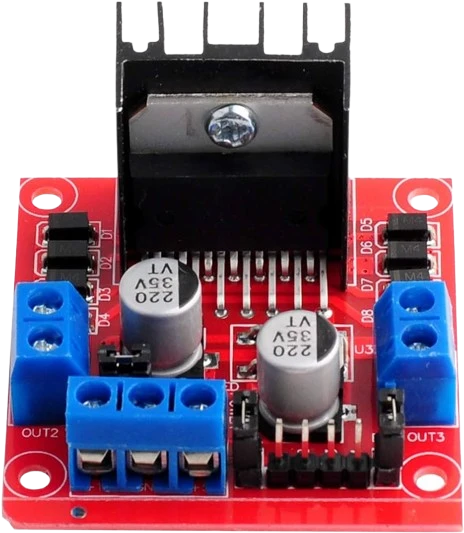
The L298N module takes its six control lines from the Raspberry Pi Pico's GP0 to GP5, with ENA on GP2 and ENB on GP5 for PWM speed. Its 5 V logic pin is on VBUS, and the L298's inputs read anything above 2.3 V as high, so the Pico's 3.3 V signals need no shifting.
Wiring the L298N Motor Driver to the Raspberry Pi Pico
Pin by pin.
| L298N Motor Driver | Raspberry Pi Pico | Note |
|---|---|---|
| IN1 | GP0 | |
| IN2 | GP1 | |
| ENA | GP2 | |
| IN3 | GP3 | |
| IN4 | GP4 | |
| ENB | GP5 | |
| 5V | VBUS | only with the module's 5V-EN jumper removed. With the jumper fitted (motor supply 12 V or less) its regulator makes 5 V on this pin: leave this wire off, or two supplies fight |
| GND | GND | |
| VMS | a separate motor supply, its − to GND |
- 5V is on VBUS, which gives about 5 V only while the board is powered from USB.
What to know on the Raspberry Pi Pico
- The L298's inputs and enables read high from 2.3 V, and its logic supply needs 4.5 V to 7 V, which is why the page takes 5 V from VBUS rather than 3V3.ST L298 datasheet, p. 3
- VBUS is 5 V only with USB connected and 0 V otherwise; on battery the module's logic needs another 5 V source.Raspberry Pi Pico datasheet, release 21, p. 8
- The logic draws 24 mA typical and 36 mA max from that 5 V. Remove the module's 5V-enable jumper first, or its onboard regulator and VBUS feed the same pin. The motors take their own supply on VMS, never the Pico's.ST L298 datasheet, p. 3
- analogWrite() on GP2 drives ENA from the RP2040's PWM hardware, one of its 16 channels, and the bridge switches up to 40 kHz.Raspberry Pi Pico datasheet, release 21, p. 4; ST L298 datasheet, p. 4
L298N Motor Driver code for the Raspberry Pi Pico
Compiled for rp2040:rp2040:rpipico on 2026-10-29.
// L298N Motor Driver on Raspberry Pi Pico: wiring and a free simulation at https://www.tinkered.ai/components/l298n-stepper-driver/raspberry-pi-pico
const int IN1 = 0, IN2 = 1, ENA = 2;    // channel A
const int IN3 = 3, IN4 = 4, ENB = 5;   // channel B

void setup() {
  const int pins[] = {IN1, IN2, ENA, IN3, IN4, ENB};   // an array: AVR has no <initializer_list>
  for (int p : pins) pinMode(p, OUTPUT);
}

// speed: -255..255, sign is direction
void driveA(int speed) {
  digitalWrite(IN1, speed >= 0);
  digitalWrite(IN2, speed < 0);
  analogWrite(ENA, abs(speed));
}

void loop() {
  driveA(200);   delay(2000);   // forward
  driveA(0);     delay(1000);   // stop
  driveA(-200);  delay(2000);   // reverse
  driveA(0);     delay(1000);
}
L298N Motor Driver on the Raspberry Pi Pico: questions
Does the L298N work with a 3.3 V Raspberry Pi Pico?
Yes. The L298's inputs read high from 2.3 V (ST datasheet, p. 3), so GP0 to GP5 drive it directly; its 5 V logic supply comes from VBUS on USB.
Why is my motor slower than expected on the Pico?
The bridge drops 1.8 V to 3.2 V at 1 A (ST datasheet, p. 3), so the motor sees less than VMS. That is the L298's, not the Pico's.
The code only drives motor A: how do I add motor B?
Write a driveB() like driveA() with IN3 (GP3), IN4 (GP4) and ENB (GP5); all six pins are already wired and set as outputs.
Keep going
This guide as plain Markdown. /components/l298n-stepper-driver/raspberry-pi-pico.md