L298N Motor Driver with an Arduino Uno
Dual full-bridge (H-bridge) driver built on the STMicroelectronics L298 IC that lets a microcontroller run two DC motors or one bipolar stepper at up to 2A per channel.
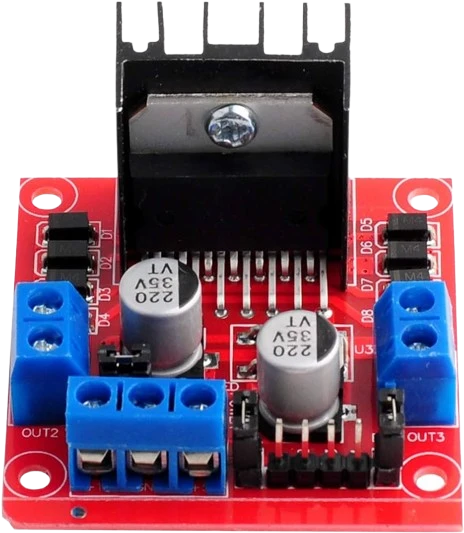
On an Arduino Uno the L298N module's IN1 to IN4 take D2 to D5 and its ENA and ENB take D9 and D10, two of the Uno's PWM pins, after their jumpers are pulled. The module's 5V terminal is tied to the Uno's 5V, which is safe only one way round, so the 5V jumper decides who powers whom.
Wiring the L298N Motor Driver to the Arduino Uno
Pin by pin.
| L298N Motor Driver | Arduino Uno | Note |
|---|---|---|
| IN1 | D2 | |
| IN2 | D3 | |
| ENA | D9 | |
| IN3 | D4 | |
| IN4 | D5 | |
| ENB | D10 | |
| 5V | 5V | only with the module's 5V-EN jumper removed. With the jumper fitted (motor supply 12 V or less) its regulator makes 5 V on this pin: leave this wire off, or two supplies fight |
| GND | GND | |
| VMS | a separate motor supply, its − to GND |
What to know on the Arduino Uno
- With the module's 5V-enable jumper fitted, its onboard regulator drives the 5V terminal. Tied to the Uno's 5V, that puts two supplies on one rail, and Arduino says not to feed the Uno's 5V pin from outside. Remove the jumper so the Uno powers the L298's logic, which draws 36 mA at most.Handson Technology L298N user guide, p. 1; ST L298 datasheet, p. 3; Arduino UNO R3 tech specs
- ENA and ENB ship with jumpers to 5 V for full speed. Remove them and wire D9 and D10, or analogWrite() has no effect on speed.Handson Technology L298N user guide, p. 1
- The bridge drops 1.8 V to 3.2 V at 1 A and up to 4.9 V at 2 A, so a motor on a 12 V supply may see only about 7 V at full load. Pick the motor supply with that drop in mind.ST L298 datasheet, p. 3
- If you add a servo, the Uno's Servo library takes Timer1 and analogWrite() on D9 and D10 stops working; move ENA and ENB to D6 and D11, since D3 and D5 already carry IN2 and IN4 here.Arduino Servo library reference
L298N Motor Driver code for the Arduino Uno
Compiled for arduino:avr:uno on 2026-10-29.
// L298N Motor Driver on Arduino Uno: wiring and a free simulation at https://www.tinkered.ai/components/l298n-stepper-driver/arduino-uno
const int IN1 = 2, IN2 = 3, ENA = 9;    // channel A
const int IN3 = 4, IN4 = 5, ENB = 10;   // channel B

void setup() {
  const int pins[] = {IN1, IN2, ENA, IN3, IN4, ENB};   // an array: AVR has no <initializer_list>
  for (int p : pins) pinMode(p, OUTPUT);
}

// speed: -255..255, sign is direction
void driveA(int speed) {
  digitalWrite(IN1, speed >= 0);
  digitalWrite(IN2, speed < 0);
  analogWrite(ENA, abs(speed));
}

void loop() {
  driveA(200);   delay(2000);   // forward
  driveA(0);     delay(1000);   // stop
  driveA(-200);  delay(2000);   // reverse
  driveA(0);     delay(1000);
}
L298N Motor Driver on the Arduino Uno: questions
Can I connect the L298N's 5V pin to the Arduino Uno's 5V?
Only with the module's 5V jumper removed, so the Uno feeds the L298's logic. With the jumper fitted the module's regulator outputs 5 V there, and tying two supplies together is what Arduino warns against on the Uno's 5V pin.
Why doesn't analogWrite() change the L298N motor speed on my Uno?
The ENA and ENB jumpers are still fitted, holding the enables at 5 V. Pull them and wire ENA to D9 and ENB to D10.
Why is my motor slow on the L298N with an Uno?
The L298 loses 1.8 V to 4.9 V across the bridge depending on current (ST datasheet, p. 3). Raise the motor supply within the module's 5 V to 35 V range or use a MOSFET driver such as the TB6612FNG.
Keep going
This guide as plain Markdown. /components/l298n-stepper-driver/arduino-uno.md