Run the device before you build it.
Interact with the inputs. Watch the firmware run. See the circuit and 3D device respond as one connected system, before you reach for parts.
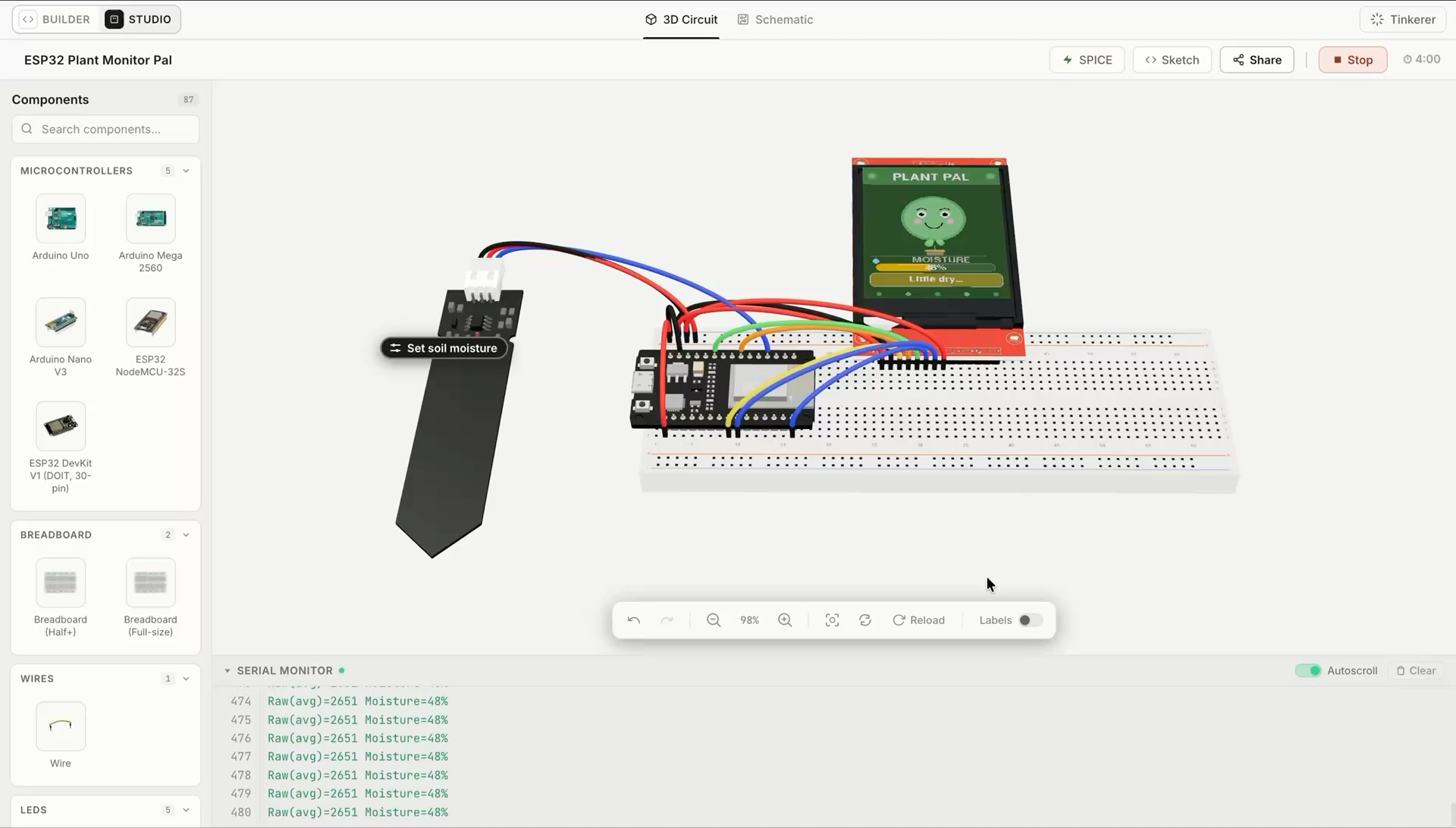
The firmware runs. The circuit responds.
Tinkered evaluates code and electronics together. Every input, connection, and output belongs to one changing device state, not a disconnected visual demo.
Firmware executes
Board-specific code runs against the project rather than playing back a scripted animation.
The circuit resolves
Connections, voltage, current, and component behavior are evaluated as the firmware changes state.
Inputs meet outputs
Controls, sensors, motors, displays, and serial output respond through the same device model.
The system is checked
Electrical conflicts and unexpected behavior surface while the complete project is still editable.
Test WiFi, MQTT, and web servers without the hardware.
A connected project is mostly the parts you cannot see: what the board published, what came back, what the page it serves actually returned. Tinkered simulates the network around ESP32 and ESP8266 boards and shows you that traffic while the firmware runs, so networking code stops being the part you debug by reflashing.
WiFi
The board joins and gets an address
WiFi.begin() associates and the board takes a real address on the simulated network. From there it does ordinary network work: resolves names, opens sockets, reconnects when it drops.
MQTT
Every message, as it happens
Each project runs its own MQTT broker. Topics and payloads arrive as the board publishes them, alongside the connect, subscribe, and disconnect events most clients never surface. Publish into it yourself and the subscribe side of your firmware finally runs.
HTTP
The page your board serves
If the firmware serves a page, it opens beside the running board. Interact with the page and the board responds, with the request landing in the same serial output you were already reading.
Test more ideas. Rebuild less hardware.
Change the firmware, wiring, or components and see the system respond before parts leave the drawer. Mistakes surface earlier, while every decision is still easy to revise.
Physical-only loop
- Assemble
- Power on
- Find the fault
- Rebuild
With Tinkered
- Build
- Simulate
- Observe
- Refine
1,300+ boards, ready when you are.
Generate, validate, compile, and deploy firmware for the boards makers use every day, from Arduino and ESP32 to Raspberry Pi Pico, STM32, Teensy, micro:bit, and more.
See all supported boards- 3D modelDrag to rotate · Scroll to zoomArduino · Renesas RA4M1
Arduino UNO R4 WiFi
- 3D modelDrag to rotate · Scroll to zoomESP32-S3 · Wi-Fi + Bluetooth
Arduino Nano ESP32
- 3D modelDrag to rotate · Scroll to zoomRP2350 · Arm + RISC-V
Raspberry Pi Pico 2
- 3D modelDrag to rotate · Scroll to zoomESP32-S3 · Compact wireless
XIAO ESP32S3
- 3D modelDrag to rotate · Scroll to zoomMatter · Thread + Bluetooth
Arduino Nano Matter
- 3D modelDrag to rotate · Scroll to zoomLearning · Sensors + display
BBC micro:bit
- Arduino Uno
- Arduino Nano
- Arduino Mega
- ESP32
- ESP8266
- Raspberry Pi Pico
- RP2040
- STM32 Nucleo
- Teensy
- BBC micro:bit
- Nordic nRF52
- Feather boards
Questions before you simulate?
Still tinkering? Bring your simulator question to the maker community.
Join the communityWhat is the Tinkered electronics simulator?
Tinkered is a 3D electronics and microcontroller simulator that runs firmware with a connected circuit. It lets you interact with a virtual device, observe how its inputs and outputs respond, and revise the project before assembling physical hardware.
Does Tinkered run the project's actual firmware?
Yes. Tinkered runs the board-specific firmware associated with the project instead of playing a prerecorded component animation. Code, pins, circuit connections, and supported component behavior participate in the same simulation state.
How do the firmware and circuit simulation work together?
The firmware's pin assignments and peripheral activity map to the same connections used by the circuit. As code changes an output or reads an input, the connected electronics respond through the shared device model rather than through a separate visual mockup.
Can I interact with components in the 3D simulation?
Yes. Supported controls, sensors, motors, LEDs, displays, serial output, and network traffic can participate in the running project. Interactions create device-state changes that the firmware and connected circuit can respond to together.
Can I test WiFi, MQTT, and web server projects without hardware?
Yes. ESP32 and ESP8266 projects join a simulated network when they run, so WiFi.begin() associates and the board takes an address. Each project runs its own MQTT broker, with topics, payloads, and the connect, subscribe, and disconnect events readable while the firmware executes. If the firmware serves a page, that page opens beside the running board and responds to interaction, with the selected board and library context visible throughout the run.
What problems can simulation surface before assembly?
Simulation surfaces incorrect wiring, incompatible voltage or interface choices, unexpected firmware behavior, pin-mapping conflicts, and component responses that do not match the intended design while the circuit and firmware are still easy to correct.
Which Arduino, ESP32, and microcontroller boards are supported?
Tinkered supports more than 1,300 boards across its hardware workflow, including Arduino, ESP32, ESP8266, Raspberry Pi Pico, RP2040, STM32, Teensy, BBC micro:bit, nRF52, and Feather families. Choose from the boards and modeled components in the simulation catalog, then continue the broader project into supported physical hardware.
Can I change the firmware or circuit and simulate again?
Yes. You can revise source code, components, connections, and pin assignments, then run the updated project again. If the device needs a larger design change, return to circuit and firmware development while preserving the same project context.
What happens after a project works in simulation?
Use the observed behavior to refine the circuit and firmware, assemble the physical prototype, and then compile and deploy to the selected board. Build, Simulate, and Deploy are connected stages of the same electronics project rather than separate exports.
Test the whole device before the first wire.
Run board-specific firmware with the connected circuit in 3D, inspect how components respond, and carry a better-tested electronics prototype to the physical bench.