TM1637 4-Digit Display with an Arduino Uno
A red 4-digit 7-segment display with a center colon, driven by the Titan Micro TM1637 chip over just two signal wires.
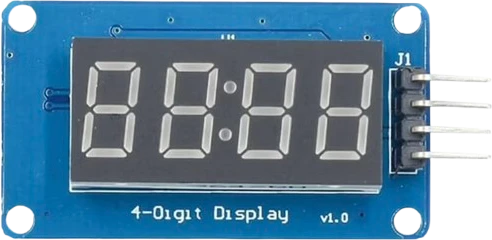
The TM1637 is specified for 5 V plus or minus 10 percent, which the Arduino Uno's 5V pin meets and 3.3 V boards do not. Its CLK and DIO take D2 and D3 here, driven by a library in software: it is not I2C, so it neither uses nor blocks the Uno's A4 and A5.
Wiring the TM1637 4-Digit Display to the Arduino Uno
Pin by pin.
| TM1637 4-Digit Display | Arduino Uno |
|---|---|
| CLK | D2 |
| DIO | D3 |
| VCC | 5V |
| GND | GND |
What to know on the Arduino Uno
- Its 5 V ± 10 % supply rating (4.5 V to 5.5 V) fits the Uno's 5V exactly, and its inputs then see the Uno's full 5 V logic swing.Titan Micro TM1637 datasheet V2.1, p. 1
- The chip takes a clock up to 500 kHz, and the library bit-bangs it far below that on the Uno, so CLK and DIO can be any two digital pins. D2 and D3 are the Uno's interrupt pins; if a sensor needs them, move the display to pins such as D7 and D8 and change CLK and DIO.Titan Micro TM1637 datasheet V2.1, p. 2
- Because the protocol has no address, it cannot share pins with another device, but it also cannot clash with the Uno's I2C parts: an I2C scan on A4 and A5 will never find it.Titan Micro TM1637 datasheet V2.1, p. 2
TM1637 4-Digit Display code for the Arduino Uno
Compiled for arduino:avr:uno on 2026-10-30.
// TM1637 4-Digit Display on Arduino Uno: wiring and a free simulation at https://www.tinkered.ai/components/tm1637-4digit-display/arduino-uno
#include <TM1637.h>

#define CLK 2
#define DIO 3

TM1637 tm(CLK, DIO);

void setup() {
  tm.init();
  tm.set(BRIGHT_TYPICAL);          // 0-7; nothing lights until this is sent
}

void loop() {
  static int n = 0;
  tm.display(0, (n / 1000) % 10);
  tm.display(1, (n / 100) % 10);
  tm.display(2, (n / 10) % 10);
  tm.display(3, n % 10);
  tm.point(n % 2 ? POINT_ON : POINT_OFF);   // colon blinks once a second
  n = (n + 1) % 10000;
  delay(1000);
}
TM1637 4-Digit Display on the Arduino Uno: questions
Can I run a TM1637 display from an Arduino Uno's 5V?
Yes, that is its specified supply: 5 V ± 10 % (TM1637 datasheet, p. 1). VCC to 5V, GND to GND, CLK and DIO to any two digital pins.
Why doesn't my TM1637 show up on an I2C scanner on the Uno?
It is not an I2C device. It uses its own two-wire protocol with no address, driven on ordinary digital pins (D2 and D3 here), so I2C scanners never see it.
Which Uno pins can the TM1637 use?
Any two digital pins. The example uses D2 for CLK and D3 for DIO; pick others if you need D2 and D3 for interrupts.
Keep going
This guide as plain Markdown. /components/tm1637-4digit-display/arduino-uno.md