PAM8302
A 2.5 W mono class-D amplifier breakout with differential inputs, a volume trimmer and a shutdown pin, for one 4 to 8 ohm speaker.
- Supply voltage2.0 V to 5.5 V
- Absolute maximum supply6.0 V
- Output power at 5 V2.5 W into 4 ohm, 1.5 W into 8 ohm at 10 % THD+N (typical)
- Gain23.5 dB typical (Adafruit board: 24 dB default, trimmer turns it down)
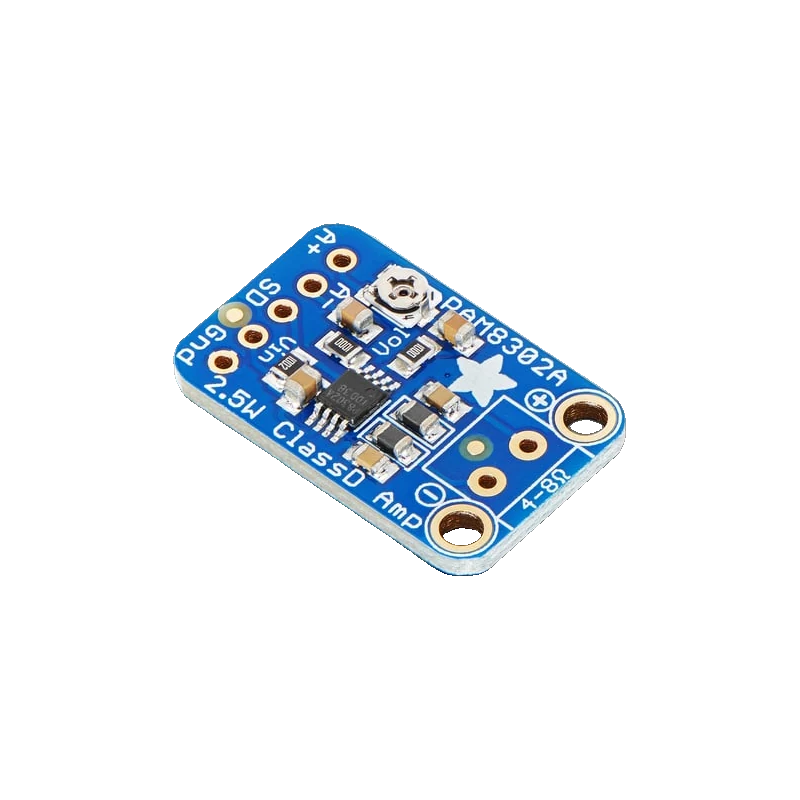
The PAM8302 is a mono class-D amplifier that delivers 2.5 W into 4 ohm or 1.5 W into 8 ohm at 5 V and 10 % THD, from a 2.0 V to 5.5 V supply (Diodes PAM8302A datasheet DS41333, p. 3). Adafruit's breakout puts 1.0 µF capacitors on its A+ and A- inputs and a volume trimmer down from the default 24 dB gain; with a single-ended source you tie A- to ground (Adafruit #2130 product page). The speaker goes between the + and - terminals, never to ground.
The PAM8302A is the mono sibling of the PAM8403: a filterless class-D amplifier with 85 % to 88 % peak efficiency, 4 mA quiescent current and under 1 µA in shutdown (Diodes datasheet, p. 3). It suits battery and USB projects that need one loud speaker: alarms, talking toys, doorbells and voice prompts.
Adafruit's breakout makes the inputs fully differential through two 1.0 µF capacitors, adds a trimmer that turns the volume down from the 24 dB default, and brings out SD, the active-low shutdown (Adafruit #2130). Its output is bridge-tied, switching at about 250 kHz, so the speaker connects straight across the output terminals.
Because the output is a high-frequency PWM rather than an audio waveform referenced to ground, it cannot feed another amplifier or a line input. Treat it as the last stage before the speaker.
PAM8302 pinout
| Pin | Function | Type |
|---|---|---|
| A_PLUS | Audio in + | input |
| A_MINUS | Audio in - | input |
| SD | Shutdown (active low)High above 1.2 V | input |
| GND | Gnd | power in |
| VIN | Vin2.0 V to 5.5 V | power in |
| OUT_PLUS | Speaker | output |
| OUT_MINUS | Speaker | output |
How to wire the PAM8302
Pin by pin, for the board you have.
| PAM8302 | Arduino Uno | Note |
|---|---|---|
| VIN | 5V | |
| GND | GND | |
| A_PLUS | D8 | Through 10 kOhm, with 1 kOhm from A+ to GND, to bring the 5 V square wave to line level. |
| A_MINUS | GND | |
| SD | D7 | HIGH plays, LOW shuts the amplifier down. |
| OUT_PLUS | Speaker + | |
| OUT_MINUS | Speaker - |
- Never connect the speaker's - terminal or either output to GND.
- At full volume into 4 ohm the amplifier draws several hundred milliamps from 5V; turn the trimmer down if the Uno resets.
| PAM8302 | ESP32 DevKit V1 | Note |
|---|---|---|
| VIN | VIN | 5 V from USB for full power; 3V3 works at lower power. |
| GND | GND | |
| A_PLUS | GPIO25 (D25) | Through 10 kOhm, with 1 kOhm from A+ to GND. |
| A_MINUS | GND | |
| SD | GPIO26 (D26) | |
| OUT_PLUS | Speaker + | |
| OUT_MINUS | Speaker - |
- The inputs pass through 1.0 µF capacitors, so no DC from the 5 V supply reaches the ESP32's pins.
- Never ground either output.
| PAM8302 | Raspberry Pi Pico | Note |
|---|---|---|
| VIN | VBUS | 5 V from USB. |
| GND | GND | |
| A_PLUS | GP15 | Through 10 kOhm, with 1 kOhm from A+ to GND. |
| A_MINUS | GND | |
| SD | GP14 | |
| OUT_PLUS | Speaker + | |
| OUT_MINUS | Speaker - |
- Use VBUS or a separate 5 V supply rather than 3V3(OUT), which should carry under 300 mA (Raspberry Pi Pico datasheet, p. 9).
- Never ground either output.
PAM8302 code
Every example here compiles for its board.
// PAM8302 on Arduino Uno: wiring and a free simulation at https://www.tinkered.ai/components/pam8302
// PAM8302 on an Arduino Uno: tone on D8 (10k/1k divider) into A+, A- to GND, SD on D7.
const int AUDIO_PIN = 8;
const int SD_PIN = 7;

void beep(int freq, int ms) {
  tone(AUDIO_PIN, freq, ms);
  delay(ms + 50);
}

void setup() {
  Serial.begin(115200);
  pinMode(SD_PIN, OUTPUT);
  digitalWrite(SD_PIN, LOW);  // off while the supply settles
  delay(10);
  digitalWrite(SD_PIN, HIGH); // amplifier on
  Serial.println("PAM8302 ready");
}

void loop() {
  Serial.println("Siren");
  for (int f = 600; f <= 1200; f += 20) { tone(AUDIO_PIN, f); delay(10); }
  for (int f = 1200; f >= 600; f -= 20) { tone(AUDIO_PIN, f); delay(10); }
  noTone(AUDIO_PIN);
  Serial.println("Two beeps");
  beep(880, 150);
  beep(880, 150);
  digitalWrite(SD_PIN, LOW); // shut down between alerts: under 1 uA
  delay(2000);
  digitalWrite(SD_PIN, HIGH);
}
// PAM8302 on ESP32 DevKit V1: wiring and a free simulation at https://www.tinkered.ai/components/pam8302
// PAM8302 on an ESP32 DevKit V1: tone on GPIO25 (10k/1k divider) into A+, A- to GND, SD on GPIO26.
const int AUDIO_PIN = 25;
const int SD_PIN = 26;

void beep(int freq, int ms) {
  tone(AUDIO_PIN, freq, ms);
  delay(ms + 50);
}

void setup() {
  Serial.begin(115200);
  pinMode(SD_PIN, OUTPUT);
  digitalWrite(SD_PIN, LOW);
  delay(10);
  digitalWrite(SD_PIN, HIGH);
  Serial.println("PAM8302 ready");
}

void loop() {
  Serial.println("Siren");
  for (int f = 600; f <= 1200; f += 20) { tone(AUDIO_PIN, f); delay(10); }
  for (int f = 1200; f >= 600; f -= 20) { tone(AUDIO_PIN, f); delay(10); }
  noTone(AUDIO_PIN);
  Serial.println("Two beeps");
  beep(880, 150);
  beep(880, 150);
  digitalWrite(SD_PIN, LOW);
  delay(2000);
  digitalWrite(SD_PIN, HIGH);
}
// PAM8302 on Raspberry Pi Pico: wiring and a free simulation at https://www.tinkered.ai/components/pam8302
// PAM8302 on a Raspberry Pi Pico (arduino-pico): tone on GP15 (10k/1k divider) into A+, A- to GND, SD on GP14.
const int AUDIO_PIN = 15;
const int SD_PIN = 14;

void beep(int freq, int ms) {
  tone(AUDIO_PIN, freq, ms);
  delay(ms + 50);
}

void setup() {
  Serial.begin(115200);
  pinMode(SD_PIN, OUTPUT);
  digitalWrite(SD_PIN, LOW);
  delay(10);
  digitalWrite(SD_PIN, HIGH);
  Serial.println("PAM8302 ready");
}

void loop() {
  Serial.println("Siren");
  for (int f = 600; f <= 1200; f += 20) { tone(AUDIO_PIN, f); delay(10); }
  for (int f = 1200; f >= 600; f -= 20) { tone(AUDIO_PIN, f); delay(10); }
  noTone(AUDIO_PIN);
  Serial.println("Two beeps");
  beep(880, 150);
  beep(880, 150);
  digitalWrite(SD_PIN, LOW);
  delay(2000);
  digitalWrite(SD_PIN, HIGH);
}
Before you wire it
- Keep Vin between 2.0 V and 5.5 V (Diodes datasheet, p. 3).
- Tie A- to GND when you feed a single-ended signal into A+ (Adafruit #2130).
- Bring a GPIO's logic-level signal down to line level with a divider before A+; the default gain is about 24 dB.
- Use a 4 ohm or higher speaker (Adafruit #2130).
- Start with SD low and raise it about 10 ms after power-up to avoid a pop (datasheet, p. 8).
- Never connect either output terminal to ground or to another amplifier's input: it is a bridge-tied 250 kHz PWM output (Adafruit #2130).
- Never exceed 6.0 V on Vin (datasheet, p. 2).
- Never drive the inputs beyond the supply rails: -0.3 V to VDD + 0.3 V (datasheet, p. 2).
- The board's 1.0 µF input capacitors block DC, so the source can sit at any DC level within the rails, such as a GPIO idling at 0 V or 3.3 V.
- The 10 kOhm and 1 kOhm divider turns a 5 V square wave into about 0.45 Vpp, or a 3.3 V one into about 0.3 Vpp.
- SD reads high above 1.2 V and low below 0.4 V (datasheet, p. 3), so a 3.3 V GPIO controls it directly; in shutdown the chip draws under 1 µA.
- The trimmer only turns the gain down from the default; for more level, raise the input signal, not the supply.
- Thermal shutdown and short-circuit protection are built in (datasheet, p. 1).
Specifications
- Supply voltage
- 2.0 V to 5.5 VDiodes PAM8302A datasheet DS41333, p. 3
- Absolute maximum supply
- 6.0 VDiodes PAM8302A datasheet DS41333, p. 2
- Output power at 5 V
- 2.5 W into 4 ohm, 1.5 W into 8 ohm at 10 % THD+N (typical)Diodes PAM8302A datasheet DS41333, p. 3
- Gain
- 23.5 dB typical (Adafruit board: 24 dB default, trimmer turns it down)Diodes PAM8302A datasheet DS41333, p. 3; Adafruit #2130 product page
- Peak efficiency
- 85 % typical, 88 % maximumDiodes PAM8302A datasheet DS41333, p. 3
- Quiescent current
- 4 mA typical, 8 mA maximum; shutdown under 1 µADiodes PAM8302A datasheet DS41333, p. 3
- Shutdown input
- High above 1.2 V, low below 0.4 VDiodes PAM8302A datasheet DS41333, p. 3
- Breakout inputs
- A+ and A- through 1.0 µF capacitors; tie A- to ground for single-ended audioAdafruit Mono 2.5W Class D Audio Amplifier (#2130) product page
- Output
- Bridge-tied, about 250 kHz PWM; any 4 ohm or higher speakerAdafruit Mono 2.5W Class D Audio Amplifier (#2130) product page
From the PAM8302A 2.5W Filterless Class-D Mono Audio Amplifier, DS41333 Rev. 6-2, published by Diodes Incorporated.
Common mistakes
Speaker - wired to ground
The output is bridge-tied (Adafruit #2130): both terminals switch. Grounding one shorts the output; connect the speaker only across + and -.
Leaving A- floating
With a single-ended source and A- unconnected, the differential input picks up noise and the volume drops. Tie A- to GND (Adafruit #2130).
Square wave straight from a pin
A full 5 V square wave at 24 dB gain clips and sounds harsh. Add the 10 kOhm and 1 kOhm divider, or turn the trimmer down.
Expecting stereo
The PAM8302 is mono. For two speakers use a PAM8403 or two PAM8302 boards.
PAM8302 questions
PAM8302 or PAM8403?
The PAM8302 is mono, 2.5 W into 4 ohm at 5 V (Diodes datasheet, p. 3), with differential inputs and a volume trimmer on Adafruit's board. The PAM8403 is stereo, 3.2 W per channel into 4 ohm. Choose by the number of speakers.
Can the PAM8302 run from 3.3 V?
Yes, it works down to 2.0 V (datasheet, p. 3), but the power falls: at 3.6 V it gives about 1.25 W into 4 ohm. For full volume use 5 V.
How do I connect a single-ended audio source?
Signal into A+, A- to ground (Adafruit #2130). The board's 1.0 µF capacitors remove any DC offset.
Is the PAM8302 better than an LM386?
For battery and USB projects, yes: Adafruit calls it an upgrade from the LM386, with 85 % to 88 % efficiency (datasheet, p. 3) and 2.5 W from 5 V, where an LM386 gives well under a watt and runs warmer.
Build something with the PAM8302
- Build this
Talking clock
Announce the hour through a speaker.
- Build this
Loud alarm siren
A battery alarm that wails when a door opens.
- Build this
Game sound effects
Add beeps and jingles to a handheld game.
This page as plain Markdown, for ChatGPT, Claude or your own agent. /components/pam8302.md