MLX90614
A Melexis non-contact infrared thermometer on a GY-906 breakout that reads an object's temperature from -70 °C to +380 °C over I2C (SMBus).
- Supply voltageMLX90614Bxx/Dxx: 2.6 V to 3.6 V; MLX90614Axx: 4.5 V to 5.5 V
- Absolute maximum supply5 V for Bxx, 7 V for Axx (under 24 h)
- Measurement rangeObject -70 °C to +380 °C; sensor (ambient) -40 °C to +125 °C
- Accuracy±0.5 °C for Ta and To between 0 °C and 50 °C
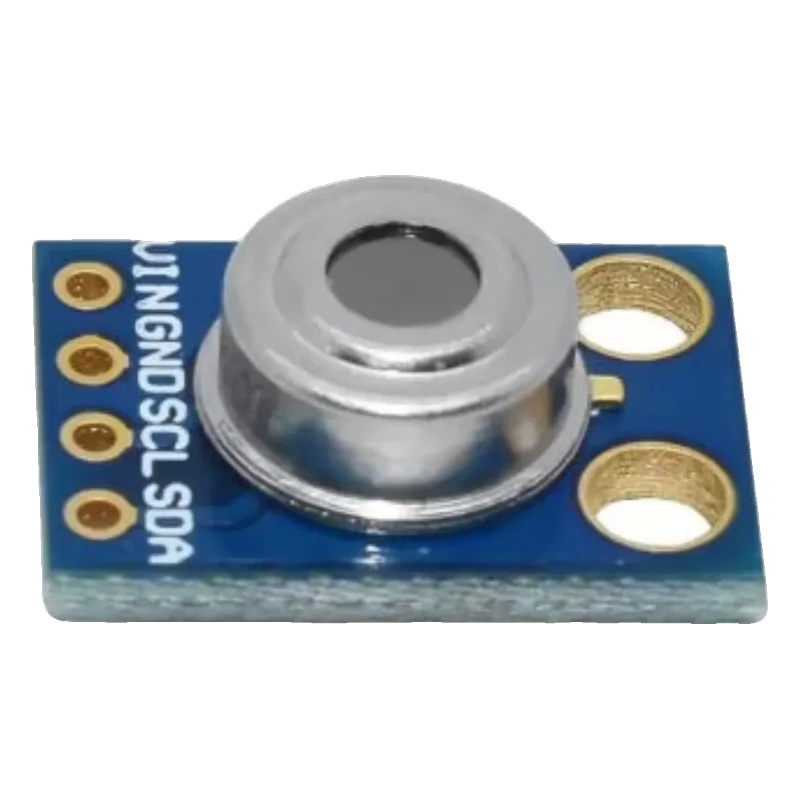
The MLX90614 is a factory-calibrated infrared thermometer: it reads object temperature from -70 °C to +380 °C and its own ambient temperature from -40 °C to +125 °C, ±0.5 °C between 0 and 50 °C, with 0.02 °C resolution (Melexis MLX90614 datasheet Rev 021, p. 1). It talks SMBus, an I2C variant, at address 0x5A and at most 100 kHz (pp. 8 to 9). The 3 V version (MLX90614xBx) runs from 2.6 V to 3.6 V, so power a GY-906 from 3.3 V on every board.
The MLX90614 is a thermopile sensor and a signal-processing chip in one TO-39 can. It measures the infrared energy coming from whatever fills its field of view and reports that as an object temperature, along with the sensor's own temperature, both linearized and calibrated at the factory over -70 °C to +380 °C and -40 °C to +125 °C (Melexis datasheet Rev 021, pp. 1, 5).
The reading is the average of everything in the field of view, and the field of view depends on the version: 90° for the xAA, 35° for the xCC, down to 5° for the xCI (p. 37). The common GY-906 board uses a wide-angle can, so the target must fill a cone as wide as it is far away. Emissivity is stored in EEPROM, factory set to 1.0 (p. 13); shiny metals need a lower value or a strip of matte tape.
Two supply versions exist: MLX90614Axx at 4.5 V to 5.5 V and MLX90614Bxx or Dxx at 2.6 V to 3.6 V (pp. 8 to 9). Many GY-906 boards add a small regulator and some do not, so the safe choice on any board is to power VIN from 3.3 V, which suits both the regulated and the bare 3 V boards and keeps SDA and SCL at 3.3 V.
MLX90614 pinout
| Pin | Function | Type |
|---|---|---|
| VIN | VIN3.3 V recommended | power in |
| GND | GND | power in |
| SCL | I2C SCL (SMBus)Pulled up to the module's supply | input |
| SDA | I2C SDA (SMBus), PWMPulled up to the module's supply | bidirectional |
How to wire the MLX90614
Pin by pin, for the board you have.
| MLX90614 | Arduino Uno | Note |
|---|---|---|
| VIN | 3.3V | The sensor draws 2.5 mA at most (datasheet, p. 9), well within the Uno's 50 mA 3.3V pin. |
| GND | GND | |
| SCL | A5 | |
| SDA | A4 |
- Powering a bare 3 V module (no regulator) from 5V exceeds the MLX90614Bxx's 5 V absolute maximum (datasheet, p. 7). 3.3V suits every GY-906.
| MLX90614 | ESP32 DevKit V1 | Note |
|---|---|---|
| VIN | 3V3 | |
| GND | GND | |
| SCL | GPIO22 (D22) | |
| SDA | GPIO21 (D21) |
| MLX90614 | Raspberry Pi Pico | Note |
|---|---|---|
| VIN | 3V3(OUT) | |
| GND | GND | |
| SCL | GP5 | |
| SDA | GP4 |
MLX90614 code
Every example here compiles for its board.
// MLX90614 on Arduino Uno: wiring and a free simulation at https://www.tinkered.ai/components/mlx90614
// MLX90614 (GY-906) on an Arduino Uno: VIN 3.3V, SDA A4, SCL A5, address 0x5A
#include <Wire.h>
#include <Adafruit_MLX90614.h>

Adafruit_MLX90614 mlx;

void setup() {
  Serial.begin(115200);
  Wire.begin();
  Wire.setClock(100000);  // SMBus: 100 kHz maximum
  delay(300);              // first data about 0.25 s after power-up
  if (!mlx.begin(0x5A, &Wire)) {
    Serial.println("MLX90614 not found at 0x5A. Check wiring.");
    while (true) delay(10);
  }
  Serial.print("Emissivity: ");
  Serial.println(mlx.readEmissivity(), 2);
}

void loop() {
  Serial.print("Object: ");
  Serial.print(mlx.readObjectTempC(), 2);
  Serial.print(" C   Ambient: ");
  Serial.print(mlx.readAmbientTempC(), 2);
  Serial.println(" C");
  delay(500);
}
// MLX90614 on ESP32 DevKit V1: wiring and a free simulation at https://www.tinkered.ai/components/mlx90614
// MLX90614 (GY-906) on an ESP32 DevKit V1: VIN 3V3, SDA GPIO21, SCL GPIO22, address 0x5A
#include <Wire.h>
#include <Adafruit_MLX90614.h>

Adafruit_MLX90614 mlx;

void setup() {
  Serial.begin(115200);
  Wire.begin(21, 22);  // SDA, SCL
  Wire.setClock(100000);  // SMBus: 100 kHz maximum
  delay(300);              // first data about 0.25 s after power-up
  if (!mlx.begin(0x5A, &Wire)) {
    Serial.println("MLX90614 not found at 0x5A. Check wiring.");
    while (true) delay(10);
  }
  Serial.print("Emissivity: ");
  Serial.println(mlx.readEmissivity(), 2);
}

void loop() {
  Serial.print("Object: ");
  Serial.print(mlx.readObjectTempC(), 2);
  Serial.print(" C   Ambient: ");
  Serial.print(mlx.readAmbientTempC(), 2);
  Serial.println(" C");
  delay(500);
}
// MLX90614 on Raspberry Pi Pico: wiring and a free simulation at https://www.tinkered.ai/components/mlx90614
// MLX90614 (GY-906) on a Raspberry Pi Pico (arduino-pico): VIN 3V3(OUT), SDA GP4, SCL GP5, address 0x5A
#include <Wire.h>
#include <Adafruit_MLX90614.h>

Adafruit_MLX90614 mlx;

void setup() {
  Serial.begin(115200);
  Wire.setSDA(4);
  Wire.setSCL(5);
  Wire.begin();
  Wire.setClock(100000);  // SMBus: 100 kHz maximum
  delay(300);              // first data about 0.25 s after power-up
  if (!mlx.begin(0x5A, &Wire)) {
    Serial.println("MLX90614 not found at 0x5A. Check wiring.");
    while (true) delay(10);
  }
  Serial.print("Emissivity: ");
  Serial.println(mlx.readEmissivity(), 2);
}

void loop() {
  Serial.print("Object: ");
  Serial.print(mlx.readObjectTempC(), 2);
  Serial.print(" C   Ambient: ");
  Serial.print(mlx.readAmbientTempC(), 2);
  Serial.println(" C");
  delay(500);
}
Before you wire it
- Keep the I2C clock at 100 kHz or less: SMBus tops out at 100 kHz (datasheet, p. 9). Other devices on the bus must accept that speed.
- Make the target fill the field of view: the sensor averages everything it sees, and the GY-906's wide cone sees a lot (p. 37).
- Set emissivity for the surface, or cover shiny metal with matte tape; the factory value is 1.0 (p. 13).
- Read the marking on the can (MLX90614ESF-Bxx is the 3 V version) before powering a board without a regulator.
- Never power a 3 V (Bxx) sensor from 5 V directly: 5 V is its absolute maximum (p. 7).
- Never aim it through glass or clear plastic: they block the long-wave infrared it measures, so it reads the window.
- Never write emissivity in a loop: it lives in EEPROM, rated for limited write cycles (p. 8).
- SMBus reads use a repeated start (p. 18); the ESP32, Pico and AVR Wire implementations handle that in requestFrom with the library's calls.
- The ambient reading is the sensor's own can temperature; thermal gradients across the can (a warm board, a hand nearby) cause errors, so let it settle.
- The address can be changed in EEPROM (p. 16) to put several sensors on one bus; power-cycle after writing it.
- SDA doubles as a PWM output when configured for it; the factory default at power-up is SMBus (p. 10).
Specifications
- Supply voltage
- MLX90614Bxx/Dxx: 2.6 V to 3.6 V; MLX90614Axx: 4.5 V to 5.5 VMelexis MLX90614 datasheet Rev 021 (June 2026), pp. 8 to 9
- Absolute maximum supply
- 5 V for Bxx, 7 V for Axx (under 24 h)Melexis MLX90614 datasheet Rev 021 (June 2026), p. 7
- Measurement range
- Object -70 °C to +380 °C; sensor (ambient) -40 °C to +125 °CMelexis MLX90614 datasheet Rev 021 (June 2026), p. 1
- Accuracy
- ±0.5 °C for Ta and To between 0 °C and 50 °CMelexis MLX90614 datasheet Rev 021 (June 2026), p. 1
- Resolution
- 0.02 °C (SMBus)Melexis MLX90614 datasheet Rev 021 (June 2026), pp. 1, 8
- Interface
- SMBus at address 0x5A, clock 10 kHz to 100 kHz; PWM output also availableMelexis MLX90614 datasheet Rev 021 (June 2026), pp. 8 to 9
- Supply current
- 1.3 mA typical, 2.5 mA maxMelexis MLX90614 datasheet Rev 021 (June 2026), pp. 8 to 9
- Field of view
- 90° (xAA), 70° per zone (xBA dual), 35° (xCC), 10° (xCF, xCH), 5° (xCI)Melexis MLX90614 datasheet Rev 021 (June 2026), p. 37
- Emissivity
- Stored in EEPROM, factory default 1.0, adjustable 0.1 to 1.0Melexis MLX90614 datasheet Rev 021 (June 2026), p. 13
- Start-up
- First data about 0.25 s after wakingMelexis MLX90614 datasheet Rev 021 (June 2026), p. 21
From the MLX90614 datasheet, published by Melexis.
Common mistakes
Reading a body temperature that is too low
Skin at 30 cm fills only part of a 90° field of view, so the reading averages in the cooler background. Get within a few centimetres, or use a narrow field of view version (35° or 10°).
Shiny metal reads near room temperature
Polished metal has low emissivity and reflects the room. Lower the emissivity setting or put a piece of matte black tape on the target.
Bus fails after adding another device
If another sensor sets Wire to 400 kHz, the MLX90614 drops off. Keep the bus at 100 kHz (datasheet, p. 9).
Reading 1037.55 °C or similar
That is the raw value of a failed or garbled read, often from a loose wire or a too-fast clock. Check wiring, pull-ups and the 100 kHz limit.
MLX90614 questions
What is the MLX90614's I2C address?
0x5A by default (Melexis datasheet Rev 021, pp. 8 to 9). It can be changed in EEPROM so several sensors can share a bus.
Is the GY-906 3.3 V or 5 V?
The sensor comes in a 3 V version (2.6 V to 3.6 V) and a 5 V version (4.5 V to 5.5 V) (pp. 8 to 9), and boards differ in whether they carry a regulator. Powering VIN from 3.3 V works for the common 3 V boards with or without a regulator.
How far away can it measure?
Distance itself does not matter; the spot size does. With a 90° field of view the spot is about twice as wide as the distance, so at 5 cm it averages a 10 cm circle. Narrow versions (35°, 10°, 5°) reach farther targets (p. 37).
Can it measure human body temperature?
The standard part is ±0.5 °C from 0 to 50 °C (p. 1); Melexis makes a medical-grade version with ±0.2 °C around body temperature (p. 5). For skin readings, measure close and correct for skin-to-core difference.
Which library should I use?
Adafruit_MLX90614 (PlatformIO: adafruit/Adafruit MLX90614 Library): begin(), readObjectTempC(), readAmbientTempC(), and readEmissivity()/writeEmissivity().
Build something with the MLX90614
- Build this
Handheld IR thermometer
Point, press a button, and read the surface temperature on an OLED.
- Build this
Contactless door thermometer
Show forehead temperature when someone comes close.
- Build this
Motor temperature watchdog
Watch a motor or a 3D printer heatsink without touching it.
This page as plain Markdown, for ChatGPT, Claude or your own agent. /components/mlx90614.md