HW-038 Water Level Sensor with a Raspberry Pi Pico
A cheap analog water sensor whose output voltage rises as more of its exposed traces go under water.
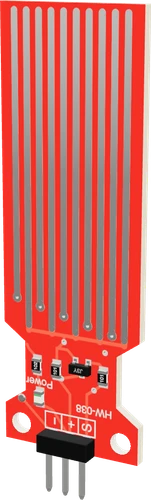
On the Raspberry Pi Pico the HW-038 takes its power from GP0, switched on only while reading, and returns its analog level on GP28. Powered from a 3.3 V pin, its S output can never pass the Pico's ADC range, whatever the water.
Wiring the HW-038 Water Level Sensor to the Raspberry Pi Pico
Pin by pin.
| HW-038 Water Level Sensor | Raspberry Pi Pico |
|---|---|
| VCC | GP0 |
| GND | GND |
| S | GP28 |
- The module pulls S to GND through only 100 Ω, so in very conductive (salty) water + can draw tens of milliamps from the pin that powers it. An RP2040 pin gives 12 mA at most (the sketch sets that drive; the default is 4 mA): for salt water, switch + through a transistor.
What to know on the Raspberry Pi Pico
- S rises toward the sensor's supply in conductive water. Fed from GP0 at 3.3 V it stays within the ADC pins' limit of about 300 mV above the rail; never feed + from VBUS on this board.Raspberry Pi Pico datasheet, release 21, p. 19
- Switching + from GP0 only for each reading slows the electrolytic corrosion of the traces; the sketch drives it HIGH, waits 10 ms, reads, then drives it LOW. It also sets GP0 to 12 mA, the RP2040's strongest drive (4 mA by default), because S has only 100 Ω to ground; in salty water, switch + through a transistor instead.Last Minute Engineers HW-038 teardown; RP2040 datasheet, section 2.19.4
- The sketch's CAL table was measured at 5 V on tap water. At 3.3 V on the Pico the readings differ, so take your own readings at 0, 25, 50, 75 and 100 % and replace the five values.Last Minute Engineers HW-038 teardown
- Only GP26 to GP28 read analog on the Pico; the sketch's 100-count dry threshold assumes arduino-pico's default 10-bit analogRead().Raspberry Pi Pico datasheet, release 21, p. 3; arduino-pico core documentation (Earle Philhower)
HW-038 Water Level Sensor code for the Raspberry Pi Pico
Compiled for rp2040:rp2040:rpipico on 2026-10-30.
// HW-038 Water Level Sensor on Raspberry Pi Pico: wiring and a free simulation at https://www.tinkered.ai/components/water-level-sensor-hw-038/raspberry-pi-pico
#include <hardware/gpio.h>

const int POWER_PIN = 0;    // HW-038 + on GP0: powered only to read (the traces corrode under constant DC)
const int SIGNAL_PIN = 28;  // HW-038 S on GP28 (ADC2)
const int DRY_BELOW = 100;  // under this the traces are dry

// 10-bit counts (arduino-pico's default) at 0, 25, 50, 75 and 100 % of the sensing length.
// + and the ADC reference are both 3.3 V here, so these tap-water figures from a 5 V Uno
// (both on 5 V) are a starting point only: record your own at known levels.
const int CAL[5] = { 335, 487, 565, 611, 641 };

int readSensor() {
  digitalWrite(POWER_PIN, HIGH);
  delay(10);                       // let S settle
  int raw = analogRead(SIGNAL_PIN);
  digitalWrite(POWER_PIN, LOW);
  return raw;
}

int levelPercent(int raw) {
  if (raw < DRY_BELOW) return 0;
  if (raw <= CAL[0]) return 1;
  for (int i = 1; i < 5; i++) {
    if (raw <= CAL[i]) return 25 * (i - 1) + (long)(raw - CAL[i - 1]) * 25 / (CAL[i] - CAL[i - 1]);
  }
  return 100;
}

void setup() {
  Serial.begin(9600);
  pinMode(POWER_PIN, OUTPUT);
  digitalWrite(POWER_PIN, LOW);
  gpio_set_drive_strength(POWER_PIN, GPIO_DRIVE_STRENGTH_12MA);   // the RP2040's default is 4 mA
  Serial.println("HW-038 ready");
}

void loop() {
  int raw = readSensor();
  Serial.print("raw ");
  Serial.print(raw);
  Serial.print("  level ");
  Serial.print(levelPercent(raw));
  Serial.println(" %");
  delay(1000);
}
HW-038 Water Level Sensor on the Raspberry Pi Pico: questions
Can I power the HW-038 from a Pico GPIO?
Yes, as the page does with GP0: it runs from 3.3 V to 5 V (Last Minute Engineers teardown), and powering it only while reading slows the traces' corrosion. The sketch raises GP0 to 12 mA drive (RP2040 datasheet, section 2.19.4).
Why do my water level percentages look wrong on the Pico?
The CAL table in the sketch was taken at 5 V. Re-measure the five points with your sensor, your water and the Pico's 3.3 V, and replace them.
Which Pico pins can read the HW-038?
S needs an ADC input: GP26, GP27 or GP28 (Pico datasheet, p. 3). The page uses GP28.
Keep going
This guide as plain Markdown. /components/water-level-sensor-hw-038/raspberry-pi-pico.md