W5500 Ethernet
A wired 10/100 Ethernet module whose WIZnet W5500 runs the TCP/IP stack in hardware, giving any SPI microcontroller a network connection.
- Chip supply2.97 V to 3.63 V (3.3 V typical)
- 5 V toleranceInputs VIH 2.0 V to 5.5 V; absolute maximum input 6 V, VDD 4.6 V
- Current132 mA transmitting at 100 Mbps, 128 mA with a 100M link, 75 mA with a 10M link, 13 mA in power down
- ProtocolsHardwired TCP, UDP, ICMP, IPv4, ARP, IGMP, PPPoE
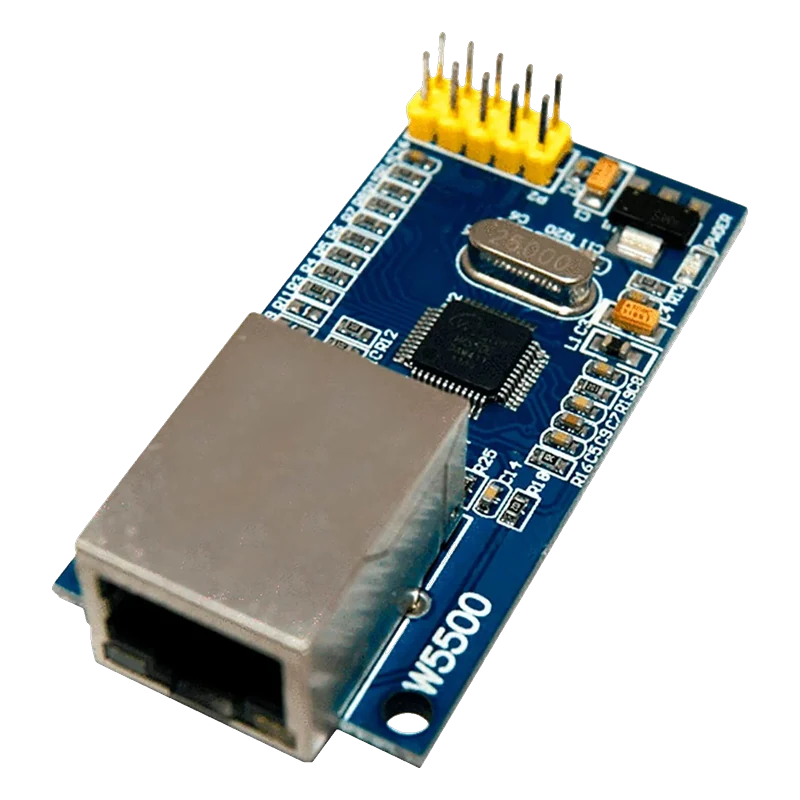
The W5500 module puts WIZnet's hardwired TCP/IP Ethernet controller and an RJ45 jack on a 2 × 5 header: the chip handles TCP, UDP, ICMP, IPv4, ARP, IGMP and PPPoE itself, with 8 sockets and 32 KB of buffer (WIZnet W5500 Datasheet V1.1.0, p. 2). It runs at 2.97 V to 3.63 V, draws about 132 mA when transmitting at 100 Mbps, and its inputs accept up to 5.5 V (pp. 59 to 60), so it connects to 3.3 V and 5 V boards over SPI without level shifting. The Arduino Ethernet library drives it with Ethernet.init(csPin).
The W5500 takes the network stack off the microcontroller. Instead of running TCP/IP in software, the sketch opens one of the chip's 8 hardware sockets and reads and writes bytes over SPI; the W5500 handles retransmission, checksums and ARP itself (WIZnet W5500 Datasheet V1.1.0, p. 2). That makes a wired network connection practical even on an Arduino Uno with 2 KB of RAM.
This module carries the chip, its 25 MHz crystal, an RJ45 jack with magnetics and link and activity LEDs, and a 3.3 V regulator behind its 5V pin. The 2 × 5 header is printed 5V, 3.3V, GND, MISO, RST, MOSI, INT, SCS, NC and SCLK. Supply either 5V (through the regulator) or 3.3V, not both. The chip's inputs are 5 V tolerant, up to 5.5 V (p. 59), so an Uno's SPI pins connect directly.
Power is the one thing to plan for. A 100 Mbps link draws about 128 mA and transmitting 132 mA (p. 60), more than an Uno's 3.3V pin can give, so feed the module's 5V pin on an Uno. SPI runs in mode 0 or 3; the chip is designed for 80 MHz and guaranteed at 33.3 MHz (p. 61), and the Ethernet library's default speed sits well below that.
W5500 Ethernet pinout
| Pin | Function | Type |
|---|---|---|
| 5V | Supply to on-board 3.3 V regulator | power in |
| 3.3V | 3.3 V supply2.97 V to 3.63 V | power in |
| GND | Ground | power in |
| MISO | SPI MISO3.3 V | output |
| MOSI | SPI MOSI5 V tolerant | input |
| SCLK | SPI SCK5 V tolerant | input |
| SCS | SPI CS (active low)5 V tolerant | input |
| RST | Reset (active low) | input |
| INT | Interrupt (active low) | output |
| NC | NC | passive |
How to wire the W5500 Ethernet
Pin by pin, for the board you have.
| W5500 Ethernet | Arduino Uno | Note |
|---|---|---|
| 5V | 5V | |
| GND | GND | |
| MISO | D12 | |
| MOSI | D11 | |
| SCLK | D13 | |
| SCS | D10 |
- Do not feed the module from the Uno's 3.3V pin: it supplies 50 mA and the W5500 draws about 132 mA.
| W5500 Ethernet | ESP32 DevKit V1 | Note |
|---|---|---|
| 3.3V | 3V3 | |
| GND | GND | |
| MISO | GPIO19 (D19) | |
| MOSI | GPIO23 (D23) | |
| SCLK | GPIO18 (D18) | |
| SCS | GPIO5 (D5) |
| W5500 Ethernet | Raspberry Pi Pico | Note |
|---|---|---|
| 3.3V | 3V3(OUT) | |
| GND | GND | |
| MISO | GP16 | |
| MOSI | GP19 | |
| SCLK | GP18 | |
| SCS | GP17 |
W5500 Ethernet code
Every example here compiles for its board.
// W5500 Ethernet on Arduino Uno: wiring and a free simulation at https://www.tinkered.ai/components/w5500-ethernet
// W5500 module on an Arduino Uno: CS D10, SPI D11/D12/D13. Gets an address by DHCP, then fetches a page.
#include <SPI.h>
#include <Ethernet.h>

byte mac[] = { 0xDE, 0xAD, 0xBE, 0xEF, 0xFE, 0x01 }; // any unique locally administered MAC
EthernetClient client;

void setup() {
  Serial.begin(115200);
  Ethernet.init(10); // CS pin
  Serial.println(F("Requesting an address by DHCP..."));
  if (Ethernet.begin(mac) == 0) {
    if (Ethernet.hardwareStatus() == EthernetNoHardware) Serial.println(F("W5500 not found: check wiring"));
    else if (Ethernet.linkStatus() == LinkOFF) Serial.println(F("No link: check the cable"));
    else Serial.println(F("DHCP failed"));
    while (true) {}
  }
  Serial.print(F("IP address: "));
  Serial.println(Ethernet.localIP());
  if (client.connect("example.com", 80)) {
    client.println(F("GET / HTTP/1.1"));
    client.println(F("Host: example.com"));
    client.println(F("Connection: close"));
    client.println();
  } else {
    Serial.println(F("Connection failed"));
  }
}

void loop() {
  while (client.available()) Serial.write(client.read());
  if (!client.connected() && client) {
    client.stop();
    Serial.println(F("\nDone"));
  }
  Ethernet.maintain(); // renews the DHCP lease
}
// W5500 Ethernet on ESP32 DevKit V1: wiring and a free simulation at https://www.tinkered.ai/components/w5500-ethernet
// W5500 module on an ESP32 DevKit V1: CS GPIO5, VSPI 18/19/23. Gets an address by DHCP, then fetches a page.
#include <SPI.h>
#include <Ethernet.h>

byte mac[] = { 0xDE, 0xAD, 0xBE, 0xEF, 0xFE, 0x02 };
EthernetClient client;

void setup() {
  Serial.begin(115200);
  SPI.begin(18, 19, 23, 5); // SCK, MISO, MOSI, SS
  Ethernet.init(5);
  Serial.println("Requesting an address by DHCP...");
  if (Ethernet.begin(mac) == 0) {
    if (Ethernet.hardwareStatus() == EthernetNoHardware) Serial.println("W5500 not found: check wiring");
    else if (Ethernet.linkStatus() == LinkOFF) Serial.println("No link: check the cable");
    else Serial.println("DHCP failed");
    while (true) { delay(100); }
  }
  Serial.print("IP address: ");
  Serial.println(Ethernet.localIP());
  if (client.connect("example.com", 80)) {
    client.println("GET / HTTP/1.1");
    client.println("Host: example.com");
    client.println("Connection: close");
    client.println();
  } else {
    Serial.println("Connection failed");
  }
}

void loop() {
  while (client.available()) Serial.write(client.read());
  if (!client.connected() && client) {
    client.stop();
    Serial.println("\nDone");
  }
  Ethernet.maintain();
}
// W5500 Ethernet on Raspberry Pi Pico: wiring and a free simulation at https://www.tinkered.ai/components/w5500-ethernet
// W5500 module on a Raspberry Pi Pico (arduino-pico): CS GP17, SPI0 GP16/18/19. Gets an address by DHCP, then fetches a page.
#include <SPI.h>
#include <Ethernet.h>

byte mac[] = { 0xDE, 0xAD, 0xBE, 0xEF, 0xFE, 0x03 };
EthernetClient client;

void setup() {
  Serial.begin(115200);
  SPI.setRX(16);
  SPI.setSCK(18);
  SPI.setTX(19);
  Ethernet.init(17);
  Serial.println("Requesting an address by DHCP...");
  if (Ethernet.begin(mac) == 0) {
    if (Ethernet.hardwareStatus() == EthernetNoHardware) Serial.println("W5500 not found: check wiring");
    else if (Ethernet.linkStatus() == LinkOFF) Serial.println("No link: check the cable");
    else Serial.println("DHCP failed");
    while (true) { delay(100); }
  }
  Serial.print("IP address: ");
  Serial.println(Ethernet.localIP());
  if (client.connect("example.com", 80)) {
    client.println("GET / HTTP/1.1");
    client.println("Host: example.com");
    client.println("Connection: close");
    client.println();
  } else {
    Serial.println("Connection failed");
  }
}

void loop() {
  while (client.available()) Serial.write(client.read());
  if (!client.connected() && client) {
    client.stop();
    Serial.println("\nDone");
  }
  Ethernet.maintain();
}
Before you wire it
- Call Ethernet.init(csPin) before Ethernet.begin(); the library otherwise assumes CS on pin 10.
- Give every device on the network its own MAC address in the mac[] array.
- Supply about 150 mA: the chip alone draws 132 mA transmitting at 100 Mbps (WIZnet W5500 Datasheet V1.1.0, p. 60).
- Call Ethernet.maintain() regularly so the DHCP lease is renewed.
- Never power the module from both its 5V and 3.3V pins at once.
- Never feed the 3.3V pin from an Uno's 3.3V output, which supplies 50 mA.
- Never put 5 V on the 3.3V pin: the chip's VDD absolute maximum is 4.6 V (p. 58).
- SCS and RST have internal pull-ups of 50 kΩ to 112 kΩ (p. 59), so RST can be left unconnected and the chip stays deselected while the board boots.
- The W5500 inputs read anything from 2.0 V up to 5.5 V as high (p. 59), which is why an Uno drives them directly; its 3.3 V MISO output is accepted by the Uno too.
- On a shared SPI bus, hold every other device's CS high while the W5500 talks, and the reverse; the Ethernet library manages its own CS line.
- The green LED on the jack shows a link and the yellow one flashes with traffic: no green LED means a cable, switch or power problem, not code.
- Arduino's Ethernet library supports the W5100, W5200 and W5500 and detects which chip it finds; Ethernet.hardwareStatus() returns EthernetW5500 for this module.
Specifications
- Chip supply
- 2.97 V to 3.63 V (3.3 V typical)WIZnet W5500 Datasheet V1.1.0, DC characteristics, p. 59
- 5 V tolerance
- Inputs VIH 2.0 V to 5.5 V; absolute maximum input 6 V, VDD 4.6 VWIZnet W5500 Datasheet V1.1.0, pp. 58 to 59
- Current
- 132 mA transmitting at 100 Mbps, 128 mA with a 100M link, 75 mA with a 10M link, 13 mA in power downWIZnet W5500 Datasheet V1.1.0, p. 60
- Protocols
- Hardwired TCP, UDP, ICMP, IPv4, ARP, IGMP, PPPoEWIZnet W5500 Datasheet V1.1.0, p. 2
- Sockets and memory
- 8 independent sockets, 32 KB internal TX/RX bufferWIZnet W5500 Datasheet V1.1.0, p. 2
- Ethernet
- 10BaseT/100BaseTX PHY with auto-negotiationWIZnet W5500 Datasheet V1.1.0, p. 2
- SPI
- Mode 0 or 3; 80 MHz design speed, 33.3 MHz guaranteedWIZnet W5500 Datasheet V1.1.0, pp. 2, 61
- Pull-ups
- Internal pull-ups (50 kΩ to 112 kΩ) on SCSn and RSTnWIZnet W5500 Datasheet V1.1.0, p. 59
- Operating temperature
- -40 °C to +85 °CWIZnet W5500 Datasheet V1.1.0, p. 58
From the WIZnet W5500 Datasheet Version 1.1.0, published by WIZnet.
Common mistakes
Powering it from the Uno's 3.3V pin
The W5500 draws about 132 mA transmitting (WIZnet W5500 Datasheet V1.1.0, p. 60), against 50 mA from the Uno's 3.3V pin. Begin() then fails or the link drops. Use the module's 5V pin, which feeds its own regulator.
Forgetting Ethernet.init()
Without Ethernet.init(), the library uses pin 10 for CS. On an ESP32 or Pico wired to another pin, begin() reports no hardware.
Two boards with the same MAC address
Copying the example's MAC to several boards on one network makes DHCP hand out conflicting leases and connections drop at random. Change the last byte on each board.
Expecting a link without a switch or router
DHCP needs a router on the other end of the cable. Plugged straight into a laptop, the module gets no address; give it a static IP with Ethernet.begin(mac, ip) instead.
W5500 Ethernet questions
Is the W5500 5 V tolerant?
Its inputs are: they read high from 2.0 V up to 5.5 V (WIZnet W5500 Datasheet V1.1.0, p. 59). The chip itself runs at 2.97 V to 3.63 V, so on a 5 V board feed the module's 5V pin, which goes through its own 3.3 V regulator, and connect the SPI lines directly.
Which library supports the W5500?
Arduino's Ethernet library (version 2 and later) supports it on AVR, ESP32 and RP2040 boards; call Ethernet.init(csPin) first. The ESP32 and Pico cores also have native W5500 drivers that plug into their own network stacks.
W5500 or ENC28J60?
The W5500 runs TCP/IP in hardware with 8 sockets and 32 KB of buffer (p. 2), so even an Uno handles web clients and servers easily. The ENC28J60 is only a MAC and PHY: the microcontroller must run the whole stack, which uses far more RAM and code.
How much current does the W5500 need?
About 128 mA with a 100 Mbps link, 132 mA when transmitting, 75 mA with a 10 Mbps link and 13 mA in power down (p. 60). Budget around 150 mA for the module.
Why does Ethernet.begin() return 0?
Check Ethernet.hardwareStatus() to see whether the chip answered, then Ethernet.linkStatus() for the cable. If both are fine, the network has no DHCP server reachable: use a static IP or check the router.
Build something with the W5500 Ethernet
- Build this
Wired web dashboard
An Uno serves a page with live sensor readings on the local network.
- Build this
Ethernet relay controller
Switch four relays from any browser on the LAN.
This page as plain Markdown, for ChatGPT, Claude or your own agent. /components/w5500-ethernet.md