ENC28J60 Ethernet
A low-cost 10 Mbps Ethernet module built on Microchip's ENC28J60 MAC and PHY, with the TCP/IP stack run by the microcontroller.
- Supply voltage3.1 V to 3.6 V (3.3 V typical)
- Absolute maximumVDD 3.6 V; RESET, CS, SCK and SI up to 6.0 V; SO, INT, CLKOUT VDD + 0.3 V
- Current160 mA typical, 180 mA maximum transmitting; 120 mA active; 1.2 mA in sleep
- Input levelsSCK, CS, SI, RESET read high from 2.25 V to 5.5 V
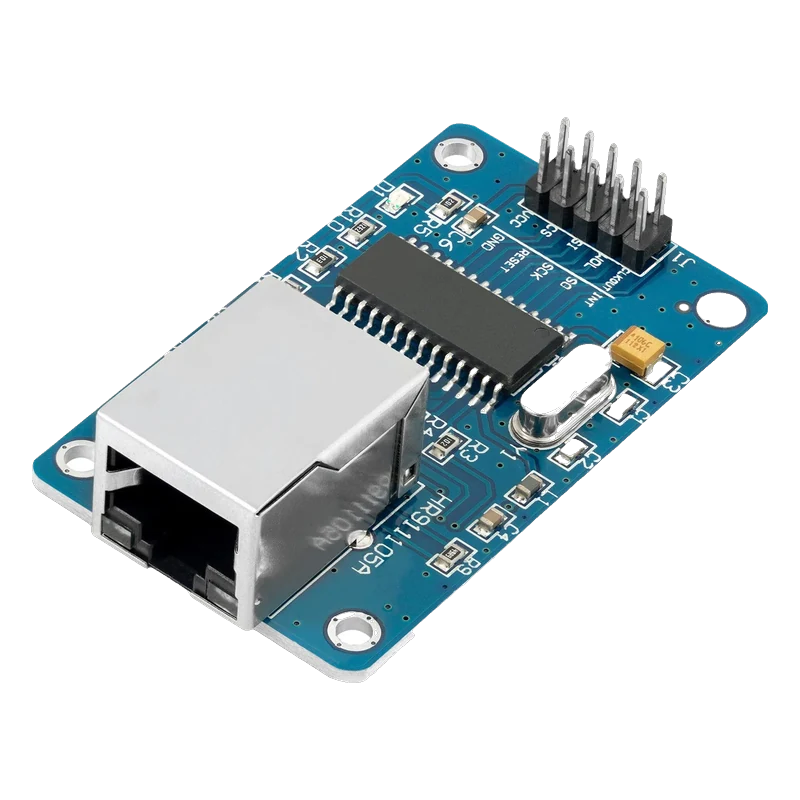
The ENC28J60 module is a 10Base-T Ethernet interface on SPI: Microchip's chip runs from 3.1 V to 3.6 V, talks SPI at up to 20 MHz and buffers packets in 8 KB of RAM (Microchip ENC28J60 DS39662E, p. 1). It draws 160 mA typical and 180 mA maximum while transmitting (p. 80), so it needs its own 3.3 V supply on an Uno. Its CS, SCK, SI and RESET inputs are 5 V tolerant (p. 7); the EthernetENC library runs the TCP/IP stack on the microcontroller.
Unlike the W5500, the ENC28J60 is only the bottom of a network stack: a 10 Mbps Ethernet MAC and PHY with an 8 KB packet buffer (Microchip ENC28J60 DS39662E, p. 1). The microcontroller runs IP, TCP, UDP and DHCP in software, which is why it needs a library such as EthernetENC (the modern successor to UIPEthernet) and why it uses more flash and RAM than a W5500 does.
The common blue module carries the chip, a 25 MHz crystal and a HanRun RJ45 jack with built-in magnetics, and breaks out a 2 × 5 header printed CLKOUT, INT, WOL, SO, SI, SCK, CS, RESET, VCC and GND. VCC is the chip's 3.3 V supply directly, with no regulator, and the chip's absolute maximum on VDD is 3.6 V (p. 79).
Current is the planning point: 120 mA while active and up to 180 mA while transmitting (p. 80), more than the 3.3 V pins of many boards deliver comfortably. Microchip made the SPI inputs 5 V tolerant for 5 V hosts, but notes that a 5 V controller may be out of specification reading the chip's 3.3 V outputs and suggests a level translator on SO (p. 7).
ENC28J60 Ethernet pinout
| Pin | Function | Type |
|---|---|---|
| CLKOUT | Clock output | output |
| INT | Interrupt (active low)3.3 V | output |
| WOL | Wake-on-LAN | output |
| SO | SPI MISO3.3 V | output |
| SI | SPI MOSI5 V tolerant | input |
| SCK | SPI SCK5 V tolerant | input |
| CS | SPI CS (active low)5 V tolerant | input |
| RESET | Reset (active low)5 V tolerant | input |
| VCC | 3.3 V supply3.1 V to 3.6 V, 180 mA | power in |
| GND | Ground | power in |
How to wire the ENC28J60 Ethernet
Pin by pin, for the board you have.
| ENC28J60 Ethernet | Arduino Uno | Note |
|---|---|---|
| VCC | 3.3 V regulator output (AMS1117-3.3 module fed from 5V) | The Uno's own 3.3V pin gives 50 mA; the module needs up to 180 mA. |
| GND | GND (shared with the regulator) | |
| SO | D12 | |
| SI | D11 | |
| SCK | D13 | |
| CS | D10 |
- SO drives about 3.3 V into the Uno, which Microchip notes may fall short of a 5 V controller's input specification (DS39662E, p. 7). It usually works; a 74HCT125 buffer powered from 5 V makes it dependable.
| ENC28J60 Ethernet | ESP32 DevKit V1 | Note |
|---|---|---|
| VCC | 3V3 | |
| GND | GND | |
| SO | GPIO19 (D19) | |
| SI | GPIO23 (D23) | |
| SCK | GPIO18 (D18) | |
| CS | GPIO5 (D5) |
| ENC28J60 Ethernet | Raspberry Pi Pico | Note |
|---|---|---|
| VCC | 3V3(OUT) | |
| GND | GND | |
| SO | GP16 | |
| SI | GP19 | |
| SCK | GP18 | |
| CS | GP17 |
- The module's 180 mA peak fits within the 300 mA Raspberry Pi recommends drawing from 3V3(OUT), but leaves little for other 3.3 V parts.
ENC28J60 Ethernet code
Every example here compiles for its board.
// ENC28J60 Ethernet on Arduino Uno: wiring and a free simulation at https://www.tinkered.ai/components/enc28j60-ethernet
// ENC28J60 module on an Arduino Uno: CS D10, SPI D11/D12/D13. Gets an address by DHCP, then fetches a page.
#include <SPI.h>
#include <EthernetENC.h>

byte mac[] = { 0xDE, 0xAD, 0xBE, 0xEF, 0xFE, 0x11 }; // unique on your network
EthernetClient client;
bool requested = false;

void setup() {
  Serial.begin(115200);
  Ethernet.init(10); // CS pin
  Serial.println(F("Requesting an address by DHCP..."));
  if (Ethernet.begin(mac) == 0) {
    if (Ethernet.hardwareStatus() == EthernetNoHardware) Serial.println(F("ENC28J60 not found: check wiring and 3.3 V supply"));
    else if (Ethernet.linkStatus() == LinkOFF) Serial.println(F("No link: check the cable"));
    else Serial.println(F("DHCP failed"));
    while (true) {}
  }
  Serial.print(F("IP address: "));
  Serial.println(Ethernet.localIP());
}

void loop() {
  Ethernet.maintain(); // EthernetENC processes incoming packets here
  if (!requested) {
    requested = true;
    if (client.connect("example.com", 80)) {
      client.println(F("GET / HTTP/1.1"));
      client.println(F("Host: example.com"));
      client.println(F("Connection: close"));
      client.println();
    } else {
      Serial.println(F("Connection failed"));
    }
  }
  while (client.available()) Serial.write(client.read());
  if (requested && client && !client.connected()) {
    client.stop();
    Serial.println(F("\nDone"));
  }
}
// ENC28J60 Ethernet on ESP32 DevKit V1: wiring and a free simulation at https://www.tinkered.ai/components/enc28j60-ethernet
// ENC28J60 module on an ESP32 DevKit V1: CS GPIO5, VSPI 18/19/23. Gets an address by DHCP, then fetches a page.
#include <SPI.h>
#include <EthernetENC.h>

byte mac[] = { 0xDE, 0xAD, 0xBE, 0xEF, 0xFE, 0x12 };
EthernetClient client;
bool requested = false;

void setup() {
  Serial.begin(115200);
  SPI.begin(18, 19, 23, 5); // SCK, MISO, MOSI, SS
  Ethernet.init(5);
  Serial.println("Requesting an address by DHCP...");
  if (Ethernet.begin(mac) == 0) {
    if (Ethernet.hardwareStatus() == EthernetNoHardware) Serial.println("ENC28J60 not found: check wiring");
    else if (Ethernet.linkStatus() == LinkOFF) Serial.println("No link: check the cable");
    else Serial.println("DHCP failed");
    while (true) { delay(100); }
  }
  Serial.print("IP address: ");
  Serial.println(Ethernet.localIP());
}

void loop() {
  Ethernet.maintain();
  if (!requested) {
    requested = true;
    if (client.connect("example.com", 80)) {
      client.println("GET / HTTP/1.1");
      client.println("Host: example.com");
      client.println("Connection: close");
      client.println();
    } else {
      Serial.println("Connection failed");
    }
  }
  while (client.available()) Serial.write(client.read());
  if (requested && client && !client.connected()) {
    client.stop();
    Serial.println("\nDone");
  }
}
// ENC28J60 Ethernet on Raspberry Pi Pico: wiring and a free simulation at https://www.tinkered.ai/components/enc28j60-ethernet
// ENC28J60 module on a Raspberry Pi Pico (arduino-pico): CS GP17, SPI0 GP16/18/19. Gets an address by DHCP, then fetches a page.
#include <SPI.h>
#include <EthernetENC.h>

byte mac[] = { 0xDE, 0xAD, 0xBE, 0xEF, 0xFE, 0x13 };
EthernetClient client;
bool requested = false;

void setup() {
  Serial.begin(115200);
  SPI.setRX(16);
  SPI.setSCK(18);
  SPI.setTX(19);
  Ethernet.init(17);
  Serial.println("Requesting an address by DHCP...");
  if (Ethernet.begin(mac) == 0) {
    if (Ethernet.hardwareStatus() == EthernetNoHardware) Serial.println("ENC28J60 not found: check wiring");
    else if (Ethernet.linkStatus() == LinkOFF) Serial.println("No link: check the cable");
    else Serial.println("DHCP failed");
    while (true) { delay(100); }
  }
  Serial.print("IP address: ");
  Serial.println(Ethernet.localIP());
}

void loop() {
  Ethernet.maintain();
  if (!requested) {
    requested = true;
    if (client.connect("example.com", 80)) {
      client.println("GET / HTTP/1.1");
      client.println("Host: example.com");
      client.println("Connection: close");
      client.println();
    } else {
      Serial.println("Connection failed");
    }
  }
  while (client.available()) Serial.write(client.read());
  if (requested && client && !client.connected()) {
    client.stop();
    Serial.println("\nDone");
  }
}
Before you wire it
- Feed VCC from a 3.3 V supply good for at least 180 mA, the chip's maximum while transmitting (Microchip DS39662E, p. 80).
- Call Ethernet.maintain() often: EthernetENC processes incoming packets inside it.
- Call Ethernet.init(csPin) before Ethernet.begin() when CS is not on pin 10.
- Give each board on the network its own MAC address.
- Never connect VCC to 5 V: the chip's absolute maximum is 3.6 V (p. 79).
- Never power it from an Uno's 3.3V pin, which supplies 50 mA.
- Never expect 100 Mbps: the ENC28J60 is a 10Base-T device (p. 1), and switches negotiate it down to 10 Mbps.
- CS, SCK, SI and RESET accept up to 5.5 V as a valid high (p. 80), so a 5 V board can drive them directly.
- Microchip's I/O section suggests a unidirectional level translator, such as a 74HCT buffer, on SO (and INT, if used) when the host runs at 5 V (p. 7).
- The chip gets warm: at 120 mA to 180 mA from 3.3 V it dissipates around half a watt, which is normal.
- The jack's LEDs are driven by the chip and show link and activity, a quick check that power and cable are fine before debugging code.
- EthernetENC's API matches Arduino's Ethernet library, so web client and server examples port by changing the include to EthernetENC.h.
Specifications
- Supply voltage
- 3.1 V to 3.6 V (3.3 V typical)Microchip ENC28J60 DS39662E, p. 1
- Absolute maximum
- VDD 3.6 V; RESET, CS, SCK and SI up to 6.0 V; SO, INT, CLKOUT VDD + 0.3 VMicrochip ENC28J60 DS39662E, p. 79
- Current
- 160 mA typical, 180 mA maximum transmitting; 120 mA active; 1.2 mA in sleepMicrochip ENC28J60 DS39662E, p. 80
- Input levels
- SCK, CS, SI, RESET read high from 2.25 V to 5.5 VMicrochip ENC28J60 DS39662E, p. 80
- Output levels
- SO and INT high at VDD - 0.7 V or more at 4 mAMicrochip ENC28J60 DS39662E, p. 80
- SPI clock
- Up to 20 MHzMicrochip ENC28J60 DS39662E, p. 1
- Ethernet
- One 10Base-T port (10 Mbps), integrated MAC and PHYMicrochip ENC28J60 DS39662E, p. 1
- Packet buffer
- 8 KB dual-port SRAM for transmit and receiveMicrochip ENC28J60 DS39662E, p. 1
From the Microchip ENC28J60 Data Sheet DS39662E, published by Microchip Technology.
Common mistakes
Feeding it from the Uno's 3.3V pin
The ENC28J60 draws 120 mA active and up to 180 mA while transmitting (Microchip DS39662E, p. 80). The Uno's 3.3V pin gives 50 mA, so DHCP fails or the link drops. Use a separate 3.3 V regulator with a shared ground.
Using the W5100 Ethernet library
Arduino's Ethernet library drives WIZnet chips only. The ENC28J60 needs a software stack such as EthernetENC or UIPEthernet; with the wrong library begin() always reports no hardware.
Not calling Ethernet.maintain()
EthernetENC handles received packets inside maintain(). A loop that blocks with long delays makes connections time out even though DHCP worked.
Running out of RAM on an Uno
The software TCP/IP stack takes a large share of the Uno's 2 KB. Keep strings in flash with F(), avoid large buffers, and consider the W5500, which keeps the stack in hardware.
ENC28J60 Ethernet questions
Is the ENC28J60 5 V tolerant?
Its CS, SCK, SI and RESET inputs are, up to 6.0 V absolute maximum (Microchip DS39662E, p. 79). Its supply is not: VCC must be 3.1 V to 3.6 V (p. 1). Its SO output is 3.3 V, which most 5 V boards read, though Microchip recommends a level translator for full specification (p. 7).
Which library should I use for the ENC28J60?
EthernetENC (jandrassy/EthernetENC), the maintained successor of UIPEthernet. Its API mirrors Arduino's Ethernet library, so the usual EthernetClient and EthernetServer examples work after changing the include.
How much current does the ENC28J60 module need?
120 mA active and 160 mA typical, 180 mA maximum while transmitting at 3.3 V (p. 80). Plan for a 3.3 V supply of at least 200 mA.
ENC28J60 or W5500?
The ENC28J60 is cheaper but runs only 10 Mbps and leaves TCP/IP to the microcontroller. The W5500 does TCP/IP in hardware at 10/100 Mbps with 8 sockets, so it suits RAM-limited boards like the Uno much better.
Does the ENC28J60 work with an ESP32 or Pico?
Yes: power it from the board's 3.3 V pin, wire the SPI lines directly and call Ethernet.init() with your CS pin. Both cores also offer native ENC28J60 drivers for their own network stacks.
Build something with the ENC28J60 Ethernet
- Build this
LAN temperature logger
Post readings to a local server every minute over a wired link.
- Build this
Ethernet doorbell notifier
A button press sends a UDP message to a PC on the network.
This page as plain Markdown, for ChatGPT, Claude or your own agent. /components/enc28j60-ethernet.md