TCRT5000 IR Line Sensor with a Raspberry Pi Pico
A reflective infrared line sensor that tells white from black a few millimetres above a surface.
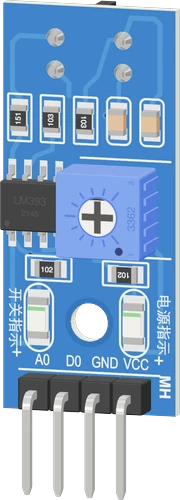
The TCRT5000 line sensor module runs from the Raspberry Pi Pico's 3V3, with its analog A0 on GP28 and its comparator output D0 on GP0. Powered at 3.3 V, both outputs stay inside the Pico's input range without a divider.
Wiring the TCRT5000 IR Line Sensor to the Raspberry Pi Pico
Pin by pin.
| TCRT5000 IR Line Sensor | Raspberry Pi Pico |
|---|---|
| VCC | 3V3 |
| GND | GND |
| AO | GP28 |
| DO | GP0 |
What to know on the Raspberry Pi Pico
- A0 needs one of the Pico's three ADC pins, GP26 to GP28; on 3V3 it cannot exceed the ADC's limit of about 300 mV above the rail.Raspberry Pi Pico datasheet, release 21, pp. 3, 19
- The sketch's thresholds (600 to black, 400 to white) are 10-bit values: arduino-pico's analogRead() returns 0 to 1023 unless analogReadResolution(12) is called, then the thresholds scale by four.arduino-pico core documentation (Earle Philhower)
- Take the module's power from the 3V3 pin, not a GPIO: its IR emitter shines continuously, and an RP2040 pin drives 12 mA at most.Vishay TCRT5000 datasheet, p. 1; RP2040 datasheet, section 2.19.4
- To count stripes on an encoder disc, attach an interrupt to D0 on GP0 with attachInterrupt(digitalPinToInterrupt(0), isr, RISING) and only increment a volatile counter in the ISR.RP2040 datasheet, section 2.19.3
TCRT5000 IR Line Sensor code for the Raspberry Pi Pico
Compiled for rp2040:rp2040:rpipico on 2026-10-29.
// TCRT5000 IR Line Sensor on Raspberry Pi Pico: wiring and a free simulation at https://www.tinkered.ai/components/tcrt5000-module/raspberry-pi-pico
const int AO_PIN = 28;   // TCRT5000 A0: low over white, high over black
const int DO_PIN = 0;    // TCRT5000 D0: LOW over white, HIGH over black

// halfway between white (about 50) and black (about 930), with a margin either side
const int TO_BLACK = 600;  // above this: black
const int TO_WHITE = 400;  // below this: white
bool onLine = false;

void setup() {
  Serial.begin(9600);
  pinMode(DO_PIN, INPUT);  // the module has its own pull-up
  Serial.println("TCRT5000 ready");
}

void loop() {
  int level = analogRead(AO_PIN);
  if (!onLine && level > TO_BLACK) onLine = true;
  else if (onLine && level < TO_WHITE) onLine = false;

  Serial.print("A0 ");
  Serial.print(level);
  Serial.print("  D0 ");
  Serial.print(digitalRead(DO_PIN) == HIGH ? "HIGH" : "LOW");
  Serial.println(onLine ? "  line" : "  white");
  delay(100);
}
TCRT5000 IR Line Sensor on the Raspberry Pi Pico: questions
Does the TCRT5000 module work with a Pico at 3.3 V?
Yes. Power it from 3V3 so A0 and D0 never exceed the Pico's 3.3 V inputs, A0 on GP26 to GP28, D0 on any GPIO.
Why are my TCRT5000 readings 0 to 1023 on the Pico, not 0 to 4095?
arduino-pico's analogRead() defaults to 10 bits. Call analogReadResolution(12) for 0 to 4095 and multiply the sketch's thresholds by four.
How high above the line should the sensor be?
About 2.5 mm is its strongest, usable from 0.2 to 15 mm (Vishay datasheet, p. 1); the board does not change that.
Keep going
This guide as plain Markdown. /components/tcrt5000-module/raspberry-pi-pico.md