TCRT5000 IR Line Sensor with an Arduino Uno
A reflective infrared line sensor that tells white from black a few millimetres above a surface.
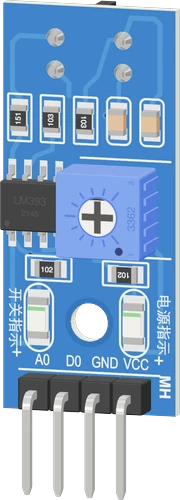
On an Arduino Uno the TCRT5000 module runs from 5V, its analog A0 output lands on the Uno's A0 as a 10-bit count, and its comparator output D0 goes to D2. The sketch decides line or white from the analog count with two thresholds, so the result does not flicker at the line's edge.
Wiring the TCRT5000 IR Line Sensor to the Arduino Uno
Pin by pin.
| TCRT5000 IR Line Sensor | Arduino Uno |
|---|---|
| VCC | 5V |
| GND | GND |
| AO | A0 |
| DO | D2 |
What to know on the Arduino Uno
- On the Uno's 10-bit ADC the sketch expects about 50 over white and about 930 over black, and switches at 600 going dark and 400 going light. Measure your own surface and set the two thresholds either side of the midpoint.Microchip ATmega328P datasheet DS40002061B, p. 2
- A line follower usually wants several sensors. The Uno has six analog inputs, A0 to A5, but A4 and A5 are its I2C pins, so a robot with an I2C display or IMU has four left for TCRT5000 outputs.Arduino UNO R3 datasheet, p. 10
- For a tachometer, put a black-and-white disc in front of the sensor and count D0's rising edges on D2 (INT0); RPM is edges per second times 60 divided by the disc's black segments.Arduino language reference, attachInterrupt()
- The sensor is strongest 2.5 mm from the surface and usable from 0.2 mm to 15 mm, so mount it a few millimetres above the track; flat against it, it reads black.Vishay TCRT5000 datasheet, p. 1
TCRT5000 IR Line Sensor code for the Arduino Uno
Compiled for arduino:avr:uno on 2026-10-29.
// TCRT5000 IR Line Sensor on Arduino Uno: wiring and a free simulation at https://www.tinkered.ai/components/tcrt5000-module/arduino-uno
const int AO_PIN = A0;   // TCRT5000 A0: low over white, high over black
const int DO_PIN = 2;    // TCRT5000 D0: LOW over white, HIGH over black

// halfway between white (about 50) and black (about 930), with a margin either side
const int TO_BLACK = 600;  // above this: black
const int TO_WHITE = 400;  // below this: white
bool onLine = false;

void setup() {
  Serial.begin(9600);
  pinMode(DO_PIN, INPUT);  // the module has its own pull-up
  Serial.println("TCRT5000 ready");
}

void loop() {
  int level = analogRead(AO_PIN);
  if (!onLine && level > TO_BLACK) onLine = true;
  else if (onLine && level < TO_WHITE) onLine = false;

  Serial.print("A0 ");
  Serial.print(level);
  Serial.print("  D0 ");
  Serial.print(digitalRead(DO_PIN) == HIGH ? "HIGH" : "LOW");
  Serial.println(onLine ? "  line" : "  white");
  delay(100);
}
TCRT5000 IR Line Sensor on the Arduino Uno: questions
What analog values does the TCRT5000 give on an Arduino Uno?
On the Uno's 0 to 1023 scale, low over white (about 50 in the example) and high over black (about 930). Calibrate on your own track and pick thresholds either side of the middle.
How many TCRT5000 sensors can an Arduino Uno read?
Up to six on A0 to A5 using the analog outputs, four if A4 and A5 are taken by I2C. Using only the D0 outputs, any free digital pins work.
Can the TCRT5000 measure motor speed on the Uno?
Yes: aim it at a striped disc and count D0's rising edges with an interrupt on D2, the Uno's INT0, then convert edges per second to RPM.
Keep going
This guide as plain Markdown. /components/tcrt5000-module/arduino-uno.md