TB6612FNG Motor Driver with an Arduino Uno
Toshiba dual H-bridge motor driver that runs two DC motors (or one bipolar stepper) at up to 1.2A average per channel through low-resistance MOSFET outputs.
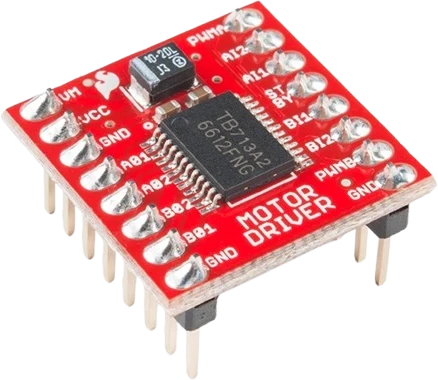
The TB6612FNG's logic runs from 2.7 V to 5.5 V, so on an Arduino Uno it takes the 5V pin and reads the Uno's 5 V outputs directly. Its two speed inputs sit on different Uno timers, PWMA on D5 and PWMB on D9, which gives the two motors different PWM frequencies.
Wiring the TB6612FNG Motor Driver to the Arduino Uno
Pin by pin.
| TB6612FNG Motor Driver | Arduino Uno |
|---|---|
| AIN1 | D2 |
| AIN2 | D3 |
| PWMA | D5 |
| BIN1 | D4 |
| BIN2 | D6 |
| PWMB | D9 |
| STBY | D7 |
| VCC | 5V |
| GND_LOGIC | GND |
| GND_VM | GND |
| VM | a separate 4.5 to 13.5 V motor supply, its − to GND |
| A1, A2 | motor A |
| B1, B2 | motor B |
What to know on the Arduino Uno
- PWMA on D5 runs at about 980 Hz (Timer0) while PWMB on D9 runs at about 490 Hz (Timer1). The motors respond much the same, but the lower frequency can whine audibly; swap PWMB and BIN2 (PWMB to D6, BIN2 to D9) to put both channels on 980 Hz.Arduino language reference, analogWrite()
- Do not retune Timer0 to raise D5 and D6's frequency: on the Uno that timer also drives millis() and delay(), which would then run fast.Arduino language reference, analogWrite()
- The Servo library takes Timer1 and stops analogWrite() on D9, so PWMB would lose its speed control if a servo is added; the same swap, PWMB on D6 and BIN2 on D9, avoids it.Arduino Servo library reference
- Motors go on VM, up to 13.5 V, from their own supply, never the Uno's 5V; the Uno only feeds VCC, and GND_VM, GND_LOGIC and the Uno's GND must all be joined.Toshiba TB6612FNG datasheet, pp. 1 to 3
TB6612FNG Motor Driver code for the Arduino Uno
Compiled for arduino:avr:uno on 2026-10-29.
// TB6612FNG Motor Driver on Arduino Uno: wiring and a free simulation at https://www.tinkered.ai/components/tb6612fng-motor-driver/arduino-uno
// TB6612FNG dual H-bridge. Wiring above.
#define AIN1 2
#define AIN2 3
#define PWMA 5
#define BIN1 4
#define BIN2 6
#define PWMB 9
#define STBY 7

void setup() {
  pinMode(AIN1, OUTPUT); pinMode(AIN2, OUTPUT); pinMode(PWMA, OUTPUT);
  pinMode(BIN1, OUTPUT); pinMode(BIN2, OUTPUT); pinMode(PWMB, OUTPUT);
  pinMode(STBY, OUTPUT);
  digitalWrite(STBY, HIGH);            // enable both channels
}

void loop() {
  // Motor A forward, motor B reverse.
  digitalWrite(AIN1, HIGH); digitalWrite(AIN2, LOW);  analogWrite(PWMA, 200);
  digitalWrite(BIN1, LOW);  digitalWrite(BIN2, HIGH); analogWrite(PWMB, 150);
  delay(1500);

  // Reverse motor A (swap the direction inputs).
  digitalWrite(AIN1, LOW);  digitalWrite(AIN2, HIGH);
  delay(1500);

  // Standby → both motors stop.
  digitalWrite(STBY, LOW);
  delay(1000);
  digitalWrite(STBY, HIGH);
}
TB6612FNG Motor Driver on the Arduino Uno: questions
Can I connect the TB6612FNG directly to an Arduino Uno?
Yes. Its logic takes 2.7 V to 5.5 V (Toshiba datasheet), so VCC goes to the Uno's 5V and the control pins connect directly. Motors need their own supply on VM.
Why does one motor whine more than the other on the Uno?
PWMB is on D9 at about 490 Hz, PWMA on D5 at about 980 Hz. Swap PWMB and BIN2, PWMB on D6 and BIN2 on D9, so both run on Timer0's higher frequency.
What does STBY do on the Uno wiring?
STBY on D7 must be HIGH for either channel to run; pulling it LOW stops both motors at once, as the sketch does between moves.
Keep going
This guide as plain Markdown. /components/tb6612fng-motor-driver/arduino-uno.md