MicroSD Card Module with a Raspberry Pi Pico
The Catalex microSD card module puts a push-push microSD socket on SPI with a 3.3 V regulator and a 74LVC125A level shifter, ready for 5 V and 3.3 V boards.
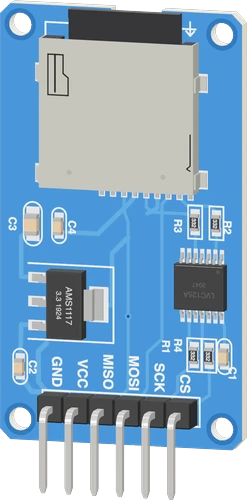
The microSD module sits on the Raspberry Pi Pico's SPI0 pins, SCK on GP18, MOSI on GP19 and MISO on GP16, with chip select on GP0 and VCC on VBUS. Its AMS1117 regulator needs that 5 V: from the Pico's 3V3 the card would get too little.
Wiring the MicroSD Card Module to the Raspberry Pi Pico
Pin by pin.
| MicroSD Card Module | Raspberry Pi Pico |
|---|---|
| VCC | VBUS |
| GND | GND |
| SCK | GP18 |
| MOSI | GP19 |
| MISO | GP16 |
| CS | GP0 |
- VCC is on VBUS, which gives about 5 V only while the board is powered from USB.
What to know on the Raspberry Pi Pico
- The AMS1117 drops 1.1 V typical, so the card's 3.3 V needs about 5 V in; the Pico's 5 V is VBUS, present only while USB powers it.Advanced Monolithic Systems AMS1117 datasheet, p. 3; Raspberry Pi Pico datasheet, release 21, p. 8
- The module's 74LVC125A runs from its 3.3 V rail, so MISO reaches GP16 at 3.3 V and needs no shifting even with VCC at 5 V.TI SN74LVC125A datasheet SCAS290T, p. 1
- GP16, GP18 and GP19 are arduino-pico's default SPI0 pins, so SPI needs no setup; GP0 is passed to SD.begin() as chip select. The default SPI0 CS, GP17, stays free.arduino-pico core documentation (Earle Philhower)
- The Pico core's SD library takes long file names; start every path with / and close or flush a file before moving on.arduino-pico core documentation (Earle Philhower), SD
MicroSD Card Module code for the Raspberry Pi Pico
Compiled for rp2040:rp2040:rpipico on 2026-10-30.
// MicroSD Card Module on Raspberry Pi Pico: wiring and a free simulation at https://www.tinkered.ai/components/microsd-module/raspberry-pi-pico
#include <SPI.h>
#include <SD.h>

const int SD_CS = 0;

void setup() {
  Serial.begin(115200);
  if (!SD.begin(SD_CS)) {
    Serial.println("No card, or the wiring is wrong");
    while (1) delay(10);
  }
  File f = SD.open("/LOG.TXT", FILE_WRITE);
  if (f) {
    f.println(millis());
    f.close();
  }
  f = SD.open("/LOG.TXT");
  while (f && f.available()) Serial.write(f.read());
  if (f) f.close();
}

void loop() {}
MicroSD Card Module on the Raspberry Pi Pico: questions
Can I power the microSD module from the Pico's 3V3?
No: its AMS1117 needs about 1.1 V of headroom (AMS1117 datasheet, p. 3), so 3.3 V in leaves the card short. Use VBUS on USB.
Which SPI pins does the microSD module use on a Pico?
SPI0's defaults in arduino-pico: SCK GP18, MOSI GP19, MISO GP16; CS can be any GPIO, GP0 on this page.
Why does SD.begin() fail on my Pico?
Check VCC is 5 V (VBUS is 0 V without USB, Pico datasheet p. 8), the card is FAT32, and CS matches SD.begin(0). Do not share MISO with an RC522 reader.
Keep going
This guide as plain Markdown. /components/microsd-module/raspberry-pi-pico.md