MicroSD Card Module with an Arduino Uno
The Catalex microSD card module puts a push-push microSD socket on SPI with a 3.3 V regulator and a 74LVC125A level shifter, ready for 5 V and 3.3 V boards.
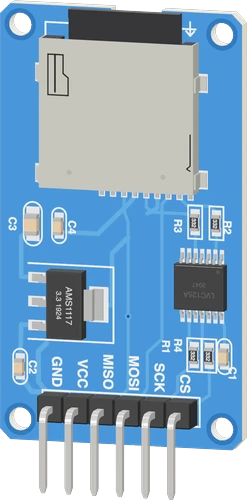
The Catalex microSD module is built for 5 V hosts like the Arduino Uno: its regulator needs the Uno's 5V on VCC, and its 74LVC125A buffer accepts the Uno's 5 V signals on SCK, MOSI and CS. It uses the Uno's hardware SPI on D11, D12 and D13 with CS on D10.
Wiring the MicroSD Card Module to the Arduino Uno
Pin by pin.
| MicroSD Card Module | Arduino Uno |
|---|---|
| VCC | 5V |
| GND | GND |
| SCK | D13 |
| MOSI | D11 |
| MISO | D12 |
| CS | D10 |
What to know on the Arduino Uno
- The AMS1117-3.3 on the module drops 1.1 V typical, so it needs about 4.4 V in; on the Uno's 5V that holds, while the Uno's 3.3V pin would leave the card underpowered.Advanced Monolithic Systems AMS1117 datasheet, p. 3
- The 74LVC125A buffer's inputs accept up to 5.5 V, so the Uno's SPI pins connect directly with no extra level shifting.TI SN74LVC125A datasheet SCAS290T, p. 1
- Arduino's SD library, the one the Uno uses, keeps a 512-byte sector buffer in SRAM: a quarter of the Uno's 2 KB is gone as soon as SD.begin() succeeds. It also takes only 8.3 file names, such as LOG.TXT.Arduino SD library reference; Arduino UNO R3 tech specs
- On the common Catalex layout MISO is driven at all times, so it cannot share D12 with another SPI reader such as an RC522; give the other device its own bus or a module that releases MISO.CircuitState Catalex module schematic
MicroSD Card Module code for the Arduino Uno
Compiled for arduino:avr:uno on 2026-10-30.
// MicroSD Card Module on Arduino Uno: wiring and a free simulation at https://www.tinkered.ai/components/microsd-module/arduino-uno
#include <SPI.h>
#include <SD.h>

const int SD_CS = 10;

void setup() {
  Serial.begin(115200);
  if (!SD.begin(SD_CS)) {
    Serial.println("No card, or the wiring is wrong");
    while (1) delay(10);
  }
  File f = SD.open("/LOG.TXT", FILE_WRITE);
  if (f) {
    f.println(millis());
    f.close();
  }
  f = SD.open("/LOG.TXT");
  while (f && f.available()) Serial.write(f.read());
  if (f) f.close();
}

void loop() {}
MicroSD Card Module on the Arduino Uno: questions
Can I power the microSD module from the Uno's 3.3V pin?
No. Its AMS1117-3.3 regulator needs headroom (1.1 V typical dropout, AMS1117 datasheet p. 3), so VCC goes to the Uno's 5V.
Why won't the SD card open a long file name on the Uno?
The Uno uses Arduino's SD library, which takes 8.3 names only: LOG.TXT, DATA01.CSV. Use SdFat if you need long names.
Can I use the microSD module and an RC522 RFID reader together on an Uno?
Not on the same MISO line with this module: its MISO is always driven. Use a microSD board that releases MISO when CS is high, or a different approach for one of the two.
Keep going
This guide as plain Markdown. /components/microsd-module/arduino-uno.md