LCD 20x4 (I2C) with a Raspberry Pi Pico
A 20x4 character LCD on an HD44780-compatible controller with a PCF8574 I2C backpack: 80 characters of text on two signal wires.
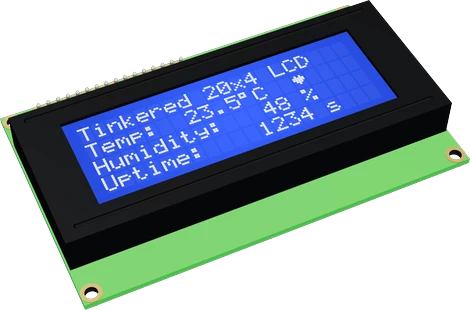
The 20x4 LCD is a 5 V module, so on the Raspberry Pi Pico its VCC goes to VBUS while SDA and SCL reach I2C0 on GP4 and GP5 through a bidirectional level shifter. The shifter answers the backpack's own pull-ups, which go to that 5 V and would hold the bus above the Pico's 3.3 V pin rating.
Wiring the LCD 20x4 (I2C) to the Raspberry Pi Pico
Pin by pin.
| LCD 20x4 (I2C) | Raspberry Pi Pico | Note |
|---|---|---|
| GND | GND | |
| VCC | VBUS | |
| SDA | GP4 | through a level shifter (a BSS138 board): the backpack pulls SDA up to its 5 V |
| SCL | GP5 | through a level shifter (a BSS138 board): the backpack pulls SCL up to its 5 V |
- VCC is on VBUS, which gives about 5 V only while the board is powered from USB.
- The backpack runs on 5 V: its PCF8574 reads a high from 0.7 × VCC (3.5 V), above a 3.3 V pin, and its pull-ups would put 5 V on the board's SDA and SCL. Put a bidirectional level shifter on both lines, as the rows say.
What to know on the Raspberry Pi Pico
- The 2004A's logic is rated 4.5 V to 5.5 V and its glass needs 4.4 V or more, so 3V3 would leave the characters faint. VBUS is the Pico's 5 V, and only while USB powers it.C2004A datasheet, p. 1; Raspberry Pi Pico datasheet, release 21, p. 8
- The backpack pulls SDA and SCL up to its VCC. At 5 V that holds GP4 and GP5 near 5 V, above the RP2040's IOVDD + 0.5 V limit: the page's rows therefore pass SDA and SCL through a bidirectional level shifter, a BSS138 board.RP2040 datasheet, section 5.5.3.1
- The PCF8574 backpack is rated for a 100 kHz I2C clock, which is the Wire default on the Pico too.TI PCF8574 datasheet SCPS068K, p. 5
- Its address is 0x27 (0x3F on a PCF8574A backpack), the same as an MCP23017 board's default; give one of them another address on a shared bus.TI PCF8574 and PCF8574A datasheets, p. 14
LCD 20x4 (I2C) code for the Raspberry Pi Pico
Compiled for rp2040:rp2040:rpipico on 2026-10-30.
// LCD 20x4 (I2C) on Raspberry Pi Pico: wiring and a free simulation at https://www.tinkered.ai/components/lcd-2004-i2c/raspberry-pi-pico
#include <Wire.h>
#include <LiquidCrystal_I2C.h>

LiquidCrystal_I2C lcd(0x27, 20, 4);   // address, columns, rows

byte degree[8] = { 0b01100, 0b10010, 0b10010, 0b01100, 0, 0, 0, 0 };

void setup() {
  Wire.begin();
  lcd.init();             // the library's entry point: starts Wire and the 20x4 display
  lcd.backlight();               // the backlight stays off until this
  lcd.createChar(0, degree);
  lcd.setCursor(0, 0); lcd.print("Weather station");
  lcd.setCursor(0, 1); lcd.print("Temp:");
  lcd.setCursor(0, 2); lcd.print("Humidity:");
  lcd.setCursor(0, 3); lcd.print("Uptime:");
}

void loop() {
  lcd.setCursor(10, 1); lcd.print("23.5"); lcd.write(0); lcd.print("C ");
  lcd.setCursor(10, 2); lcd.print("48 %  ");
  lcd.setCursor(10, 3); lcd.print(millis() / 1000); lcd.print(" s   ");
  delay(1000);
}
LCD 20x4 (I2C) on the Raspberry Pi Pico: questions
Can I power the LCD 2004 from the Pico's 3V3 pin?
No. The module is rated 4.5 V to 5.5 V (C2004A datasheet, p. 1); at 3.3 V the characters are faint or invisible. Use VBUS on USB, or another 5 V source.
Is it safe to wire the LCD's SDA and SCL straight to GP4 and GP5?
Not within spec: the backpack's pull-ups go to its 5 V VCC, above the RP2040's IOVDD + 0.5 V pin rating (RP2040 datasheet, section 5.5.3.1). The page's wiring adds a bidirectional level shifter on the two lines.
What address does the 20x4 LCD use on a Pico?
0x27 on a PCF8574 backpack, 0x3F on a PCF8574A (TI datasheets, p. 14). The page's sketch uses LiquidCrystal_I2C lcd(0x27, 20, 4).
Keep going
This guide as plain Markdown. /components/lcd-2004-i2c/raspberry-pi-pico.md