IR Remote
A 20-key infrared handset that sends NEC codes on a 38 kHz carrier, read by an IR receiver module on any Arduino, ESP32 or Pico.
- ProtocolNEC: 8-bit address + inverse, 8-bit command + inverse
- Carrier38 kHz bursts
- Leader code9 ms burst, 4.5 ms pause
- Bit timing0 = 1.125 ms, 1 = 2.25 ms pulse distance
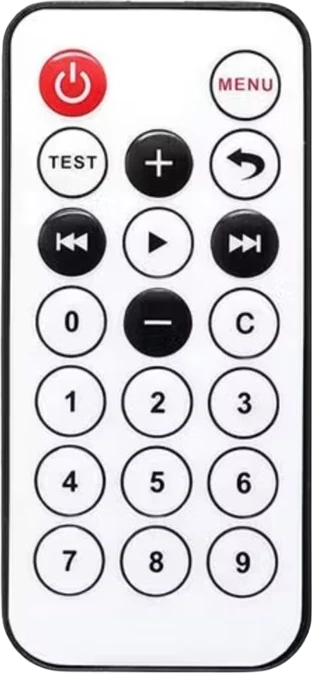
This IR remote is a 20-key handset that sends NEC-format infrared frames on a 38 kHz carrier: a 9 ms leader burst, a 4.5 ms pause, then an 8-bit address and an 8-bit command, each followed by its inverse (Vishay Data Formats for IR Remote Control, doc 80071, p. 2). It has no wires of its own: you connect a 38 kHz IR receiver such as the TSOP4838 (2.0 V to 5.5 V, Vishay TSOP48 datasheet, p. 3) to a digital pin and decode the frames with a library such as IRremote. Switch on the 8-bit command, 0x45 for Power, rather than on a 32-bit raw code.
The IR remote is the small 20-key handset that comes with most Arduino starter kits. It sends each key press as infrared light from an LED at its front, modulated on a 38 kHz carrier, in the NEC code format. An IR receiver module on your board strips off the carrier and hands the microcontroller a clean digital signal whose pulse timing carries the code.
In the NEC format each frame starts with a 9 ms burst and a 4.5 ms pause, then sends 32 bits by pulse distance: a 0 is 1.125 ms long and a 1 is 2.25 ms (Vishay Data Formats for IR Remote Control, doc 80071, p. 2). The bits are an 8-bit address, its inverse, an 8-bit command and its inverse, so the receiver can check every frame. Holding a key down does not resend the code: the remote sends a short repeat frame, the leader code and a single bit, every 108 ms (pp. 2, 3).
This handset uses address 0 for every key and a different command byte per key. Libraries print those codes differently: IRremote 4.x reports the command least-significant bit first, so Power reads 0x45, while older 2.x sketches print the whole 32-bit frame, 0xFFA25D for the same key (Wokwi IR remote reference). Matching on the command byte keeps a sketch working across library versions.
Specifications
- Protocol
- NEC: 8-bit address + inverse, 8-bit command + inverseVishay Data Formats for IR Remote Control, doc 80071 rev 2.3, p. 2
- Carrier
- 38 kHz burstsVishay Data Formats for IR Remote Control, doc 80071, p. 2
- Leader code
- 9 ms burst, 4.5 ms pauseVishay Data Formats for IR Remote Control, doc 80071, pp. 2, 3
- Bit timing
- 0 = 1.125 ms, 1 = 2.25 ms pulse distanceVishay Data Formats for IR Remote Control, doc 80071, p. 2
- Repeat
- Leader code and one bit every 108 ms while a key is heldVishay Data Formats for IR Remote Control, doc 80071, pp. 2, 3
- Keys
- 20: Power, Menu, Test, +, -, Back, Prev, Play, Next, C, 0 to 9Wokwi IR remote reference
- Address
- 0x00 for every keyWokwi IR remote reference
- Example codes
- Power command 0x45 (IRremote 4.x), raw 0xFFA25D (IRremote 2.x)Wokwi IR remote reference (command 162, bit order reversed)
- Dimensions
- 40 × 7 × 86 mm
- Weight
- 14 g
From the maker's datasheet.
Common mistakes
Matching on 32-bit raw codes
Raw values differ between library versions: IRremote 2.x printed Power as 0xFFA25D, while IRremote 4.x reports the command 0x45. Sketches written for one break on the other. Switch on the decoded command byte.
Treating the repeat frame as a key
Holding a key sends a short repeat frame every 108 ms instead of the full code (Vishay doc 80071, pp. 2, 3). Old IRremote versions reported it as 0xFFFFFFFF. Ignore repeats, or use them on purpose for volume-style auto-repeat.
Wiring an IR LED or photodiode instead of a receiver
The remote needs a demodulating receiver module such as a TSOP4838 or VS1838B on the board. A bare photodiode sees the 38 kHz carrier, not the code, and a library cannot decode it.
Flat or reversed battery
A dead coin cell or a cell inserted upside down makes every key do nothing. Point a phone camera at the remote's LED while pressing a key: most phone cameras show the infrared flash.
IR Remote questions
How do I read the IR remote with an Arduino?
Wire an IR receiver module's VCC and GND to the board and its OUT pin to a digital pin, install the IRremote library, call IrReceiver.begin(pin), then in loop() check IrReceiver.decode() and read IrReceiver.decodedIRData.command. The remote sends NEC frames on 38 kHz (Vishay doc 80071, p. 2), which IRremote decodes out of the box. Call IrReceiver.resume() after each key.
What are the key codes of the 20-key IR remote?
Every key uses address 0. With IRremote 4.x the commands include Power 0x45, Menu 0x47, Test 0x44, Plus 0x40, Minus 0x19, Play 0x15, Prev 0x07, Next 0x09, 0 0x16, 1 0x0C and 2 0x18 (Wokwi IR remote reference, bit order reversed). Print decodedIRData.command once for each key to confirm your remote.
Does the IR remote work with an ESP32 or other 3.3 V board?
Yes: the remote has no electrical connection, and the receiver runs on the board's own voltage. A TSOP4838 takes 2.0 V to 5.5 V (Vishay TSOP48 datasheet, p. 3), so power it from 3.3 V and wire OUT straight to a GPIO. Use the IRremoteESP8266 library on ESP32.
Why does my IR remote print 0xFFFFFFFF?
That is the NEC repeat frame, which the remote sends every 108 ms while a key is held (Vishay doc 80071, pp. 2, 3); IRremote 2.x reported it as 0xFFFFFFFF. In IRremote 4.x check decodedIRData.flags for the repeat flag and keep the last command if you want held keys to repeat.
Why does nothing happen when I press a key?
First check the remote: look at its LED through a phone camera while pressing a key. Then check the receiver: it must be a 38 kHz demodulating module powered from the board's logic voltage, with OUT on the pin your sketch passes to the library and a shared ground. Finally print every decoded frame to the serial monitor to see whether codes arrive but do not match your switch cases.
Can I make my own Arduino send these remote codes?
Yes. Drive an IR LED, such as a KY-005 module, from a PWM-capable pin and call IrSender.sendNEC(0x00, command, 0) in IRremote. The library generates the 38 kHz carrier and the NEC timing: the 9 ms leader, 4.5 ms pause and 32 data bits (Vishay doc 80071, p. 2).
Build something with the IR Remote
Remote-controlled LED or relay
Turn lights, a fan or a lamp on and off from the couch with the Power and number keys.
IR-controlled robot car
Drive forward, back, left and right with the arrow-style Prev, Next, + and - keys.
Music or volume controller
Use Play, Prev, Next and the volume keys to control a DFPlayer Mini or an I2S audio project.
Code-lock keypad
Enter a PIN with the number keys and open a servo latch when it matches.
This page as plain Markdown, for ChatGPT, Claude or your own agent. /components/ir-remote-controller.md