HC-12
A 433 MHz radio that acts as a wireless serial cable: bytes written to one module come out of the other, up to about 1 km apart.
- Supply voltage (VCC)3.2 V to 5.5 V, from a supply able to deliver at least 200 mA
- CurrentUp to 100 mA transmitting; idle 16 mA (FU3), 3.6 mA (FU1), 80 µA (FU2)
- Frequency433.4 MHz to 473.0 MHz, 100 channels 400 kHz apart
- Transmit powerUp to 20 dBm (100 mW), 8 steps: -1, 2, 5, 8, 11, 14, 17, 20 dBm
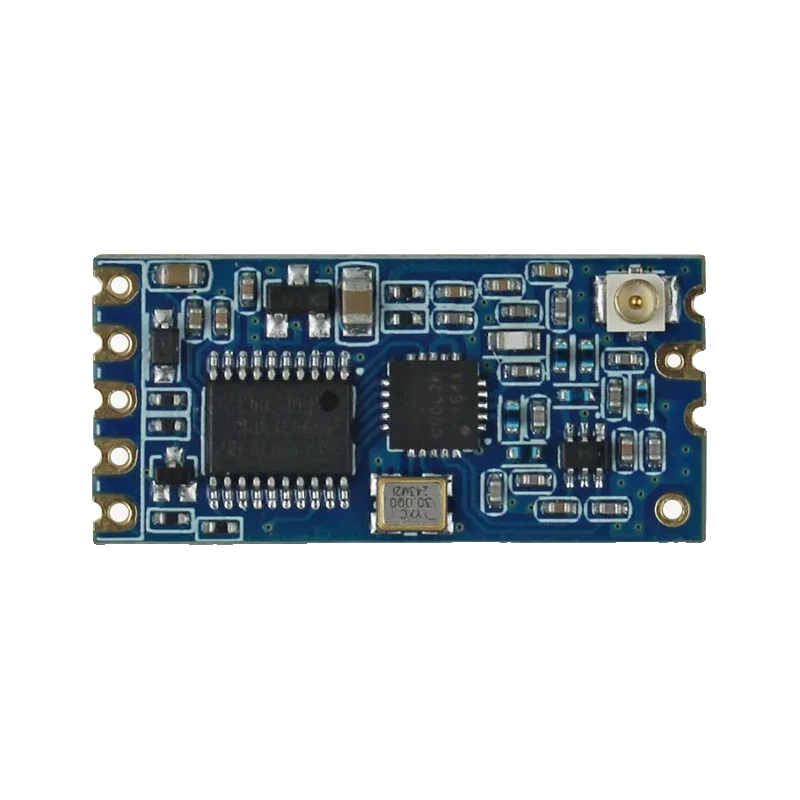
The HC-12 is a 433 MHz serial radio module: two of them replace a UART cable, with up to 100 mW (20 dBm) of transmit power, 100 channels between 433.4 and 473.0 MHz and about 1,000 m of range in open space (HC-12 User Manual V1.18, p. 2). It runs from 3.2 V to 5.5 V with a supply good for 200 mA (p. 3) and ships at 9600 baud, channel 1, FU3 mode (p. 9). Its TX line is pulled up to its own VCC, so on an ESP32 or a Pico power it from 3.3 V.
Inside the HC-12 a small microcontroller drives a Silicon Labs sub-GHz transceiver and handles all the radio work. To the host it is just a serial port: whatever arrives on RXD is sent over the air, and the paired module outputs it on TXD. There is no addressing or protocol to write, which is why it is popular for long-range telemetry, remote switches and robot links where the nRF24L01+ runs out of range.
Range comes from the low frequency and the low air data rate. In its default FU3 mode the module picks its air rate from the serial baud rate: 9600 baud goes out at 15,000 bps with -112 dBm sensitivity, and 1200 or 2400 baud at 5,000 bps with -117 dBm (HC-12 User Manual V1.18, p. 6). Every 6 dB of sensitivity halves or doubles the distance, so slowing the serial port down is the easiest way to reach further.
Settings live in the module and survive power cycles. Pulling SET low puts it in command mode, where AT+B sets the baud rate, AT+C the channel, AT+P the power (8 steps from -1 dBm to 20 dBm) and AT+FU the mode (pp. 7 to 9). Both ends of a link must share mode, baud rate and channel. The link is half duplex: a module either sends or receives at any instant (p. 5).
HC-12 pinout
| Pin | Function | Type |
|---|---|---|
| VCC | Supply3.2 V to 5.5 V, 200 mA capable | power in |
| GND | Ground | power in |
| RXD | UART RX3.3 V to 5 V TTL | input |
| TXD | UART TXPulled up to VCC | output |
| SET | Command mode (active low) | input |
| ANT | 433 MHz antenna | passive |
How to wire the HC-12
Pin by pin, for the board you have.
| HC-12 | Arduino Uno | Note |
|---|---|---|
| VCC | 5V | |
| GND | GND | |
| TXD | D2 (SoftwareSerial RX) | |
| RXD | D3 (SoftwareSerial TX) | |
| SET | D4 |
- Add a 1N4007 in series with VCC if the module will transmit for long periods from 5 V, as the manual advises above 4.5 V to keep its regulator cool.
| HC-12 | ESP32 DevKit V1 | Note |
|---|---|---|
| VCC | 3V3 | Put a 100 µF capacitor across VCC and GND at the module for the 100 mA transmit bursts. |
| GND | GND | |
| TXD | GPIO16 (RX2) | |
| RXD | GPIO17 (TX2) | |
| SET | GPIO4 (D4) |
- Do not power the HC-12 from VIN (5 V) here: TXD is pulled up to the module's VCC, which would put 5 V on GPIO16.
| HC-12 | Raspberry Pi Pico | Note |
|---|---|---|
| VCC | 3V3(OUT) | Put a 100 µF capacitor across VCC and GND at the module for the 100 mA transmit bursts. |
| GND | GND | |
| TXD | GP1 (Serial1 RX) | |
| RXD | GP0 (Serial1 TX) | |
| SET | GP2 |
- Do not power the HC-12 from VBUS or VSYS here: TXD is pulled up to the module's VCC, which would put 5 V on GP1.
HC-12 code
Every example here compiles for its board.
// HC-12 on Arduino Uno: wiring and a free simulation at https://www.tinkered.ai/components/hc-12
// HC-12 on an Arduino Uno: TXD -> D2, RXD <- D3, SET <- D4
// Prints the module's settings, then forwards Serial Monitor text over the air and back.
#include <SoftwareSerial.h>

SoftwareSerial hc12(2, 3); // RX, TX
const int SET_PIN = 4;

void enterCommandMode() {
  pinMode(SET_PIN, OUTPUT);
  digitalWrite(SET_PIN, LOW);
  delay(100);
}

void leaveCommandMode() {
  pinMode(SET_PIN, INPUT); // released: the module's own pull-up takes SET high
  delay(100);
}

void setup() {
  Serial.begin(115200);
  hc12.begin(9600); // factory baud rate
  enterCommandMode();
  hc12.print("AT+RX"); // report mode, baud, channel and power
  delay(300);
  while (hc12.available()) Serial.write(hc12.read());
  leaveCommandMode();
  Serial.println(F("HC-12 ready: type to send"));
}

void loop() {
  while (Serial.available()) hc12.write(Serial.read());
  while (hc12.available()) Serial.write(hc12.read());
}
// HC-12 on ESP32 DevKit V1: wiring and a free simulation at https://www.tinkered.ai/components/hc-12
// HC-12 on an ESP32 DevKit V1 (module powered from 3V3): TXD -> GPIO16, RXD <- GPIO17, SET <- GPIO4
// Prints the module's settings, then forwards Serial Monitor text over the air and back.
#include <Arduino.h>

const int HC12_RX = 16; // ESP32 receives here
const int HC12_TX = 17; // ESP32 transmits here
const int SET_PIN = 4;

void enterCommandMode() {
  pinMode(SET_PIN, OUTPUT);
  digitalWrite(SET_PIN, LOW);
  delay(100);
}

void leaveCommandMode() {
  pinMode(SET_PIN, INPUT); // released: the module's own pull-up takes SET high
  delay(100);
}

void setup() {
  Serial.begin(115200);
  Serial2.begin(9600, SERIAL_8N1, HC12_RX, HC12_TX);
  enterCommandMode();
  Serial2.print("AT+RX");
  delay(300);
  while (Serial2.available()) Serial.write(Serial2.read());
  leaveCommandMode();
  Serial.println("HC-12 ready: type to send");
}

void loop() {
  while (Serial.available()) Serial2.write(Serial.read());
  while (Serial2.available()) Serial.write(Serial2.read());
}
// HC-12 on Raspberry Pi Pico: wiring and a free simulation at https://www.tinkered.ai/components/hc-12
// HC-12 on a Raspberry Pi Pico (arduino-pico, module powered from 3V3(OUT)): TXD -> GP1, RXD <- GP0, SET <- GP2
// Prints the module's settings, then forwards Serial Monitor text over the air and back.
#include <Arduino.h>

const int SET_PIN = 2;

void enterCommandMode() {
  pinMode(SET_PIN, OUTPUT);
  digitalWrite(SET_PIN, LOW);
  delay(100);
}

void leaveCommandMode() {
  pinMode(SET_PIN, INPUT); // released: the module's own pull-up takes SET high
  delay(100);
}

void setup() {
  Serial.begin(115200);
  Serial1.setTX(0);
  Serial1.setRX(1);
  Serial1.begin(9600);
  enterCommandMode();
  Serial1.print("AT+RX");
  delay(300);
  while (Serial1.available()) Serial.write(Serial1.read());
  leaveCommandMode();
  Serial.println("HC-12 ready: type to send");
}

void loop() {
  while (Serial.available()) Serial1.write(Serial.read());
  while (Serial1.available()) Serial.write(Serial1.read());
}
Before you wire it
- Use the same mode (FU1, FU2 or FU3), baud rate and channel on both modules of a link; different modes cannot talk to each other (HC-12 User Manual V1.18, p. 5).
- Give VCC a supply that can deliver at least 200 mA (p. 3), with a 100 µF capacitor close to the module.
- Power the HC-12 from 3.3 V on an ESP32 or Pico, because TXD is pulled up to the module's own VCC.
- Attach the spring antenna or an external 433 MHz antenna before transmitting.
- Pull SET low only to change settings, and release it to return to normal transmission.
- Never run VCC above 5.5 V (p. 3).
- Never send in both directions at the same moment: the link is half duplex (p. 5).
- Never pair an HC-12 with an HC-11: the two are not compatible over the air.
- For maximum range, set both modules to 1200 or 2400 baud with AT+B1200 or AT+B2400: in FU3 that gives a 5,000 bps air rate and -117 dBm sensitivity (p. 6).
- The manual recommends a 1N4007 in series with VCC above 4.5 V when the module transmits for long periods, to keep its internal regulator from overheating (p. 3).
- Setting a module up from power-on with SET held low forces 9600 baud in command mode, a way back into a module whose baud rate is unknown (p. 7).
- AT+DEFAULT restores 9600 baud, channel 001, FU3 and full power (p. 10).
- On the bench, AT+P1 drops the power to -1 dBm so two modules a few centimetres apart do not overload each other.
Specifications
- Supply voltage (VCC)
- 3.2 V to 5.5 V, from a supply able to deliver at least 200 mAHC-12 User Manual V1.18, pin table, p. 3
- Current
- Up to 100 mA transmitting; idle 16 mA (FU3), 3.6 mA (FU1), 80 µA (FU2)HC-12 User Manual V1.18, pp. 2, 7
- Frequency
- 433.4 MHz to 473.0 MHz, 100 channels 400 kHz apartHC-12 User Manual V1.18, p. 2
- Transmit power
- Up to 20 dBm (100 mW), 8 steps: -1, 2, 5, 8, 11, 14, 17, 20 dBmHC-12 User Manual V1.18, pp. 2, 8
- Sensitivity (FU3)
- -117 dBm at 5,000 bps air rate, -112 dBm at 15,000 bps, -100 dBm at 236,000 bpsHC-12 User Manual V1.18, p. 6
- Range
- About 1,000 m in open space at 5,000 bps air rateHC-12 User Manual V1.18, p. 2
- Factory settings
- FU3 mode, 9600 baud 8N1, channel 001 (433.4 MHz), 20 dBmHC-12 User Manual V1.18, pp. 9 to 10
- UART levels
- 3.3 V to 5 V TTL; RXD pulled up to the internal 3.3 V, TXD pulled up to the external VCCHC-12 English user manual v2.x, pin definition table
- Size
- 27.8 × 14.4 × 4 mmHC-12 User Manual V1.18, p. 2
From the HC-12 Wireless Serial Port Communication Module User Manual V1.18, published by HC Information Technology (Guangzhou HC).
Common mistakes
5 V TX line into a 3.3 V board
TXD is pulled up to the module's VCC (HC-12 user manual v2.x pin table), so a module fed from 5 V idles its TX line at 5 V. On an ESP32 or Pico, power the HC-12 from 3.3 V, which the 3.2 V minimum allows.
Settings differ between the two ends
A module in FU3 at 9600 baud will not hear one in FU1 or at 19200 baud. Read both with AT+RX and match mode, baud rate and channel.
Weak supply
Transmitting draws up to 100 mA (HC-12 User Manual V1.18, p. 2). A thin jumper from a weak 3.3 V rail makes the module reset or garble data; add a 100 µF capacitor at VCC and keep the wires short.
Commands ignored
AT commands only work while SET is low, and new settings take effect once SET is released (p. 7). Send the command without a long delay after pulling SET low, and leave about 100 ms before and after.
HC-12 questions
What is the range of the HC-12?
The manual quotes about 1,000 m in open space at a 5,000 bps air rate (HC-12 User Manual V1.18, p. 2). At the default 9600 baud, FU3 uses a 15,000 bps air rate with 5 dB less sensitivity (p. 6), so range is shorter. Antennas and obstacles matter as much as settings.
What baud rate does the HC-12 use?
9600 baud, 8N1 out of the box (p. 10). AT+B changes it to 1200 to 115200 baud; in FU3 the air rate follows the serial rate, trading speed for range.
Is the HC-12 5 V or 3.3 V?
Both: VCC takes 3.2 V to 5.5 V (p. 3) and the UART accepts 3.3 V to 5 V TTL. TXD is pulled up to VCC, so match VCC to your board's logic: 5 V on an Uno, 3.3 V on an ESP32 or Pico.
How do I enter AT command mode?
Pull the SET pin low, wait about 100 ms, then send commands such as AT, AT+RX or AT+C021 at the module's current baud rate (pp. 7 to 9). Release SET to leave command mode; settings are kept after power-off.
HC-12 or nRF24L01+?
The HC-12 reaches further, especially through walls, and needs no library because it is a serial cable. The nRF24L01+ is cheaper, much faster and acknowledges each packet in hardware, but its 2.4 GHz signal goes less far.
Can several HC-12 modules share one channel?
Yes: every module on the channel hears every transmission, so one sender can broadcast to many. Because there is no addressing, add your own node ID to each message and avoid two modules sending at once.
Build something with the HC-12
- Build this
Long-range garden sensor
A soil moisture reading sent across the garden to a display indoors.
- Build this
Gate opener remote
A button on one module triggers a relay on another up to hundreds of metres away.
This page as plain Markdown, for ChatGPT, Claude or your own agent. /components/hc-12.md