DHT11 Temp & Humidity Sensor
A low-cost digital humidity and temperature sensor that reports whole-number readings over one data wire, once every 2 seconds.
- Supply3.3 V to 5.5 V DC (5.0 V typical)
- Supply current0.06 mA standby, 1.0 mA max measuring
- Humidity5 to 95 %RH, ±5 %RH at 25 °C
- TemperatureFrom -20 °C, ±2 °C at 25 °C (V1.3 range -20 to 60 °C)
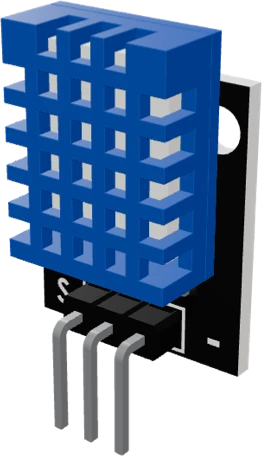
The DHT11 is Aosong's low-cost digital humidity and temperature sensor: it runs on 3.3 V to 5.5 V, reads humidity to ±5 %RH and temperature to ±2 °C at 25 °C, and must be sampled no faster than once every 2 seconds (Aosong DHT11 manual V1.3, pp. 4, 5). Wire VCC to 5 V or 3.3 V, GND to GND and DATA to any digital pin with a pull-up to VCC; Aosong recommends 4.7 kΩ for cables under 5 m (p. 5), and most 3-pin breakouts already carry one.
The DHT11 combines a humidity sensing element and an NTC thermistor with an 8-bit microcontroller that converts both readings to a calibrated digital signal (Aosong DHT11 manual V1.3, p. 2). It is the cheapest common way to add humidity to an Arduino, ESP32 or Raspberry Pi Pico project, and it ships on its own 4-pin body or on a 3-pin breakout labelled S, + and -.
It talks over a single DATA line with its own timing protocol, not I2C and not Dallas 1-Wire. The host pulls DATA low for at least 18 ms (30 ms at most), the sensor answers with an 83 µs low and an 87 µs high, then sends 40 bits: humidity integer, humidity decimal, temperature integer, temperature decimal and a checksum (p. 6). The humidity decimal byte is always zero, so humidity comes back as a whole number (p. 6). A bit is told apart by the length of its high pulse, 23 to 27 µs for a 0 and 68 to 74 µs for a 1 (p. 8), which is why every board uses a library rather than hand-timed code.
Aosong's current manual rates it 5 to 95 %RH and down to -20 °C, at ±5 %RH and ±2 °C at 25 °C (p. 4); the revision record of that same manual notes the earlier ranges of 20 to 90 %RH and 0 to 50 °C, which many older modules still follow (p. 2). The sensor reports the result of its previous measurement, so a read after a long gap returns stale data; read twice in a row for a fresh value (p. 7). For better accuracy and a wider range, the DHT22 is the drop-in upgrade.
DHT11 Temp & Humidity Sensor pinout
| Pin | Function | Type |
|---|---|---|
| DATA | 1-Wire | bidirectional |
| VCC | + (3.3-5V)3 V (max 5.5 V) | power in |
| GND | - (GND) | power in |
How to wire the DHT11 Temp & Humidity Sensor
Pin by pin, for the board you have.
| DHT11 Temp & Humidity Sensor | Arduino Uno | Note |
|---|---|---|
| VCC | 5V | |
| DATA | D2 | |
| GND | GND |
| DHT11 Temp & Humidity Sensor | ESP32 DevKit V1 | Note |
|---|---|---|
| VCC | 3V3 | |
| DATA | GPIO13 (D13) | |
| GND | GND |
| DHT11 Temp & Humidity Sensor | Raspberry Pi Pico | Note |
|---|---|---|
| VCC | 3V3 | |
| DATA | GP0 | |
| GND | GND |
Before you wire it
- The breakout carries its own 10k pull-up (R1, marked 103): do not add an external one
- Construct as DHT dht(PIN, DHT11): the type argument is what makes the library read this part
- Readings are WHOLE numbers: -20 to 60 C, 5 to 95 %RH. Never print or promise decimals
- Read it at most every 2 seconds
- Do not add a pull-up resistor to DATA
- Do not pass DHT22 or AM2302 as the sensor type
- Do not read faster than every 2 seconds
- Power VCC from 5 V or 3.3 V (3.3 V to 5.5 V, Aosong manual V1.3, p. 5) and share the ground with the microcontroller. On 3.3 V keep the cable as short as possible: a long lead drops the supply and skews the reading (p. 5).
- DATA idles high and needs a pull-up to VCC; Aosong recommends 4.7 kΩ for cables under 5 m (p. 5). The 3-pin breakouts carry their own pull-up on the board, so add none; the bare 4-pin sensor needs one.
- Power the DHT11 from the same voltage as the board's logic. Its DATA line is pulled up to the sensor's own supply, so on an ESP32, ESP8266 or Pico run it from 3.3 V and DATA never rises above 3.3 V.
- Wait 1 second after power-up before the first command (p. 7), then leave more than 2 seconds between reads (p. 5).
- A noisy supply moves the temperature reading; Aosong warns that large switching-supply ripple makes the temperature jump (p. 6).
- Range: 5 to 95 %RH and -20 to 60 °C (Aosong DHT11 V1.3).
Specifications
- Supply
- 3.3 V to 5.5 V DC (5.0 V typical)Aosong DHT11 manual V1.3, p. 5
- Supply current
- 0.06 mA standby, 1.0 mA max measuringAosong DHT11 manual V1.3, p. 5
- Humidity
- 5 to 95 %RH, ±5 %RH at 25 °CAosong DHT11 manual V1.3, p. 4
- Temperature
- From -20 °C, ±2 °C at 25 °C (V1.3 range -20 to 60 °C)Aosong DHT11 manual V1.3, pp. 2, 4
- Older ranges
- 20 to 90 %RH and 0 to 50 °C before V1.3Aosong DHT11 manual V1.3, revision record, p. 2
- Sampling period
- More than 2 s between readsAosong DHT11 manual V1.3, pp. 5, 6
- Response time (63 %)
- Under 6 s humidity, under 10 s temperatureAosong DHT11 manual V1.3, p. 4
- Pull-up
- 4.7 kΩ on DATA for cables under 5 mAosong DHT11 manual V1.3, p. 5
- Data frame
- 40 bits: RH integer, RH decimal (always 0), T integer, T decimal, checksumAosong DHT11 manual V1.3, p. 6
- Pinout (bare sensor)
- 1 VDD, 2 DATA, 3 NC, 4 GNDAosong DHT11 manual V1.3, p. 3
- Supply voltage
- 3.3–5.5 Vmaker's datasheet, checked 29 Oct 2026
- Maximum supply voltage
- 5.5 V
- Interface
- Single-wire (DHT protocol)
- Dimensions
- 16 × 8.5 × 22 mm
- Weight
- 2.5 g
From the maker's datasheet.
Common mistakes
Reading it faster than every 2 seconds
Aosong specifies a sampling period of more than 2 seconds (manual V1.3, p. 5). Faster polling returns the previous value or a failed checksum, which looks like a frozen or broken sensor. Read on a 2000 ms timer and keep the last good value.
Declaring it as a DHT22 in the library
The DHT11 and DHT22 share a protocol but not a data format. Construct the library object with the DHT11 type (for example DHT dht(PIN, DHT11)); with the DHT22 type the bytes are decoded wrongly and the readings come out nonsense.
Adding a second pull-up to a breakout
The 3-pin breakouts already carry a pull-up on DATA. The bare 4-pin sensor is the one that needs an external resistor, 4.7 kΩ for cables under 5 m (Aosong manual V1.3, p. 5).
Expecting decimals on humidity
The humidity decimal byte is always zero (Aosong manual V1.3, p. 6), so humidity steps in whole percent. Printing 45.00 % does not add precision; it is a 1 %RH reading at ±5 %RH accuracy (p. 4).
Wiring the 4-pin sensor by position
The bare sensor is pin 1 VDD, pin 2 DATA, pin 3 not connected, pin 4 GND (Aosong manual V1.3, p. 3), while 3-pin breakouts print S, + and - in their own order. Wire by the printed labels, never by position.
DHT11 Temp & Humidity Sensor questions
DHT11 vs DHT22: which should I use?
The DHT22 when accuracy matters: it reads 0 to 100 %RH at ±2 %RH and -40 to 80 °C at ±0.5 °C with 0.1 resolution (Aosong AM2302/DHT22 datasheet, p. 1), against the DHT11's ±5 %RH and ±2 °C at 25 °C in whole-number humidity steps (Aosong DHT11 manual V1.3, pp. 4, 6). Both use the same one-wire timing protocol and the same libraries, so swapping one for the other is a one-word code change. The DHT11 is cheaper and fine for rough indoor monitoring.
Can I use the DHT11 with an ESP32 or a 3.3 V board?
Yes. The DHT11 runs from 3.3 V to 5.5 V (Aosong manual V1.3, p. 5), so power it from the ESP32's 3V3 pin and DATA never rises above 3.3 V. Keep the cable short at 3.3 V, because a long lead drops the supply and skews the reading (p. 5).
Why does my DHT11 return NaN or a checksum error?
The library got no valid answer. Check the pull-up on DATA (a bare sensor needs one, 4.7 kΩ under 5 m, Aosong manual V1.3, p. 5), that DATA goes to the pin your sketch names, that the library type is DHT11, that you wait 1 second after power-up (p. 7) and that you leave more than 2 seconds between reads (p. 5).
Why does the DHT11 show an old reading?
It always returns the result of its previous measurement, then measures again (Aosong manual V1.3, p. 7). After a long pause the first read is stale; Aosong says to read twice in a row and keep the second value.
What is the DHT11's temperature and humidity range?
Aosong's current manual (V1.3) rates 5 to 95 %RH and a range starting at -20 °C (p. 4), with -20 to 60 °C given in its revision record (p. 2). The same record shows earlier DHT11s were specified 20 to 90 %RH and 0 to 50 °C, which many older and clone modules still follow.
Do I need a resistor with the DHT11?
Yes, a pull-up from DATA to VCC, because the single bus idles high (Aosong manual V1.3, p. 6). Aosong recommends 4.7 kΩ for cables under 5 m (p. 5). The 3-pin breakouts already have it on the board; the bare 4-pin sensor does not.
Build something with the DHT11 Temp & Humidity Sensor
- Build this
Room weather station
Show temperature and humidity on an LCD or OLED, refreshed every few seconds.
- Build this
Wi-Fi humidity logger
Push readings from an ESP32 or ESP8266 to a dashboard or MQTT broker.
- Build this
Dehumidifier or fan controller
Switch a relay when the humidity crosses a threshold, with a few percent of hysteresis.
- Build this
Plant and terrarium monitor
Track the air around plants or a terrarium and log it over days.
This page as plain Markdown, for ChatGPT, Claude or your own agent. /components/dht11.md