Raspberry Pi Pico vs Pico W
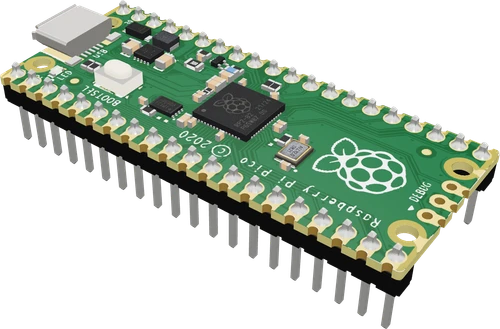
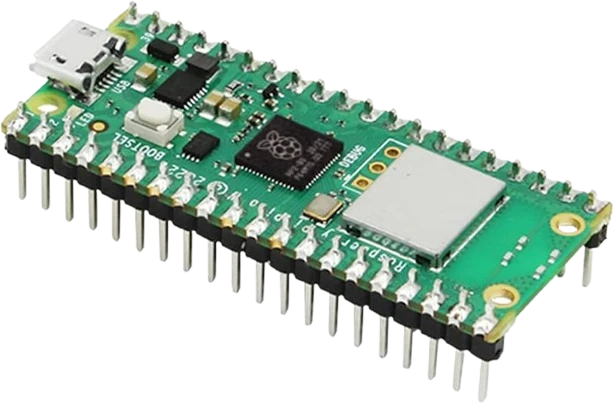
The Pico W is a Pico plus an Infineon CYW43439 radio for 2.4 GHz Wi-Fi (802.11n) and Bluetooth 5.2, on the same 51 × 21 mm board with the same RP2040, 264 kB of SRAM, 2 MB of flash and 26 GPIO at 3.3 V (Raspberry Pi Pico W datasheet, p. 4; Pico datasheet, p. 3). The visible change in code is the on-board LED, which moves from GP25 to the wireless chip's WL_GPIO0 (Pico datasheet, p. 7; Pico W datasheet, p. 8). Buy the Pico W for any networked project and the plain Pico when no radio is needed.
Side by side
| Raspberry Pi Pico | Pico W | |
|---|---|---|
| MicrocontrollerRaspberry Pi Pico datasheet, p. 3; Pico W datasheet, p. 4 | RP2040, dual Cortex-M0+ up to 133 MHz | RP2040, dual Cortex-M0+ up to 133 MHz |
| MemoryRaspberry Pi Pico datasheet, p. 3; Pico W datasheet, p. 4 | 264 kB SRAM, 2 MB flash | 264 kB SRAM, 2 MB flash |
| WirelessRaspberry Pi Pico W datasheet, p. 4 | None | Infineon CYW43439: 2.4 GHz Wi-Fi 802.11n, Bluetooth 5.2 |
| User LEDRaspberry Pi Pico datasheet, p. 7; Pico W datasheet, p. 8 | GP25 | CYW43439 WL_GPIO0 |
| Header GPIORaspberry Pi Pico datasheet, p. 3; Pico W datasheet, p. 4 | 26 at 3.3 V | 26 at 3.3 V |
| ADCRaspberry Pi Pico datasheet, pp. 4, 7; Pico W datasheet, pp. 4, 14 | 12-bit, 500 ksps on GP26 to GP28 | 12-bit, 500 ksps on GP26 to GP28 |
| VSYS inputRaspberry Pi Pico datasheet, p. 8; Pico W datasheet, p. 9 | 1.8 V to 5.5 V | 1.8 V to 5.5 V |
| 3V3 outputRaspberry Pi Pico datasheet, p. 8; Pico W datasheet, p. 9 | Keep external load under 300 mA | Keep external load under 300 mA |
| Board sizeRaspberry Pi Pico datasheet, p. 6; Pico W datasheet | 51 × 21 mm | 51 × 21 mm |
Which one to pick
- Offline projects such as robots, MIDI controllers, LED drivers and data loggers, where a radio adds nothing.
- Firmware that toggles GP25 for its status LED (Pico datasheet, p. 7), with no wireless driver to start.
- Battery builds that never transmit, with no radio to keep powered down.
- Wi-Fi sensors, web-controlled hardware, MQTT clients and home automation, using the CYW43439's 2.4 GHz Wi-Fi (Pico W datasheet, p. 4).
- Bluetooth 5.2 links to a phone or another board (p. 4).
- Keeping one board in stock for both kinds of project: the pinout, power and size match the Pico's.
Swapping one for the other
What changes in the wiring and the code.
- Wiring does not change: the 40-pin header, the 26 GPIO at 3.3 V, VSYS at 1.8 V to 5.5 V and the 3V3 output match (Pico datasheet, pp. 3, 8; Pico W datasheet, pp. 4, 9).
- Rebuild the firmware for the right board: select Raspberry Pi Pico W in arduino-pico, the pico_w board in the C SDK, or the Pico W MicroPython build. A Pico image does not bring up the radio on a Pico W.
- Change the LED code: on the Pico W the LED is WL_GPIO0 on the CYW43439 (Pico W datasheet, p. 8). In MicroPython use machine.Pin('LED'); in arduino-pico LED_BUILTIN already points to it; in the C SDK use cyw43_arch_gpio_put(CYW43_WL_GPIO_LED_PIN, 1).
- GP23, GP24, GP25 and GP29 are not on the header of either board; on the Pico W they serve the wireless chip, so code that read VBUS sense or the SMPS mode pin on the Pico must not drive them on the Pico W.
Raspberry Pi Pico or Pico W: questions
What is the difference between the Pico and the Pico W?
Only the radio. The Pico W adds an Infineon CYW43439 for 2.4 GHz Wi-Fi and Bluetooth 5.2 (Pico W datasheet, p. 4) and moves the user LED to that chip (p. 8). The RP2040, memory, pinout and power system are the same (Pico datasheet, p. 3).
Why doesn't my LED blink on the Pico W?
The code drives GP25, which is the LED pin on the Pico (Pico datasheet, p. 7). On the Pico W the LED hangs off the CYW43439's WL_GPIO0 (Pico W datasheet, p. 8): use machine.Pin('LED') in MicroPython or LED_BUILTIN in arduino-pico.
Can I use Pico code on a Pico W?
Sketches and programs that use only the header GPIO run the same once rebuilt for the Pico W. Change the LED code, and select the Pico W board or firmware so the wireless chip and its pins are set up.
Do the Pico and Pico W have the same pinout?
Yes. Both expose 26 GPIO at 3.3 V on the same 40-pin, 51 × 21 mm footprint, with ADC inputs on GP26 to GP28 (Pico datasheet, pp. 3, 6, 7; Pico W datasheet, pp. 4, 14).
Are the Pico W pins 5 V tolerant?
No, on either board. The GPIO run at 3.3 V and the RP2040 rates its pins to IOVDD + 0.5 V, about 3.8 V (RP2040 datasheet, section 5.5.3.1). Use a divider or a level shifter for 5 V signals.
The two references
Checked on 2026-10-29 against 3 sources, the makers’ datasheets first.
This comparison as plain Markdown. /compare/raspberry-pi-pico-vs-raspberry-pi-pico-w.md