Raspberry Pi Pico vs Arduino Nano
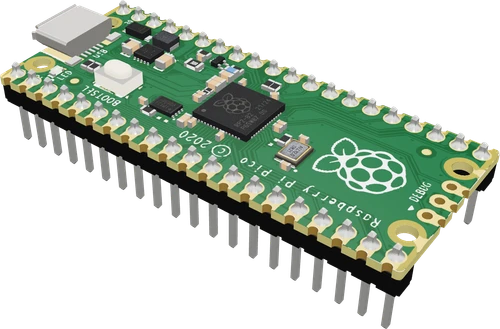
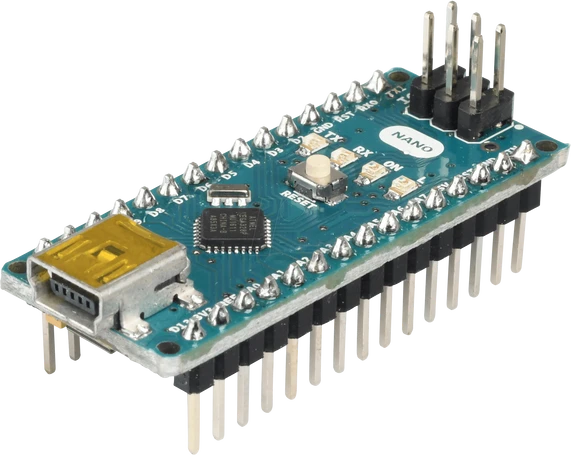
The Raspberry Pi Pico's RP2040 has two Cortex-M0+ cores at up to 133 MHz, 264 kB of SRAM, 2 MB of flash and 26 GPIO with PIO state machines (Raspberry Pi Pico datasheet, pp. 3, 4), against the Nano's single 8-bit ATmega328P at 16 MHz with 2 KB of SRAM and 32 KB of flash (Arduino Nano tech specs; Nano datasheet, p. 2). The catch is voltage: the Pico's pins are 3.3 V and not 5 V tolerant (RP2040 datasheet, section 5.5.3.1), while the Nano runs 5 V logic at 20 mA per pin. Pick the Pico for speed, memory, MicroPython or custom timing, the Nano for 5 V modules and existing AVR Arduino code.
Side by side
| Raspberry Pi Pico | Arduino Nano | |
|---|---|---|
| MicrocontrollerRaspberry Pi Pico datasheet, p. 3; Arduino Nano tech specs (A000005) | RP2040, dual-core Arm Cortex-M0+, up to 133 MHz | ATmega328P, 8-bit AVR, 16 MHz |
| MemoryRaspberry Pi Pico datasheet, p. 3; Arduino Nano datasheet, p. 2 | 264 kB SRAM, 2 MB flash | 2 KB SRAM, 32 KB flash, 1 KB EEPROM |
| Logic levelRaspberry Pi Pico datasheet, p. 3; RP2040 datasheet, section 5.5.3.1; Arduino Nano tech specs | 3.3 V, not 5 V tolerant (IOVDD + 0.5 V maximum) | 5 V |
| GPIORaspberry Pi Pico datasheet, p. 3; Arduino Nano store description and tech specs | 26 on the headers | 14 digital + 8 analog inputs (A6, A7 analog only) |
| Analog inputsRaspberry Pi Pico datasheet, pp. 4, 7; Arduino Nano tech specs; ATmega328P datasheet, p. 2 | 3 (GP26 to GP28), 12-bit, 500 ksps | 8 (A0 to A7), 10-bit |
| PWMRaspberry Pi Pico datasheet, p. 4; Arduino Nano tech specs | 16 channels | 6 pins (D3, D5, D6, D9, D10, D11) |
| Pin currentRP2040 datasheet, section 2.19.4; Arduino Nano tech specs | 2, 4, 8 or 12 mA selectable, 4 mA default | 20 mA recommended, 40 mA maximum |
| Power inputRaspberry Pi Pico datasheet, p. 8; Arduino Nano tech specs; Nano datasheet, p. 2 | Micro-USB, or 1.8 V to 5.5 V on VSYS | Mini-B USB, VIN 7 to 12 V, or regulated 5 V on the 5V pin |
| Board sizeRaspberry Pi Pico datasheet, p. 6; Arduino Nano tech specs | 51 × 21 mm | 18 × 45 mm, 7 g |
Which one to pick
- Heavier code: two cores, 264 kB of SRAM and 2 MB of flash (Pico datasheet, p. 3) for displays, data buffers and maths the Nano cannot hold.
- MicroPython or CircuitPython, and custom protocols through the RP2040's two PIO blocks with 8 state machines (p. 4).
- Battery projects: VSYS takes 1.8 V to 5.5 V through a buck-boost converter (p. 8), so one lithium cell or two AA cells run it directly.
- 5 V sensors, relay boards and modules wired straight to the pins, with no level shifting.
- Loads up to 20 mA per pin, such as LEDs, straight from the GPIO (Arduino Nano tech specs).
- Classic Arduino code and libraries that use AVR registers or timers, and kits and tutorials written for the Uno and Nano.
Swapping one for the other
What changes in the wiring and the code.
- Logic level changes from 5 V to 3.3 V: level-shift or divide every 5 V signal going into the Pico (RP2040 datasheet, section 5.5.3.1), and check that 5 V modules read a 3.3 V high from it.
- For Arduino code, install the Raspberry Pi Pico/RP2040 core (arduino-pico) and select Raspberry Pi Pico. Uploads go through BOOTSEL and a UF2 file the first time (Pico datasheet, p. 19).
- Pins are named GP0 to GP22 and GP26 to GP28 (GP23 to GP25 and GP29 are used on the board), not D and A numbers. In arduino-pico, Wire defaults to GP4 (SDA) and GP5 (SCL) instead of A4/A5, and analog inputs are GP26 to GP28 only.
- Power moves from VIN (7 to 12 V on the Nano) to VSYS (1.8 V to 5.5 V on the Pico, p. 8). Never put 7 V or more on VSYS.
- Libraries that write AVR registers or use avr/ headers do not compile for the RP2040; replace them with portable Arduino calls.
Raspberry Pi Pico or Arduino Nano: questions
Is the Raspberry Pi Pico faster than an Arduino Nano?
Much faster: two 32-bit Cortex-M0+ cores at up to 133 MHz with 264 kB of SRAM (Pico datasheet, p. 3), against one 8-bit ATmega328P at 16 MHz with 2 KB (Arduino Nano tech specs).
Can I use 5 V sensors with the Raspberry Pi Pico?
Power them from 5 V if they need it, but never feed their outputs straight into a GPIO: the RP2040 rates its pins to IOVDD + 0.5 V, about 3.8 V (RP2040 datasheet, section 5.5.3.1). Use a 1 kΩ / 2 kΩ divider or a level shifter.
Can I program the Pico with the Arduino IDE?
Yes, through the arduino-pico core: install Raspberry Pi Pico/RP2040 in the Boards Manager and select Raspberry Pi Pico. Most Arduino functions and libraries work; code that touches AVR registers does not.
Which board has more analog inputs?
The Nano, with eight 10-bit inputs, A0 to A7 (Arduino Nano tech specs). The Pico has three 12-bit inputs on GP26 to GP28 (Pico datasheet, pp. 4, 7), so add an I2C ADC if you need more.
Which is easier for a beginner?
The Nano's 5 V pins take most hobby modules directly and every Arduino tutorial applies to it. The Pico gives far more speed and memory for the same projects, plus MicroPython, as long as you keep its pins at 3.3 V.
The two references
Checked on 2026-10-29 against 4 sources, the makers’ datasheets first.
This comparison as plain Markdown. /compare/raspberry-pi-pico-vs-arduino-nano-v3.md