YF-S201 Water Flow with a Raspberry Pi Pico
An inline Hall-effect water flow sensor that turns liquid flow into a pulse train, about 450 pulses per liter.
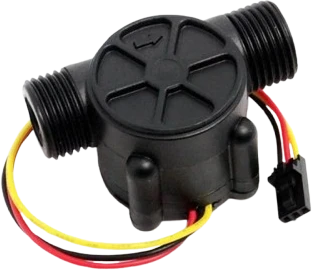
The YF-S201 runs from the Raspberry Pi Pico's VBUS, the 5 V available on USB, and sends its pulses to GP0, where an interrupt counts them. At 5 V its pulses rise above 4.5 V, so on the Pico DATA passes through the 10 kOhm and 20 kOhm divider in the page's DATA row.
Wiring the YF-S201 Water Flow to the Raspberry Pi Pico
Pin by pin.
| YF-S201 Water Flow | Raspberry Pi Pico | Note |
|---|---|---|
| VCC | VBUS | |
| GND | GND | |
| DATA | GP0 | through a 10 kΩ resistor, with a 20 kΩ resistor from the board pin to GND: a divider that brings the 5 V pulses down to 3.3 V |
- VCC is on VBUS, which gives about 5 V only while the board is powered from USB.
What to know on the Raspberry Pi Pico
- Powered at 5 V the pulses exceed 4.5 V, above the RP2040's IOVDD + 0.5 V pin rating; a resistor divider (10 kOhm in series, 20 kOhm to GND) brings them near 3.3 V before GP0.YF-S201C datasheet (same series); RP2040 datasheet, section 5.5.3.1
- The sensor works from 5 V to 18 V and draws at most 15 mA at 5 V. VBUS gives 5 V only on USB; a battery build needs another 5 V source.YF-S201 datasheet; Raspberry Pi Pico datasheet, release 21, p. 8
- The sketch counts RISING edges with attachInterrupt() on GP0; on the RP2040 any GPIO can take the interrupt, unlike the Uno's D2 and D3.RP2040 datasheet, section 2.19.3
- Flow in L/min is pulses per second divided by 7.5, about 450 pulses per litre; at its 30 L/min top that is 225 Hz, easy for the Pico's interrupts.YF-S201 datasheet
YF-S201 Water Flow code for the Raspberry Pi Pico
Compiled for rp2040:rp2040:rpipico on 2026-10-29.
// YF-S201 Water Flow on Raspberry Pi Pico: wiring and a free simulation at https://www.tinkered.ai/components/yf-s201-water-flow-sensor/raspberry-pi-pico
#ifndef IRAM_ATTR                  // ESP32 puts the ISR in RAM so it survives a
#define IRAM_ATTR                  // flash access; AVR does not define the macro
#endif

volatile unsigned long pulses = 0;
void IRAM_ATTR onPulse() { pulses++; }

#define FLOW_PIN 0                 // Uno: D2 = INT0. ESP32: any GPIO.

void setup() {
  Serial.begin(115200);
  pinMode(FLOW_PIN, INPUT_PULLUP);
  attachInterrupt(digitalPinToInterrupt(FLOW_PIN), onPulse, RISING);
}

void loop() {
  noInterrupts();
  pulses = 0;
  interrupts();
  delay(1000);                     // count for 1 second
  noInterrupts();
  unsigned long n = pulses;        // snapshot: the ISR may fire mid-read
  interrupts();
  float lpm = n / 7.5;             // YF-S201: f(Hz) = 7.5 * Q(L/min)
  Serial.print("Flow: ");
  Serial.print(lpm);
  Serial.println(" L/min");
}
YF-S201 Water Flow on the Raspberry Pi Pico: questions
Can I connect the YF-S201 directly to a Raspberry Pi Pico?
Not its DATA line when the sensor runs on 5 V: the pulses rise above 4.5 V (YF-S201C datasheet). Use a divider into GP0, and power the sensor from VBUS on USB.
Which Pico pin should the flow sensor use?
Any GPIO can raise the interrupt on the RP2040; the page uses GP0 with attachInterrupt(digitalPinToInterrupt(0), onPulse, RISING).
How do I convert pulses to litres per minute?
Divide pulses per second by 7.5 (YF-S201 datasheet: F = 7.5 x Q), which the sketch does over a one-second window.
Keep going
This guide as plain Markdown. /components/yf-s201-water-flow-sensor/raspberry-pi-pico.md