SW-520D Tilt Switch
A two-lead, mercury-free ball switch that is closed while it stands upright and opens when it tips over.
- TypeTwo-ball, single-direction roll-ball tilt switch
- Contact rating12 V
- Contact resistance (closed)Under 10 Ω
- Insulation resistance (open)Over 10 MΩ
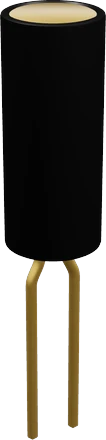
The SW-520D is a two-ball tilt switch rated 12 V, closed at under 10 Ω while its leads point down and open when it tips toward its cap end (Bailin SW-520 datasheet, pp. 1, 2). Wire one lead to a digital pin set to INPUT_PULLUP and the other to GND: it reads LOW upright and HIGH when tipped. It has no polarity and needs no resistor, but debounce it in code because the balls bounce.
The SW-520D is a roll-ball tilt switch: a small sealed can, about 5.2 mm across and 11.5 mm long, with two gold-plated brass leads out of one end (Bailin SW-520 datasheet, p. 2). Inside, two gold-plated stainless-steel balls roll to whichever end is lower (p. 1). When they sit against the leaded end they bridge the two leads and the switch is closed; when the cap end is lower they roll away and it opens. Bailin sells it as a mercury-free replacement for mercury tilt switches (p. 1).
It is a plain two-terminal switch with no power pin and no polarity, so it reads like a push button: one lead to a GPIO with the internal pull-up, the other to ground. Standing upright with its leads down, as it does in a breadboard, it is closed; tipped past horizontal toward its cap, it is open. Near horizontal, Bailin specifies a tilt of more than 10° to switch it: below horizontal on the lead side closes it, below horizontal on the cap side opens it (p. 1).
Closed it measures under 10 Ω and open over 10 MΩ, with 5 pF of capacitance and a life of 100,000 cycles (p. 1). It reports "upright or tipped", not an angle, and any shake makes the balls chatter for a moment, which is both why it needs debouncing and why it works as a cheap vibration or knock sensor. For a real angle, use an accelerometer such as the MPU-6050.
How to wire the SW-520D Tilt Switch
Pin by pin, for the board you have.
| SW-520D Tilt Switch | Arduino Uno | Note |
|---|---|---|
| pin1 | D2 | |
| pin2 | GND |
| SW-520D Tilt Switch | ESP32 DevKit V1 | Note |
|---|---|---|
| pin1 | GPIO13 (D13) | |
| pin2 | GND |
| SW-520D Tilt Switch | Raspberry Pi Pico | Note |
|---|---|---|
| pin1 | GP0 | |
| pin2 | GND |
SW-520D Tilt Switch code
Every example here compiles for its board.
// SW-520D Tilt Switch on Arduino Uno: wiring and a free simulation at https://www.tinkered.ai/components/sw-520d
// SW-520D tilt switch: one lead on TILT_PIN (INPUT_PULLUP), the other on GND.
// Upright (leads down) the balls close it: LOW. Tipped over: HIGH.
const int TILT_PIN = 2;
// The tilt alarm's LED: 13 is the Uno's, Nano's and Mega's own LED; on another board, the pin its LED is
// wired to (not LED_BUILTIN: the ESP32 DevKits' core has none, and on the C3 boards it is no real pin).
const int LED_PIN = 13;
const unsigned long DEBOUNCE_MS = 50;

int stableState = LOW;           // the debounced reading
int lastReading = LOW;
unsigned long lastChange = 0;

void setup() {
  pinMode(TILT_PIN, INPUT_PULLUP);
  pinMode(LED_PIN, OUTPUT);
  Serial.begin(115200);
  stableState = lastReading = digitalRead(TILT_PIN);
}

void loop() {
  int reading = digitalRead(TILT_PIN);
  if (reading != lastReading) {           // it bounced or moved: restart the clock
    lastReading = reading;
    lastChange = millis();
  }
  if (millis() - lastChange > DEBOUNCE_MS && reading != stableState) {
    stableState = reading;
    bool tipped = (stableState == HIGH);
    digitalWrite(LED_PIN, tipped ? HIGH : LOW);
    Serial.println(tipped ? "TIPPED" : "UPRIGHT");
  }
}
Before you wire it
- Read it with a digital pin set INPUT_PULLUP, its other lead on GND: upright reads LOW, tipped reads HIGH. No resistor needed.
- Debounce it: accept a new state only after it has held ~50 ms. A shake (or a knock while it lies flat) gives bursts of short pulses.
- On an ESP32 never use GPIO34-39 for it: those pins have no pull-up. On an ESP8266 avoid D0 (GPIO16, no INPUT_PULLUP) and D3/D4/D8 (boot pins).
- Never wire one lead to a supply and the other straight to GND: it is closed upright, so that shorts the supply.
- No supply on its other lead with INPUT_PULLUP: the pin then reads HIGH both ways. If a lead must go to the supply, use INPUT and a 10 kΩ pull-down.
- No 5 V on a 3.3 V board's pin through it (ESP32, ESP8266, Pico): GND + INPUT_PULLUP.
- No motors, relays' coils or LED strips through its contact.
- Wire one lead to a digital pin set to INPUT_PULLUP and the other to GND. Upright it closes and the pin reads LOW; tipped it opens and the pull-up reads HIGH. No external resistor is needed, and the leads are interchangeable.
- Never connect one lead to a supply and the other straight to GND: the switch is closed when upright, so that shorts the supply.
- On an ESP32 avoid GPIO34 to GPIO39, which have no internal pull-up; on an ESP8266 avoid GPIO16 (D0), which has no INPUT_PULLUP. On 3.3 V boards keep 5 V off the input: wire the switch to GND and use the internal pull-up.
- Debounce it: accept a new state only after it has held for around 50 ms. The balls bounce on every change, and a shake produces a burst of short pulses.
- Treat it as a signal switch. Bailin rates the contact at 12 V and gives no current rating (datasheet, p. 1); switch a logic input or a small indicator, never a motor, a relay coil or an LED strip.
Specifications
- Type
- Two-ball, single-direction roll-ball tilt switchBailin SW-520 datasheet, p. 1
- Contact rating
- 12 VBailin SW-520 datasheet, p. 1
- Contact resistance (closed)
- Under 10 ΩBailin SW-520 datasheet, p. 1
- Insulation resistance (open)
- Over 10 MΩBailin SW-520 datasheet, p. 1
- Capacitance
- 5 pFBailin SW-520 datasheet, p. 1
- Switching tilt
- More than 10° past horizontal: lead end down closes, cap end down opensBailin SW-520 datasheet, p. 1
- Life
- 100,000 cyclesBailin SW-520 datasheet, p. 1
- Body
- Ø5.2 × 11.5 mm, sealed (airtight, waterproof, dustproof)Bailin SW-520 datasheet, pp. 1, 2
- Leads
- Ø0.6 mm, 8 mm long, 2.4 mm apartBailin SW-520 datasheet, p. 2
- Materials
- Gold-plated stainless-steel balls, gold-plated brass pinsBailin SW-520 datasheet, p. 1
- Supply voltage
- 5 V
- Maximum supply voltage
- 12 V
- Dimensions
- 5 × 5 × 16 mm
From the Shenzhen Shouhan Technology (also Bailin)'s datasheet, published by Shenzhen Shouhan Technology (also Bailin).
Common mistakes
Wiring it across the supply
One lead on 5 V and the other on GND looks like a sensor circuit but is a short circuit whenever the switch is upright and closed. Put it between a GPIO with INPUT_PULLUP and GND.
No debounce
Every change of state bounces, and a shake gives a burst of edges. Without debouncing, one tip registers as several events. Wait for the reading to hold about 50 ms before accepting it.
Expecting an angle
The SW-520D only says whether its lead end is down or not; Bailin specifies a switching tilt of more than 10° around horizontal (datasheet, p. 1). It cannot report 30° or 60°. Use an accelerometer such as the MPU-6050 for angles.
Supply on the other lead with INPUT_PULLUP
If the second lead goes to VCC instead of GND, the pin reads HIGH whether the switch is open or closed. Either wire it to GND with INPUT_PULLUP, or to VCC with INPUT and an external pull-down.
Mounting it the wrong way round
It is closed with the leads down and open with the cap down (Bailin datasheet, pp. 1, 2). Mounted upside down in an enclosure, the logic inverts; check which end points down in the rest position.
SW-520D Tilt Switch questions
How do I wire the SW-520D to an Arduino?
One lead to a digital pin, the other to GND, and pinMode(pin, INPUT_PULLUP) in setup(). digitalRead() returns LOW while the switch stands upright with its leads down and HIGH once it tips over. The leads have no polarity.
Does the SW-520D work with 3.3 V boards like the ESP32 and Pico?
Yes. It is a passive switch, so wire it between a GPIO and GND and enable the internal pull-up; the pin then sees only the board's own 3.3 V. On an ESP32 pick a pin with a pull-up (not GPIO34 to GPIO39).
Why does my tilt switch give random or repeated readings?
The balls bounce on each change and chatter when shaken or when the switch lies near horizontal, where Bailin specifies a 10° tilt to switch (datasheet, p. 1). Debounce in code, mount it upright so it rests firmly closed, and check that the other lead goes to GND rather than to VCC.
Is the SW-520D a vibration sensor?
It can serve as one. Laid flat or near horizontal, a knock makes the balls bounce and the contact chatter, so counting edges in a short window detects a shake. It cannot measure vibration strength or frequency.
SW-520D vs a mercury tilt switch: what is the difference?
Both switch on orientation, but the SW-520D uses two gold-plated steel balls instead of mercury and is RoHS compliant; Bailin sells it as a replacement for mercury switches (datasheet, p. 1). It bounces more than a mercury switch, so give it a firmware debounce.
Build something with the SW-520D Tilt Switch
- Build this
Tip-over alarm
Beep or cut power when a heater, lamp or robot falls over.
- Build this
Anti-theft or tamper sensor
Raise an alert when a box, bike or bag is lifted or moved.
- Build this
Shake-to-wake gadget
Wake a battery device from sleep with an interrupt on the switch's edges.
- Build this
Orientation-aware display
Flip a picture frame or a dice project's display when it is turned upside down.
This page as plain Markdown, for ChatGPT, Claude or your own agent. /components/sw-520d.md