4.0" TFT Touch Display (ST7796S) with an Arduino Uno
A 4.0 inch 480x320 color TFT on a Sitronix ST7796S controller, with XPT2046 resistive touch and a microSD slot, all on one SPI bus.
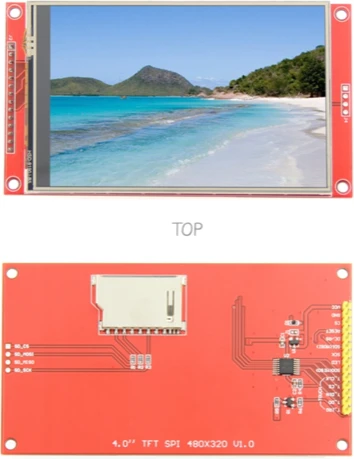
The 4-inch ST7796S board carries three SPI devices, display, touch and microSD, and on an Arduino Uno all three share D11, D12 and D13 with chip selects on D2, D5 and D6. The ST7796S's inputs are rated to its 3.3 V I/O supply plus 0.5 V, so every line the Uno drives needs a level shifter; the bigger limit, though, is the Uno's 2 KB of SRAM.
Wiring the 4.0" TFT Touch Display (ST7796S) to the Arduino Uno
Pin by pin.
| 4.0" TFT Touch Display (ST7796S) | Arduino Uno |
|---|---|
| VCC | 5V |
| GND | GND |
| LED | 3V3 |
| CS | D2 |
| RESET | D3 |
| DC | D4 |
| MOSI | D11 |
| MISO | D12 |
| SCK | D13 |
| T_CS | D5 |
| T_CLK | D13 |
| T_DIN | D11 |
| T_DO | D12 |
| SD_CS | D6 |
| SD_SCK | D13 |
| SD_MOSI | D11 |
| SD_MISO | D12 |
- Its inputs are rated to its 3.3 V I/O supply plus 0.5 V: put a level shifter between this board's 5 V pins and the display.
What to know on the Arduino Uno
- A 480 × 320 frame at 16 bits is 307,200 bytes, about 150 times the Uno's SRAM. The SD library's 512-byte sector buffer, the touch driver and the GFX text state then share what is left, so this example is near the Uno's ceiling: add features sparingly.Sitronix ST7796S datasheet V1.0, p. 8; Arduino SD library reference; Arduino UNO R3 tech specs
- The ST7796S accepts a 66 ns write clock, far faster than the Uno's 8 MHz SPI ceiling. Filling the 480 × 320 screen moves 307,200 bytes, at least about 0.31 s on the Uno, so repaint only what changes.Sitronix ST7796S datasheet V1.0, p. 54; Microchip ATmega328P datasheet DS40002061B, SPI section
- Its logic inputs are rated to VDDI + 0.5 V with VDDI at 3.3 V at most; put a level shifter on SCK, MOSI, CS, DC, RESET, T_CS and SD_CS. MISO, returning at 3.3 V, reads as a high on the Uno.Sitronix ST7796S datasheet V1.0, pp. 9, 46
- The touch points are raw 12-bit counts; the sketch's map() from 200 to 3900 is a starting guess, so touch the four corners on your panel and replace those numbers.LCDWiki 4.0inch SPI Module ST7796 (MSP4021)
4.0" TFT Touch Display (ST7796S) code for the Arduino Uno
Compiled for arduino:avr:uno on 2026-10-30.
// 4.0" TFT Touch Display (ST7796S) on Arduino Uno: wiring and a free simulation at https://www.tinkered.ai/components/st7796s-tft-4/arduino-uno
#include <Adafruit_GFX.h>
#include <Adafruit_ST7796S.h>
#include <XPT2046_Touchscreen.h>
#include <SPI.h>
#include <SD.h>

#define TFT_CS    2
#define TFT_DC    4
#define TFT_RST   3
#define TOUCH_CS  5
#define SD_CS     6

Adafruit_ST7796S tft(TFT_CS, TFT_DC, TFT_RST);
XPT2046_Touchscreen ts(TOUCH_CS);

void setup() {
  Serial.begin(9600);
  tft.init(320, 480);             // Adafruit_ST7796S: init(), its begin() is protected
  tft.setRotation(1);              // 480x320 landscape
  tft.fillScreen(ST77XX_BLACK);
  tft.setCursor(10, 10);
  tft.setTextColor(ST77XX_WHITE);
  tft.print("Hello");

  ts.begin();

  if (SD.begin(SD_CS)) {
    File f = SD.open("/README.TXT");
    if (f) { while (f.available()) Serial.write(f.read()); f.close(); }
  }
}

void loop() {
  if (ts.touched()) {
    TS_Point p = ts.getPoint();    // raw 12-bit counts, needs calibrating
    tft.fillCircle(map(p.x, 200, 3900, 0, 479),
                   map(p.y, 200, 3900, 0, 319), 3, ST77XX_RED);
  }
}
4.0" TFT Touch Display (ST7796S) on the Arduino Uno: questions
Can an Arduino Uno run the 4 inch ST7796S display with touch and SD?
Yes, as this example shows, but it is close to the Uno's 2 KB SRAM limit with three libraries loaded, and a full-screen redraw takes about a third of a second at the Uno's 8 MHz SPI. A board with more memory suits bigger interfaces.
Does the ST7796S need a level shifter on an Arduino Uno?
Yes. Its inputs are rated to the 3.3 V I/O supply plus 0.5 V (Sitronix datasheet, p. 46), and the Uno drives 5 V on every SPI and control line.
Why is the touch position wrong on the Uno?
The XPT2046 gives raw counts. Read the corners, then adjust the 200 and 3900 bounds in the sketch's map() calls for each axis.
This guide as plain Markdown. /components/st7796s-tft-4/arduino-uno.md