KY-038 Sound Sensor with a Raspberry Pi Pico
A microphone module with a raw analog output and a digital output that trips on loud sounds such as claps.
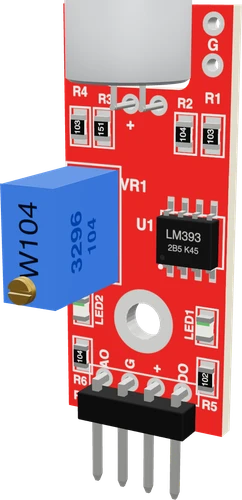
The KY-038 runs from the Raspberry Pi Pico's 3V3, with AO on GP28, one of the board's three ADC inputs, and DO on GP0. On 3.3 V both outputs stay within the Pico's input range, and the sketch measures loudness as AO's swing over a 50 ms window.
Wiring the KY-038 Sound Sensor to the Raspberry Pi Pico
Pin by pin.
| KY-038 Sound Sensor | Raspberry Pi Pico |
|---|---|
| VCC | 3V3 |
| GND | GND |
| AO | GP28 |
| DO | GP0 |
What to know on the Raspberry Pi Pico
- AO must go to GP26, GP27 or GP28, the only ADC inputs on the headers, and must not exceed the 3.3 V rail by more than about 300 mV, which 3V3 power guarantees.Raspberry Pi Pico datasheet, release 21, pp. 3, 19
- analogRead() on arduino-pico returns 10 bits by default, matching the sketch's 0 to 1023 window; analogReadResolution(12) gives the ADC's full 12 bits if you rescale.arduino-pico core documentation (Earle Philhower); Raspberry Pi Pico datasheet, release 21, p. 4
- The Pico's ADC samples up to 500 ksps, so a 50 ms window catches many points of a clap's waveform.Raspberry Pi Pico datasheet, release 21, p. 4
- For a steadier AO baseline, return the module's ground to AGND (pin 33), the analog ground under GP26 to GP29, and consider driving GP23 high to put the regulator in its lower-ripple PWM mode.Raspberry Pi Pico datasheet, release 21, pp. 8, 19
KY-038 Sound Sensor code for the Raspberry Pi Pico
Compiled for rp2040:rp2040:rpipico on 2026-10-29.
// KY-038 Sound Sensor on Raspberry Pi Pico: wiring and a free simulation at https://www.tinkered.ai/components/sound-sensor-ky-038/raspberry-pi-pico
const int AO_PIN = 28;               // KY-038 AO: the capsule's signal on a DC level
const int DO_PIN = 0;                // KY-038 DO: HIGH while the sound passes the trimmer's threshold
const unsigned long WINDOW_MS = 50;  // one loudness reading per 50 ms
const unsigned long CLAP_GAP_MS = 300;

int claps = 0;
unsigned long lastClap = 0;
unsigned long lastPrint = 0;

void setup() {
  Serial.begin(9600);
  pinMode(DO_PIN, INPUT);  // the module has its own pull-up
  Serial.println("KY-038 ready");
}

void loop() {
  // the swing of AO over a window: its peak-to-peak is the loudness
  unsigned long start = millis();
  int lo = 1023, hi = 0;
  bool loud = false;
  while (millis() - start < WINDOW_MS) {
    int v = analogRead(AO_PIN);
    if (v < lo) lo = v;
    if (v > hi) hi = v;
    if (digitalRead(DO_PIN) == HIGH) loud = true;
  }
  int level = hi - lo;

  // one clap per CLAP_GAP_MS, however long DO stays HIGH
  if (loud && millis() - lastClap > CLAP_GAP_MS) {
    lastClap = millis();
    claps++;
    Serial.print("Clap ");
    Serial.print(claps);
    Serial.print("  (level ");
    Serial.print(level);
    Serial.println(")");
  }

  if (millis() - lastPrint >= 1000) {
    lastPrint = millis();
    Serial.print("AO ");
    Serial.print((lo + hi) / 2);
    Serial.print("  level ");
    Serial.println(level);
  }
}
KY-038 Sound Sensor on the Raspberry Pi Pico: questions
Can I use the KY-038 with a Raspberry Pi Pico?
Yes, on 3V3: Joy-IT wires it at 3.3 V on 3.3 V boards (Joy-IT SensorKit, KY-038). Put AO on GP26 to GP28 and DO on any GPIO.
Why does the KY-038's AO barely change on my Pico?
It has no amplifier: AO moves only for loud sounds. Read its peak-to-peak swing over a window, as the sketch does, and turn the trimmer to set DO's threshold.
Which Pico pins read analog?
GP26, GP27 and GP28 (ADC0 to ADC2) on the headers (Pico datasheet, p. 3); the page uses GP28.
Keep going
This guide as plain Markdown. /components/sound-sensor-ky-038/raspberry-pi-pico.md