PMS5003
A Plantower laser particle sensor with a built-in fan that reports PM1.0, PM2.5 and PM10 mass concentrations and particle counts over a 9600 baud serial link.
- Supply voltage5.0 V typical (4.5 V to 5.5 V); the fan needs 5 V
- CurrentActive 100 mA max; standby 200 µA max
- Data pin level3.3 V TTL on SET, RX, TX and RESET
- Particle range0.3 µm to 10 µm; counting efficiency 50 % at 0.3 µm, 98 % at 0.5 µm and above
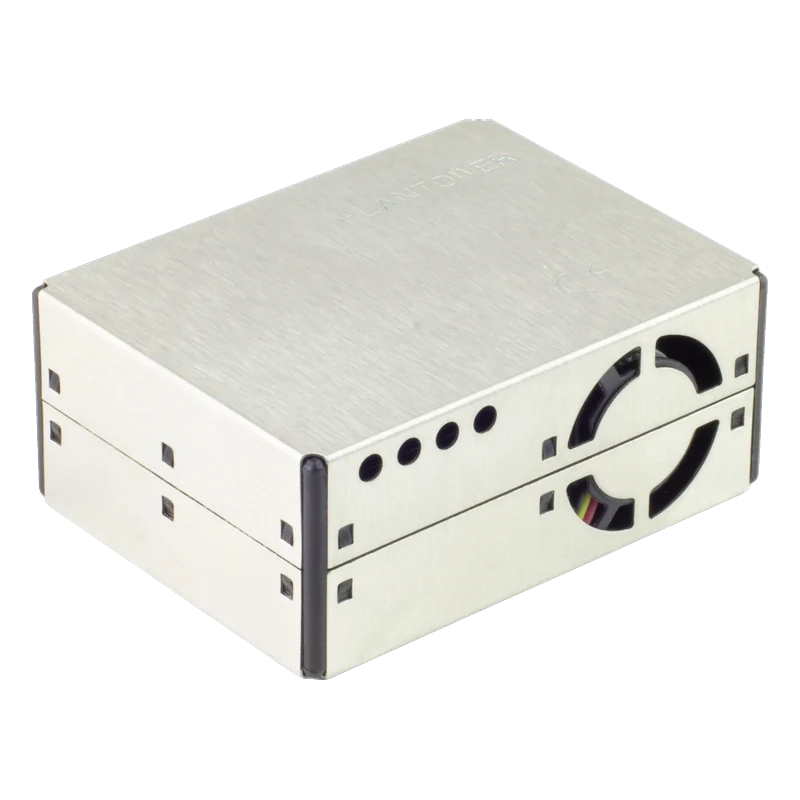
The PMS5003 is Plantower's laser-scattering particle sensor: it counts particles from 0.3 µm to 10 µm and reports PM1.0, PM2.5 and PM10 in µg/m³ with 1 µg/m³ resolution and an effective PM2.5 range of 0 to 500 µg/m³ (Plantower PMS5003 manual V2.3, p. 3). It needs 5 V for its fan (4.5 V to 5.5 V, up to 100 mA) but its data pins are 3.3 V TTL (pp. 3, 10). It streams a 32-byte frame at 9600 baud on its own, so only the sensor's TX needs wiring (pp. 4, 13).
Inside the PMS5003, a small fan draws air past a laser; a photodiode counts the flashes scattered by each particle and a processor turns the counts into mass concentrations. It measures particles of 0.3 µm to 10 µm, counting 50 % of 0.3 µm particles and 98 % of those 0.5 µm and larger, and reports PM1.0, PM2.5 and PM10 plus particle counts per 0.1 L in six size bins (Plantower manual V2.3, pp. 3, 13 to 14).
Power must be 5 V because of the fan, but the data pins work at 3.3 V; Plantower asks for level conversion if the host is a 5 V microcontroller (p. 10). In practice that only matters for the sensor's RX: in its default active mode it sends a frame every 2.3 s in stable air and every 200 ms to 800 ms when the concentration changes fast (p. 4), so most projects only listen to TX. SET and RESET are pulled up inside and can stay unconnected (p. 10).
Each frame carries two sets of values: 'CF=1, standard particle', which Plantower intends for the factory environment, and 'under atmospheric environment', which is what to report for room or outdoor air (pp. 13 to 14). Readings are stable about 30 s after the fan starts (p. 10). The Adafruit PM2.5 kit pairs the sensor with a cable and a breadboard adapter.
PMS5003 pinout
| Pin | Function | Type |
|---|---|---|
| VCC | PIN1 VCC5 V (4.5 V to 5.5 V) | power in |
| GND | PIN2 GND | power in |
| SET | Sleep (low)3.3 V TTL | input |
| RX | UART RX3.3 V TTL | input |
| TX | UART TX3.3 V TTL | output |
| RESET | Reset (low)3.3 V TTL | input |
| NC | PIN7, PIN8 NC | passive |
How to wire the PMS5003
Pin by pin, for the board you have.
| PMS5003 | Arduino Uno | Note |
|---|---|---|
| VCC | 5V | |
| GND | GND | |
| TX | D2 | SoftwareSerial RX |
- Do not wire the Uno's 5 V TX to the sensor's 3.3 V RX without a divider or level shifter (manual, p. 10). Listening only, as here, needs no commands. D3 is reserved by SoftwareSerial as TX but left unconnected.
| PMS5003 | ESP32 DevKit V1 | Note |
|---|---|---|
| VCC | VIN | |
| GND | GND | |
| TX | GPIO16 (RX2) |
- VIN gives 5 V only while the DevKit is on USB; the fan will not run from 3V3. The sensor's TX is 3.3 V, safe for GPIO16.
| PMS5003 | Raspberry Pi Pico | Note |
|---|---|---|
| VCC | VBUS | |
| GND | GND | |
| TX | GP1 | Serial1 RX |
- VBUS is 5 V only while the Pico is on USB. The sensor's TX is 3.3 V, safe for GP1.
PMS5003 code
Every example here compiles for its board.
// PMS5003 on Arduino Uno: wiring and a free simulation at https://www.tinkered.ai/components/pms5003
// PMS5003 on an Arduino Uno: VCC 5V, sensor TX to D2 (listen only), 9600 baud
#include <SoftwareSerial.h>
#include <Adafruit_PM25AQI.h>

SoftwareSerial pmSerial(2, 3);  // RX from sensor TX; D3 unused

Adafruit_PM25AQI aqi;

void setup() {
  Serial.begin(115200);
  pmSerial.begin(9600);
  delay(3000);  // let the fan spin up
  if (!aqi.begin_UART(&pmSerial)) {
    Serial.println("PMS5003 did not start");
    while (true) delay(10);
  }
  Serial.println("PMS5003 ready (readings settle after about 30 s)");
}

void loop() {
  PM25_AQI_Data data;
  if (!aqi.read(&data)) {  // false until a full, checksummed frame has arrived
    delay(500);
    return;
  }
  // "env" values are the atmospheric-environment figures, the ones to use indoors and outdoors
  Serial.print("PM1.0: ");
  Serial.print(data.pm10_env);
  Serial.print("  PM2.5: ");
  Serial.print(data.pm25_env);
  Serial.print("  PM10: ");
  Serial.print(data.pm100_env);
  Serial.print(" ug/m3   Particles >0.3um per 0.1 L: ");
  Serial.println(data.particles_03um);
  delay(1000);
}
// PMS5003 on ESP32 DevKit V1: wiring and a free simulation at https://www.tinkered.ai/components/pms5003
// PMS5003 on an ESP32 DevKit V1: VCC VIN (5 V), sensor TX to GPIO16, 9600 baud
#include <Adafruit_PM25AQI.h>

Adafruit_PM25AQI aqi;

void setup() {
  Serial.begin(115200);
  Serial2.begin(9600, SERIAL_8N1, 16, 17);  // RX2 on GPIO16; GPIO17 left unconnected
  delay(3000);  // let the fan spin up
  if (!aqi.begin_UART(&Serial2)) {
    Serial.println("PMS5003 did not start");
    while (true) delay(10);
  }
  Serial.println("PMS5003 ready (readings settle after about 30 s)");
}

void loop() {
  PM25_AQI_Data data;
  if (!aqi.read(&data)) {  // false until a full, checksummed frame has arrived
    delay(500);
    return;
  }
  // "env" values are the atmospheric-environment figures, the ones to use indoors and outdoors
  Serial.print("PM1.0: ");
  Serial.print(data.pm10_env);
  Serial.print("  PM2.5: ");
  Serial.print(data.pm25_env);
  Serial.print("  PM10: ");
  Serial.print(data.pm100_env);
  Serial.print(" ug/m3   Particles >0.3um per 0.1 L: ");
  Serial.println(data.particles_03um);
  delay(1000);
}
// PMS5003 on Raspberry Pi Pico: wiring and a free simulation at https://www.tinkered.ai/components/pms5003
// PMS5003 on a Raspberry Pi Pico (arduino-pico): VCC VBUS, sensor TX to GP1, 9600 baud
#include <Adafruit_PM25AQI.h>

Adafruit_PM25AQI aqi;

void setup() {
  Serial.begin(115200);
  Serial1.setRX(1);
  Serial1.setTX(0);  // GP0 left unconnected
  Serial1.begin(9600);
  delay(3000);  // let the fan spin up
  if (!aqi.begin_UART(&Serial1)) {
    Serial.println("PMS5003 did not start");
    while (true) delay(10);
  }
  Serial.println("PMS5003 ready (readings settle after about 30 s)");
}

void loop() {
  PM25_AQI_Data data;
  if (!aqi.read(&data)) {  // false until a full, checksummed frame has arrived
    delay(500);
    return;
  }
  // "env" values are the atmospheric-environment figures, the ones to use indoors and outdoors
  Serial.print("PM1.0: ");
  Serial.print(data.pm10_env);
  Serial.print("  PM2.5: ");
  Serial.print(data.pm25_env);
  Serial.print("  PM10: ");
  Serial.print(data.pm100_env);
  Serial.print(" ug/m3   Particles >0.3um per 0.1 L: ");
  Serial.println(data.particles_03um);
  delay(1000);
}
Before you wire it
- Power it from 5 V: the fan needs it (manual, p. 10).
- Report the 'atmospheric environment' values for room or outdoor air; Plantower reserves CF=1 for the factory environment (p. 14).
- Wait about 30 s after power-up or wake before trusting a reading (p. 10).
- Mount it with inlet and outlet clear and at least 20 cm above the floor, out of the stream of an air purifier (p. 10).
- Never connect PIN7 or PIN8 (p. 10).
- Never drive RX, SET or RESET with 5 V logic; they are 3.3 V TTL (pp. 4, 10).
- Never let the metal shell touch anything but ground: it is connected to GND (p. 10).
- Never use it unprotected outdoors, in kitchens or in bathroom mist; Plantower requires extra protection there (p. 10).
- The fan draws most of the 100 mA (p. 3); USB power on any of the three boards is enough.
- Pull SET low to sleep the sensor (fan off, under 200 µA) between readings and save the laser's life; allow 30 s after waking (pp. 3, 10).
- For passive mode or sleep commands over UART, drive RX from a 3.3 V board, or through a divider from an Uno (p. 15).
- The connector is a fine-pitch 8-pin socket; use the matching cable and an adapter board on a breadboard.
Specifications
- Supply voltage
- 5.0 V typical (4.5 V to 5.5 V); the fan needs 5 VPlantower PMS5003 data manual V2.3 (2016), pp. 3, 10
- Current
- Active 100 mA max; standby 200 µA maxPlantower PMS5003 data manual V2.3 (2016), p. 3
- Data pin level
- 3.3 V TTL on SET, RX, TX and RESETPlantower PMS5003 data manual V2.3 (2016), p. 4
- Particle range
- 0.3 µm to 10 µm; counting efficiency 50 % at 0.3 µm, 98 % at 0.5 µm and abovePlantower PMS5003 data manual V2.3 (2016), p. 3
- PM2.5 range
- Effective 0 to 500 µg/m³, maximum at least 1000 µg/m³, resolution 1 µg/m³Plantower PMS5003 data manual V2.3 (2016), p. 3
- Consistency
- ±10 µg/m³ from 0 to 100 µg/m³, ±10 % from 100 to 500 µg/m³ (PM2.5 standard)Plantower PMS5003 data manual V2.3 (2016), p. 3
- Response time
- 10 s or less; data every 2.3 s in stable air, 200 ms to 800 ms when changing fastPlantower PMS5003 data manual V2.3 (2016), pp. 3 to 4
- Serial protocol
- 9600 baud, 8N1; 32-byte frame starting 0x42 0x4DPlantower PMS5003 data manual V2.3 (2016), p. 13
- Operating range and size
- -10 °C to +60 °C; 50 × 38 × 21 mmPlantower PMS5003 data manual V2.3 (2016), p. 3
From the PMS5003 series data manual V2.3, published by Plantower.
Common mistakes
Reading CF=1 values outdoors
The library's pm25_standard is the CF=1 set meant for the factory environment (manual, p. 14). Use pm25_env for room and outdoor air.
Wiring the Uno's TX to the sensor
The sensor's RX is 3.3 V TTL and Plantower asks for level conversion with a 5 V host (p. 10). If you only read, leave it unconnected.
Powering from 3.3 V
The electronics may start but the fan will not move enough air, so readings are wrong or absent. VCC needs 4.5 V to 5.5 V (p. 3).
Checksum errors and garbage
SoftwareSerial on an Uno drops bytes if the sketch blocks for long. Keep loop() short, or use a board with a spare hardware UART.
PMS5003 questions
Is the PMS5003 5 V or 3.3 V?
Both: VCC takes 5 V for the fan (4.5 V to 5.5 V), while SET, RX, TX and RESET are 3.3 V TTL (Plantower manual V2.3, pp. 3 to 4). Its TX connects directly to any board's RX.
What is the difference between 'standard' and 'environment' values?
The frame carries CF=1 standard-particle values and atmospheric-environment values. Plantower says CF=1 should be used in the factory environment (p. 14); for air quality reporting use the atmospheric ones (pm25_env in the Adafruit library).
How accurate is the PMS5003?
Plantower specifies consistency, not absolute accuracy: ±10 µg/m³ from 0 to 100 µg/m³ and ±10 % from 100 to 500 µg/m³ (p. 3). High humidity and fog make optical counters read high.
How often does it send data?
In its default active mode, every 2.3 s when the air is stable and every 200 ms to 800 ms when concentrations change fast (p. 4). Passive mode sends a frame only when asked.
How do I compute the AQI?
AQI is a piecewise function of the 24-hour average concentration defined by each country's agency. The Adafruit library can fill AQI fields from the PM2.5 and PM10 readings; treat a reading from one moment as an indication, not an official AQI.
Build something with the PMS5003
- Build this
Desk air quality monitor
Show PM2.5 and PM10 with a coloured status bar.
- Build this
Wildfire smoke alert
Push a phone notification when PM2.5 spikes.
- Build this
3D printer enclosure monitor
Watch particle counts while printing ABS.
This page as plain Markdown, for ChatGPT, Claude or your own agent. /components/pms5003.md