4×4 Keypad with an Arduino Uno
A 16-button matrix keypad wired as 4 rows by 4 columns, read over 8 digital pins with no power supply of its own.
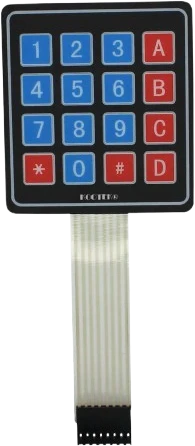
A 4x4 keypad needs eight pins and no power, and on an Arduino Uno that is two thirds of the twelve digital pins left once D0 and D1 serve USB. Here rows go to D2 to D5 and columns to D6 to D9, leaving the SPI pins D10 to D13 and the analog pins free.
Wiring the 4×4 Keypad to the Arduino Uno
Pin by pin.
| 4×4 Keypad | Arduino Uno |
|---|---|
| R1 | D2 |
| R2 | D3 |
| R3 | D4 |
| R4 | D5 |
| C1 | D6 |
| C2 | D7 |
| C3 | D8 |
| C4 | D9 |
What to know on the Arduino Uno
- The Uno has 14 digital pins, and D0 and D1 carry its USB serial link, so the keypad's eight wires take most of what remains. A0 to A5 can serve as digital pins D14 to D19 if a project runs short.Arduino UNO R3 tech specs; Arduino UNO R3 datasheet, p. 10
- The Keypad library uses the ATmega328P's internal pull-ups, so no resistors are needed. Avoid D13 for a row: its onboard LED and resistor load the pin and can make an INPUT_PULLUP read low.Arduino UNO R3 tech specs (LED_BUILTIN on D13)
- Rows R1 and R2 sit on D2 and D3, the Uno's only external interrupt pins. If another part needs an interrupt, move those two rows to free pins and change rowPins[] to match.Arduino language reference, attachInterrupt()
- The contacts are rated 24 VDC and 30 mA, far above the fraction of a milliamp an internal pull-up passes through a pressed key.Parallax 4x4 Matrix Membrane Keypad #27899 datasheet v1.2, p. 1
4×4 Keypad code for the Arduino Uno
Compiled for arduino:avr:uno on 2026-10-29.
// 4×4 Keypad on Arduino Uno: wiring and a free simulation at https://www.tinkered.ai/components/keypad-4x4/arduino-uno
#include <Keypad.h>

const byte ROWS = 4;
const byte COLS = 4;

char keys[ROWS][COLS] = {
  {'1','2','3','A'},
  {'4','5','6','B'},
  {'7','8','9','C'},
  {'*','0','#','D'}
};

byte rowPins[ROWS] = {2, 3, 4, 5};  // R1, R2, R3, R4
byte colPins[COLS] = {6, 7, 8, 9};  // C1, C2, C3, C4

Keypad kpd = Keypad(makeKeymap(keys), rowPins, colPins, ROWS, COLS);

// Returns the next pressed key character, or NO_KEY (== 0) if none.
// Combines the Keypad library (matrix scan on real hardware) with
char readKey() {
  char k = kpd.getKey();
  if (k) return k;
  if (Serial.available()) {
    char c = Serial.read();
    if (c >= ' ') return c;  // skip newlines / control chars
  }
  return NO_KEY;
}

void setup() {
  Serial.begin(115200);
}

void loop() {
  char key = readKey();
  if (key) {
    Serial.println(key);
  }
}
4×4 Keypad on the Arduino Uno: questions
How many Uno pins does a 4x4 keypad use?
Eight: four rows and four columns. On the Uno this example uses D2 to D9; any free digital pins work, including A0 to A5 as D14 to D19.
Does a 4x4 keypad need resistors on an Arduino Uno?
No. The Keypad library turns on the Uno's internal pull-ups on the row pins, so the eight wires go straight to the board.
Can I free up pins when using a keypad with an Uno?
Use the analog pins as digital pins D14 to D19, or move the keypad behind an I2C I/O expander on A4 and A5 so it takes two pins instead of eight.
This guide as plain Markdown. /components/keypad-4x4/arduino-uno.md