IR Receiver Module (VS1838B) with an Arduino Uno
A three-pin 38 kHz infrared receiver board that turns TV-remote button presses into clean digital pulses.
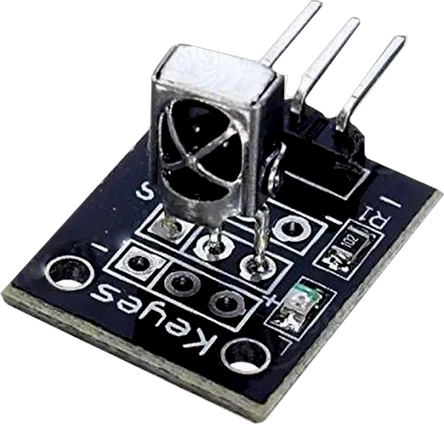
The ST1089 breakout's VS1838B runs from 2.7 V to 5.5 V, so on an Arduino Uno it takes the 5V pin and its output swings close to the Uno's full 5 V. IRremote 4.x samples it from Timer2 on the Uno, which is the one Uno resource this pairing takes away from the rest of a sketch.
Wiring the IR Receiver Module (VS1838B) to the Arduino Uno
Pin by pin.
| IR Receiver Module (VS1838B) | Arduino Uno |
|---|---|
| OUT | D2 |
| GND | GND |
| VCC | 5V |
What to know on the Arduino Uno
- At 5 V the VS1838B's output is 0.4 V at most when low and 4.5 V at least when high, comfortably inside the Uno's input thresholds.VS1838B datasheet, p. 2; Microchip ATmega328P datasheet DS40002061B, DC characteristics
- On the Uno, IRremote 4.x uses Timer2. tone() needs the same timer, so the two cannot share a sketch, and analogWrite() on D3 and D11, which Timer2 also drives, stops working while the receiver runs.IRremote library documentation; Arduino language reference, tone()
- Because IRremote samples the pin from a timer, S does not need an interrupt pin: D2 is used here, but any Uno digital pin works, which keeps D2 and D3 free when other parts need interrupts.IRremote library documentation
- ENABLE_LED_FEEDBACK blinks the Uno's onboard D13 LED on each received frame, a quick check that the remote is being seen before any code is decoded.Arduino UNO R3 tech specs (LED_BUILTIN on D13)
IR Receiver Module (VS1838B) code for the Arduino Uno
Compiled for arduino:avr:uno on 2026-10-30.
// IR Receiver Module (VS1838B) on Arduino Uno: wiring and a free simulation at https://www.tinkered.ai/components/ir-receiver-st1089/arduino-uno
#define DECODE_NEC
#define DECODE_RC5
#include <IRremote.hpp>          // .hpp, not .h, in 4.x

const int IR_PIN = 2;

void setup() {
  Serial.begin(9600);
  IrReceiver.begin(IR_PIN, ENABLE_LED_FEEDBACK);
}

void loop() {
  if (IrReceiver.decode()) {
    Serial.println(IrReceiver.decodedIRData.command, HEX);   // e.g. 45
    // also: .address, .protocol, .decodedRawData,
    //       .flags & IRDATA_FLAGS_IS_REPEAT
    IrReceiver.resume();                                     // required
  }
}
IR Receiver Module (VS1838B) on the Arduino Uno: questions
Why does tone() stop working when I add the IR receiver on my Uno?
IRremote 4.x and tone() both use Timer2 on the Uno. Use an active buzzer (no tone() needed), or drop one of the two.
Which Uno pin should the ST1089's S pin go to?
Any digital pin. The example uses D2, but IRremote reads the pin from a timer, so it does not need one of the Uno's interrupt pins.
Should the IR receiver use 5V or 3.3V on an Arduino Uno?
5V. The VS1838B takes 2.7 V to 5.5 V (datasheet, p. 2) and its output then swings to the Uno's 5 V logic.
Keep going
This guide as plain Markdown. /components/ir-receiver-st1089/arduino-uno.md