FC-51 IR Obstacle Sensor with an Arduino Uno
An infrared reflection switch whose OUT pin goes LOW when something comes within reach, rated 2 to 30 cm.
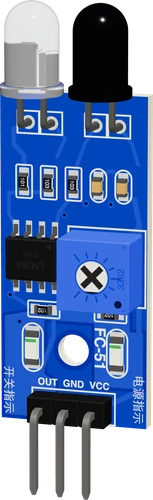
On an Arduino Uno the FC-51 runs from 5V, so its OUT pin, pulled up to the module's supply, swings between 0 and 5 V exactly as the Uno's inputs expect. OUT goes to D2, the Uno's INT0, which makes the module a natural object counter with attachInterrupt().
Wiring the FC-51 IR Obstacle Sensor to the Arduino Uno
Pin by pin.
| FC-51 IR Obstacle Sensor | Arduino Uno |
|---|---|
| VCC | 5V |
| GND | GND |
| OUT | D2 |
What to know on the Arduino Uno
- OUT is an LM393 open-collector output pulled up to VCC by the module. On the Uno's 5V it idles at 5 V and drops LOW on an obstacle; no extra resistor is needed, and pinMode(INPUT) is enough.HW-201 module sheet, pp. 1, 2; TI LM393 datasheet (SLCS005AH), p. 17
- To count objects, attach an interrupt on D2 FALLING and only increment a volatile counter in the handler. On the Uno no IRAM_ATTR is needed; if the same sketch must also build for an ESP32 or ESP8266, add #ifndef IRAM_ATTR, #define IRAM_ATTR, #endif at the top.Arduino language reference, attachInterrupt()
- The comparator has no hysteresis, so OUT chatters at the edge of the 2 to 30 cm range. The example needs three equal reads 10 ms apart before it changes state; an interrupt counter should likewise ignore edges within about 50 ms of the last.HW-201 module sheet, p. 1
- The sketch lights the Uno's onboard LED on D13 while something is in front, so no external indicator is needed.Arduino UNO R3 tech specs (LED_BUILTIN on D13)
FC-51 IR Obstacle Sensor code for the Arduino Uno
Compiled for arduino:avr:uno on 2026-10-29.
// FC-51 IR Obstacle Sensor on Arduino Uno: wiring and a free simulation at https://www.tinkered.ai/components/ir-obstacle-sensor-fc-51/arduino-uno
const int OUT_PIN = 2;    // FC-51 OUT: LOW while something is in front
const int LED_PIN = 13;   // the warning LED

int lowReads = 0;         // consecutive reads with OUT LOW
int highReads = 0;        // consecutive reads with OUT HIGH
bool blocked = false;     // what the sketch believes, after the chatter
unsigned long count = 0;  // objects seen arriving

void setup() {
  Serial.begin(9600);
  pinMode(OUT_PIN, INPUT); // the module has its own pull-up
  pinMode(LED_PIN, OUTPUT);
  Serial.println("FC-51 ready");
}

void loop() {
  if (digitalRead(OUT_PIN) == LOW) { lowReads++; highReads = 0; }
  else { highReads++; lowReads = 0; }

  // 3 reads in a row (30 ms) to change its mind: the comparator has no hysteresis
  if (!blocked && lowReads >= 3) {
    blocked = true;
    count++;
    digitalWrite(LED_PIN, HIGH);
    Serial.print("Obstacle! count=");
    Serial.println(count);
  } else if (blocked && highReads >= 3) {
    blocked = false;
    digitalWrite(LED_PIN, LOW);
    Serial.println("clear");
  }
  delay(10);
}
FC-51 IR Obstacle Sensor on the Arduino Uno: questions
Can I connect the FC-51 directly to an Arduino Uno?
Yes. Power it from the Uno's 5V; OUT is pulled up to 5 V and goes LOW when an obstacle reflects the infrared, which any Uno digital pin reads.
How do I count objects with the FC-51 on an Uno?
Use D2 or D3, the Uno's interrupt pins: attachInterrupt(digitalPinToInterrupt(2), onEdge, FALLING), increment a volatile counter in onEdge(), and ignore edges closer than about 50 ms to filter chatter.
Why does the FC-51 flicker between obstacle and clear?
Near the edge of its range the LM393 output has no hysteresis and chatters. Require a few consecutive equal reads, as the example does, or turn the potentiometer to move the threshold.
This guide as plain Markdown. /components/ir-obstacle-sensor-fc-51/arduino-uno.md