HX711 Load Cell Amplifier with an Arduino Uno
A 24-bit ADC with a gain-128 amplifier, built to read load cells and turn a strain gauge bridge into a digital scale.
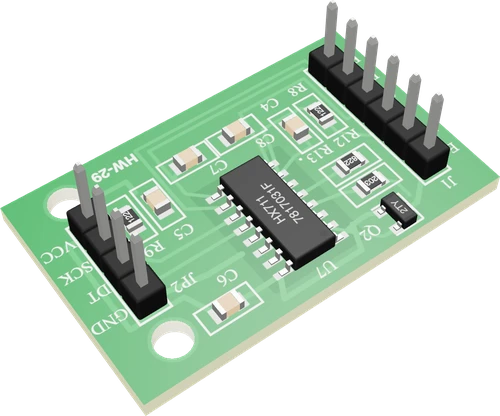
On an Arduino Uno the HX711 module runs from the 5V pin, so DT's high is 5 V and the chip gets the 5 V supply its datasheet uses for its ±20 mV full scale at gain 128. DT and SCK sit on D3 and D2, two ordinary digital pins the library bit-bangs.
Wiring the HX711 Load Cell Amplifier to the Arduino Uno
Pin by pin.
| HX711 Load Cell Amplifier | Arduino Uno |
|---|---|
| VCC | 5V |
| GND | GND |
| DT | D3 |
| SCK | D2 |
What to know on the Arduino Uno
- Channel A's full scale is ±20 mV at gain 128 with AVDD = 5 V. The module's excitation regulator needs its output at least 100 mV below VSUP, a headroom the Uno's 5V supply provides.Avia HX711 datasheet V2.0, pp. 1, 3, 4
- Holding SCK high for more than 60 µs powers the HX711 down. On the Uno a long interrupt in the middle of a read, such as SoftwareSerial receiving a byte, can stretch a clock pulse that long and corrupt the reading, so avoid SoftwareSerial traffic during scale.get_units().Avia HX711 datasheet V2.0, p. 5
- At the module's 10 samples per second the first valid reading arrives 400 ms after power-up, which is why setup() waits for is_ready() before taring, and why get_units(5) takes about half a second on the Uno.Avia HX711 datasheet V2.0, pp. 1, 3
- The load cell's output is millivolts, far below one step of the Uno's own ADC (about 4.9 mV on 5 V), which is why it goes through the HX711 and never to an analog pin.Microchip ATmega328P datasheet DS40002061B, p. 2
HX711 Load Cell Amplifier code for the Arduino Uno
Compiled for arduino:avr:uno on 2026-10-30.
// HX711 Load Cell Amplifier on Arduino Uno: wiring and a free simulation at https://www.tinkered.ai/components/hx711-module/arduino-uno
#include "HX711.h"

const int DT_PIN = 3;    // HX711 DT (DOUT)
const int SCK_PIN = 2;   // HX711 SCK
// counts per gram: about 430 for a 5 kg bar (2150 at 1 kg, 215 at 10 kg); calibrate with a known weight
const float CALIBRATION = 430.0;

HX711 scale;

void setup() {
  Serial.begin(9600);
  scale.begin(DT_PIN, SCK_PIN);
  Serial.println("HX711 scale");
  while (!scale.is_ready()) delay(10);   // its first reading comes 0.4 s after power-up
  scale.set_scale(CALIBRATION);
  scale.tare(10);                        // the empty scale's zero, averaged
  Serial.println("Tared: put a weight on it");
}

void loop() {
  if (scale.is_ready()) {
    float grams = scale.get_units(5);    // the average of 5 readings, tared and scaled
    Serial.print("Weight: ");
    Serial.print(grams, 1);
    Serial.println(" g");
  }
  delay(500);
}
HX711 Load Cell Amplifier on the Arduino Uno: questions
Can I connect the HX711 to the Arduino Uno's 5V?
Yes. The HX711 runs from 2.6 V to 5.5 V (Avia datasheet, p. 1), and on 5V its DT output matches the Uno's logic. 5 V is also the supply at which the datasheet gives the ±20 mV full scale.
Why can't I read a load cell with analogRead() on the Uno?
A load cell gives about 1 mV per volt at full load, while one step of the Uno's 10-bit ADC is about 4.9 mV. The HX711's gain of 128 and 24-bit ADC resolve it.
Why are my HX711 readings occasionally wrong on the Uno?
If SCK stays high more than 60 µs the chip powers down (Avia datasheet, p. 5). Interrupt-heavy code, SoftwareSerial in particular, can stretch a clock pulse that long; read the scale when no other serial traffic is running.
Keep going
This guide as plain Markdown. /components/hx711-module/arduino-uno.md