HC-05 Bluetooth Module with an Arduino Uno
The HC-05 is a Classic Bluetooth 2.0 serial port module: pair a phone or PC and it turns the link into a 9600 baud UART.
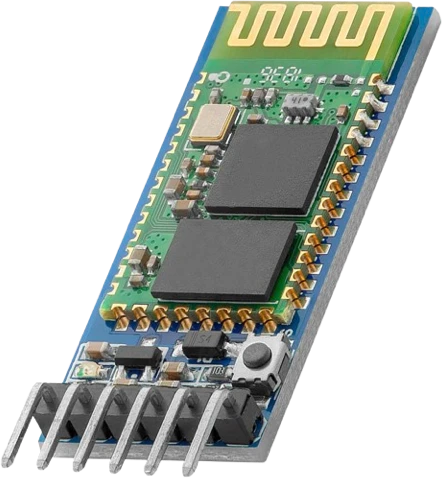
The HC-05 talks to an Arduino Uno through SoftwareSerial on D10 and D11, because D0 and D1 are the Uno's USB serial and an upload fails with the module's TXD on D0. Its ZS-040 carrier runs from the Uno's 5V, while its RXD is a 3.3 V input reached through a 1 kΩ / 2 kΩ divider from D11.
Wiring the HC-05 Bluetooth Module to the Arduino Uno
Pin by pin.
| HC-05 Bluetooth Module | Arduino Uno | Note |
|---|---|---|
| VCC | 5V | |
| GND | GND | |
| TXD | D10 | |
| RXD | D11 | through a 1 kΩ resistor, with a 2 kΩ resistor from RXD to GND (a divider) |
| STATE | D7 |
What to know on the Arduino Uno
- The module's UART runs at 3.3 V. The divider drops the Uno's 5 V TX to about 3.3 V; the module's 3.3 V TXD on D10 is read as a high by the Uno, which needs 0.6 × VCC (3.0 V).HC Serial Bluetooth Products user manual, p. 11; Microchip ATmega328P datasheet DS40002061B, DC characteristics
- SoftwareSerial handles both speeds the HC-05 uses: 9600 baud in data mode and 38400 in AT mode, both under the library's 115200 baud ceiling. Change bt.begin() to 38400 when the module is started in AT mode.HC Serial Bluetooth Products user manual, pp. 4, 13; Arduino SoftwareSerial library reference
- D10 and D11 are also the Uno's SPI SS and MOSI pins. If the project adds an SPI device (SD card, RFID, display), move the HC-05 to other pins such as D8 and D9; every Uno pin supports SoftwareSerial receive.Arduino UNO R3 datasheet, p. 10
- Pairing draws 30 mA to 40 mA, which the Uno's 5V pin supplies easily over USB but which a battery-powered Uno should budget for.HC Serial Bluetooth Products user manual, pp. 4, 5
HC-05 Bluetooth Module code for the Arduino Uno
Compiled for arduino:avr:uno on 2026-10-29.
// HC-05 Bluetooth Module on Arduino Uno: wiring and a free simulation at https://www.tinkered.ai/components/hc-05/arduino-uno
#include <SoftwareSerial.h>

SoftwareSerial bt(10, 11);   // RX, TX: the module's TXD, RXD (through the divider)
const int STATE_PIN = 7;

void setup() {
  Serial.begin(9600);
  bt.begin(9600);            // the HC-05's data-mode speed out of the box
  pinMode(LED_BUILTIN, OUTPUT);
  pinMode(STATE_PIN, INPUT);
  Serial.println("Pair with HC-05 (PIN 1234) and send ON or OFF");
}

String line;
uint32_t last = 0;

void loop() {
  while (bt.available()) {
    char c = bt.read();
    if (c == '\n' || c == '\r') {
      if (line == "ON")  { digitalWrite(LED_BUILTIN, HIGH); bt.println("LED on"); }
      if (line == "OFF") { digitalWrite(LED_BUILTIN, LOW);  bt.println("LED off"); }
      if (line.length()) Serial.println("phone: " + line);
      line = "";
    } else {
      line += c;
    }
  }
  if (millis() - last > 2000 && digitalRead(STATE_PIN)) {
    last = millis();
    bt.print("uptime ");
    bt.println(millis() / 1000);
  }
}
HC-05 Bluetooth Module on the Arduino Uno: questions
Can I connect the HC-05 to the Uno's D0 and D1?
Avoid it. D0 and D1 are the Uno's USB serial: the upload fails while TXD sits on D0, and Serial would carry both the monitor and the module. Use SoftwareSerial on D10 and D11 as the example does.
Does the HC-05 need a voltage divider on an Arduino Uno?
Only on RXD. The module's logic is 3.3 V (user manual, p. 11), so wire 1 kΩ from the Uno's D11 to RXD and 2 kΩ from RXD to GND. TXD goes straight to D10.
Why do AT commands get no answer on the Uno?
AT mode needs EN held high at power-up and 38400 baud (user manual, p. 13). Change bt.begin(9600) to bt.begin(38400) and end each command with \r\n (println).
Keep going
This guide as plain Markdown. /components/hc-05/arduino-uno.md