BME280 with a Raspberry Pi Pico
A Bosch BME280 breakout that measures barometric pressure, temperature, and relative humidity on one small board, talking to a microcontroller over I2C or SPI.
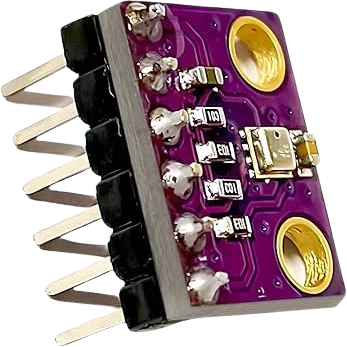
The BME280 sits on the Raspberry Pi Pico's default I2C0 pins, SDA on GP4 and SCL on GP5, with VCC and CSB on 3V3. Run from 3.3 V, the chip's 1.2 V to 3.6 V interface matches the Pico's GPIO level without any shifting.
Wiring the BME280 to the Raspberry Pi Pico
Pin by pin.
| BME280 | Raspberry Pi Pico |
|---|---|
| VCC | 3V3 |
| GND | GND |
| SCL | GP5 |
| SDA | GP4 |
| CSB | 3V3 |
What to know on the Raspberry Pi Pico
- CSB is wired to 3V3 to select I2C; left low or floating the chip may switch to SPI and never answer on GP4 and GP5.Bosch BME280 datasheet rev 1.24, p. 32
- The sketch asks for 0x76, the address with SDO low. A module with SDO high answers at 0x77; change begin() to match.Bosch BME280 datasheet rev 1.24, p. 32
- At 3.6 µA at 1 Hz the sensor barely registers against the 300 mA Raspberry Pi recommends for the 3V3 pin, so the Pico can power it alongside several other I2C parts.Bosch BME280 datasheet rev 1.24, p. 2; Raspberry Pi Pico datasheet, release 21, p. 8
BME280 code for the Raspberry Pi Pico
Compiled for rp2040:rp2040:rpipico on 2026-10-30.
// BME280 on Raspberry Pi Pico: wiring and a free simulation at https://www.tinkered.ai/components/bme280/raspberry-pi-pico
#include <Wire.h>
#include <Adafruit_BME280.h>

Adafruit_BME280 bme;

void setup() {
  Serial.begin(9600);
  if (!bme.begin(0x76)) {            // 0x77 if SDO is tied HIGH
    Serial.println("BME280 not found");
    while (1) delay(10);
  }
}

void loop() {
  Serial.print(bme.readTemperature()); Serial.print(" C  ");
  Serial.print(bme.readHumidity());    Serial.print(" %  ");
  Serial.print(bme.readPressure() / 100.0); Serial.println(" hPa");
  delay(1000);
}
BME280 on the Raspberry Pi Pico: questions
Can the BME280 run from the Pico's 3V3 pin?
Yes. The chip's VDD is rated 1.71 V to 3.6 V and its interface 1.2 V to 3.6 V (Bosch datasheet rev 1.24, p. 2), so 3.3 V is inside both ranges.
Why does my Pico print 'BME280 not found'?
Check SDA on GP4 and SCL on GP5, CSB high, then the address: 0x76 with SDO low, 0x77 with SDO high (Bosch datasheet, p. 32).
Can I use different I2C pins on the Pico?
Yes. Call Wire.setSDA() and Wire.setSCL() with another I2C0 pin pair before bme.begin(); the page uses arduino-pico's defaults, GP4 and GP5.
Keep going
This guide as plain Markdown. /components/bme280/raspberry-pi-pico.md