Arduino UNO R4 Minima vs R4 WiFi
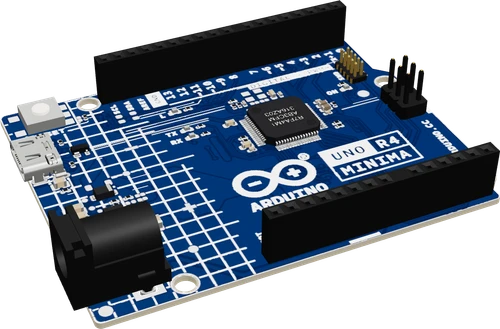
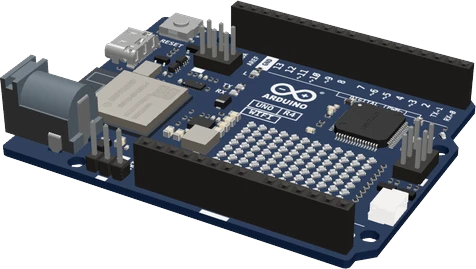
Both boards run the same 5 V Renesas RA4M1 (48 MHz Cortex-M4, 256 kB flash, 32 kB SRAM) on the same UNO headers (UNO R4 Minima datasheet, p. 1; UNO R4 WiFi datasheet, p. 1). The R4 WiFi adds an ESP32-S3-MINI-1 module for 2.4 GHz Wi-Fi and Bluetooth 5 LE, a 12 × 8 LED matrix and a 3.3 V Qwiic connector (R4 WiFi datasheet, pp. 3, 12, 14). Buy the WiFi for anything networked or for the built-in display, the Minima when the project stays offline.
Side by side
| Arduino UNO R4 Minima | R4 WiFi | |
|---|---|---|
| Main microcontrollerUNO R4 Minima datasheet (ABX00080), pp. 1, 9; UNO R4 WiFi datasheet (ABX00087), pp. 1, 9 | Renesas RA4M1, Cortex-M4 with FPU, 48 MHz | Renesas RA4M1, Cortex-M4 with FPU, 48 MHz |
| MemoryUNO R4 Minima datasheet, p. 1; UNO R4 WiFi datasheet, p. 1 | 256 kB flash, 32 kB SRAM, 8 kB EEPROM | 256 kB flash, 32 kB SRAM, 8 kB EEPROM |
| WirelessUNO R4 Minima datasheet, p. 1; UNO R4 WiFi datasheet, pp. 2, 3, 9 | None | ESP32-S3-MINI-1-N8: Wi-Fi 802.11 b/g/n (2.4 GHz), Bluetooth 5 LE |
| LED matrixUNO R4 WiFi datasheet, p. 12 | None | 12 × 8 red LEDs |
| Qwiic connectorUNO R4 WiFi datasheet, p. 14 | None | Yes, second I2C bus (Wire1) at 3.3 V |
| CAN pinsUNO R4 Minima datasheet, p. 2; UNO R4 WiFi datasheet, p. 18 | D4 / D5 (external transceiver) | D10 (TX) / D13 (RX) (external transceiver) |
| USB-C pathUNO R4 Minima datasheet, p. 2; UNO R4 WiFi datasheet, p. 11 | Straight to the RA4M1's native USB | Through the ESP32-S3 bridge to the RA4M1 by default |
| Power inputUNO R4 Minima datasheet, p. 6; UNO R4 WiFi datasheet, p. 7 | 6 V to 24 V on jack or VIN; USB-C 4.8 V to 5.5 V | 6 V to 24 V on jack or VIN; USB-C 4.8 V to 5.5 V |
| Current per GPIOUNO R4 Minima datasheet, p. 11; UNO R4 WiFi datasheet, p. 16 | 8 mA | 8 mA (RA4M1 pins) |
Which one to pick
- Offline projects: sensors, motors, displays and data logging where no radio is needed.
- USB devices: the USB-C port goes straight to the RA4M1's own USB (UNO R4 Minima datasheet, p. 2), the simplest path for keyboard and mouse sketches.
- Projects that use CAN on D4/D5 and keep D10 to D13 free for SPI (datasheet, p. 2).
- Anything that talks to a network or a phone: Wi-Fi through WiFiS3 and Bluetooth LE through ArduinoBLE, on the ESP32-S3 module (UNO R4 WiFi datasheet, p. 3).
- Quick status displays and animations on the 12 × 8 LED matrix, with no extra wiring (p. 12).
- Plug-in 3.3 V sensors over Qwiic, on a second I2C bus that leaves A4/A5 free (p. 14).
Swapping one for the other
What changes in the wiring and the code.
- The headers, the 5 V logic and the 8 mA per pin limit are the same on both (UNO R4 Minima datasheet, p. 11; UNO R4 WiFi datasheet, p. 16), so shields and wiring carry over.
- Select the right board in the Arduino UNO R4 Boards package: a sketch built for one does not run on the other.
- CAN moves: D4/D5 on the Minima, D10 (TX) and D13 (RX) on the WiFi (Minima datasheet, p. 2; WiFi datasheet, p. 18). On the WiFi, CAN and SPI share D10 and D13.
- On the WiFi, Qwiic devices are on Wire1, not Wire (WiFi datasheet, p. 14). Change Wire.begin() to Wire1.begin() when you move a sensor from A4/A5 to the Qwiic port.
- Network code is new on the WiFi: include WiFiS3.h for Wi-Fi and ArduinoBLE.h for Bluetooth LE. The Minima has no radio, so these libraries have nothing to talk to there.
Arduino UNO R4 Minima or R4 WiFi: questions
Is the UNO R4 WiFi faster than the UNO R4 Minima?
No. Both run your sketch on the same RA4M1, a 48 MHz Cortex-M4 with 256 kB flash and 32 kB SRAM (UNO R4 Minima datasheet, p. 1; UNO R4 WiFi datasheet, p. 1). The WiFi's ESP32-S3 handles the radio and the USB bridge, not your code.
Can I add Wi-Fi to an UNO R4 Minima later?
Only with an external module, since the Minima has no radio (UNO R4 Minima datasheet, p. 1). If Wi-Fi or Bluetooth is likely, the R4 WiFi carries an ESP32-S3-MINI-1 with 802.11 b/g/n and Bluetooth 5 LE on the board (UNO R4 WiFi datasheet, pp. 2, 3).
Do both boards use 5 V logic?
Yes on the UNO headers: every header pin runs at 5 V, set by the RA4M1 (UNO R4 Minima datasheet, p. 11; UNO R4 WiFi datasheet, p. 16). On the WiFi, the ESP32-S3 module and the Qwiic connector run at 3.3 V (WiFi datasheet, pp. 2, 14).
Why does my CAN code work on the Minima but not on the WiFi?
The CAN pins differ: D4/D5 on the Minima, D10 (TX) and D13 (RX) on the WiFi (Minima datasheet, p. 2; WiFi datasheet, p. 18). Move the transceiver's wires and keep SPI off D10 and D13.
What does the UNO R4 WiFi have that the Minima does not?
An ESP32-S3 for Wi-Fi and Bluetooth LE, a 12 × 8 red LED matrix, a Qwiic connector on a second I2C bus, an RTC backup pin (VRTC) and an OFF pin that switches the board's supply (UNO R4 WiFi datasheet, pp. 3, 6, 12, 14, 19).
The two references
Checked on 2026-10-29 against 2 sources, the makers’ datasheets first.
This comparison as plain Markdown. /compare/arduino-uno-r4-minima-vs-arduino-uno-r4-wifi.md