ST7735 TFT 1.8-inch with an Arduino Uno
A 1.8-inch 128x160 color TFT LCD breakout driven by an ST7735S controller over a 4-wire SPI interface.
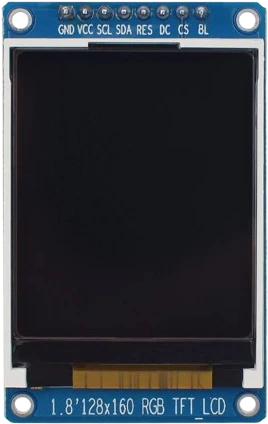
The MSP1803 takes 3.3 V to 5 V on VCC through its regulator, but its logic is 3.3 V TTL with no level shifters, so on an Arduino Uno the five lines the Uno drives (D2, D3, D4, D11, D13) should pass through a level shifter. SDA and SCK use the Uno's hardware SPI pins, while CS, RESET and A0 take D2, D3 and D4.
Wiring the ST7735 TFT 1.8-inch to the Arduino Uno
Pin by pin.
| ST7735 TFT 1.8-inch | Arduino Uno | Note |
|---|---|---|
| VCC | 5V | |
| GND | GND | |
| CS | D2 | through a level shifter to 3.3 V |
| RESET | D3 | through a level shifter to 3.3 V |
| A0 | D4 | through a level shifter to 3.3 V |
| SDA | D11 | through a level shifter to 3.3 V |
| SCK | D13 | through a level shifter to 3.3 V |
| LED | 3V3 |
- The board's regulator feeds the ST7735 3.3 V from VCC, but its signal pins take no more than VDDI + 0.3 V: put a level shifter (a 74LVC245 or a BSS138 board) between the Uno's 5 V outputs and CS, RESET, A0, SDA and SCK.
What to know on the Arduino Uno
- The board's logic is 3.3 V and it has a regulator but no level shifters, so its inputs must not be driven above VDDI + 0.3 V. The Uno drives 5 V, so the page's rows pass SDA, SCK, CS, A0 and RESET through a level shifter such as a 74LVC245 or a BSS138 board.LCDWiki MSP1803 product parameters; Sitronix ST7735 datasheet V2.1, p. 19
- A 128 × 160 frame in RGB565 is 40,960 bytes, twenty times the Uno's SRAM, so the Adafruit library writes straight into the ST7735's memory and the Uno draws shapes and text without a buffer.Arduino UNO R3 tech specs
- CS is on D2 rather than D10, but SPI.begin() still sets D10, the Uno's SS pin, as an output. Leave D10 unused or use it as an output; as an input pulled low it would knock the Uno's SPI out of master mode.Microchip ATmega328P datasheet DS40002061B, SPI section
- LED goes to the Uno's 3.3V pin for the backlight; that pin is rated 50 mA in total, so other 3.3 V parts on it share the same budget.LCDWiki MSP1803 user manual, p. 6; Arduino UNO R3 tech specs
ST7735 TFT 1.8-inch code for the Arduino Uno
Compiled for arduino:avr:uno on 2026-10-30.
// ST7735 TFT 1.8-inch on Arduino Uno: wiring and a free simulation at https://www.tinkered.ai/components/st7735-tft-1-8/arduino-uno
#include <Adafruit_GFX.h>
#include <Adafruit_ST7735.h>
#include <SPI.h>

#define TFT_CS  2
#define TFT_DC  4   // wired to the A0 pin
#define TFT_RST 3

Adafruit_ST7735 tft = Adafruit_ST7735(TFT_CS, TFT_DC, TFT_RST);

void setup() {
  tft.initR(INITR_BLACKTAB);
  tft.fillScreen(ST77XX_RED);
  delay(500);
  tft.fillScreen(ST77XX_BLUE);
  tft.setCursor(10, 10);
  tft.setTextColor(ST77XX_WHITE);
  tft.setTextSize(2);
  tft.println("Hi ST7735");
}

void loop() {}
ST7735 TFT 1.8-inch on the Arduino Uno: questions
Does the 1.8 inch ST7735 TFT need a level shifter on an Arduino Uno?
Yes, for in-spec operation. The module regulates VCC but its logic pins are 3.3 V with no level shifting (LCDWiki MSP1803), and the Uno drives 5 V on SDA, SCK, CS, A0 and RESET.
Why is the ST7735 screen white or blank on my Uno?
Check initR(INITR_BLACKTAB) matches your panel (try GREENTAB or REDTAB variants), that A0 is wired to the pin given as TFT_DC (D4 here), and that LED has 3.3 V for the backlight.
Can the Uno buffer a frame for the ST7735?
No: a full frame is 40,960 bytes against the Uno's 2,048 bytes of SRAM. Draw directly with Adafruit_GFX calls.
Keep going
This guide as plain Markdown. /components/st7735-tft-1-8/arduino-uno.md