MG996R Servo · Straight Horn with a Raspberry Pi Pico
TowerPro's metal-gear servo, 11 kg·cm at 6V from a standard 50Hz servo pulse, fitted with a single straight arm.
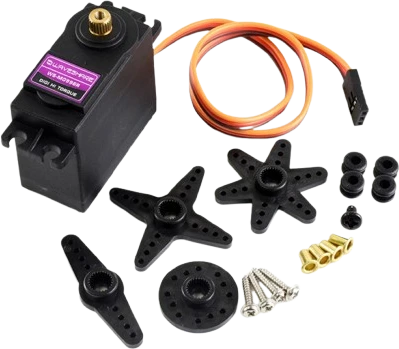
The MG996R's signal wire goes to the Raspberry Pi Pico's GP0, and arduino-pico's built-in Servo library drives it with no extra install. Its power never comes from the Pico: it needs 4.8 V to 6.6 V and up to 1,400 mA at stall, from a supply of its own whose ground joins the Pico's.
Wiring the MG996R Servo · Straight Horn to the Raspberry Pi Pico
Pin by pin.
| MG996R Servo · Straight Horn | Raspberry Pi Pico | Note |
|---|---|---|
| GND | GND | and to the separate supply's −: the servo, its supply and the board share one ground |
| SIG | GP0 | |
| VCC | a separate 4.8 to 6.6 V supply (4 × AA), never the board's 5V pin | the MG996R draws about 1.4 A at stall |
What to know on the Raspberry Pi Pico
- A 3.3 V pulse from the Pico drives the signal input; the servo's red and brown wires go to its own 5 V to 6 V supply, for example four AA cells.TowerPro MG996R spec page
- The table's GND row ties the servo supply's ground to a Pico GND pin; leave it out and the pulse has no reference, so the servo jitters or ignores it.The page's sketch, supply comment
- Not even VBUS: it is the USB port's 5 V, and a stall current of 1,400 mA is far beyond what a USB port supplies.Raspberry Pi Pico datasheet, release 21, p. 8; TowerPro MG996R spec page
- The sketch calls attach(SERVO_PIN) with the core's default pulse range. A wider range such as attach(SERVO_PIN, 500, 2400) gives more travel; widen it only until the horn stops short of its end stops, where the servo stalls.arduino-pico core documentation (Earle Philhower), Servo
MG996R Servo · Straight Horn code for the Raspberry Pi Pico
Compiled for rp2040:rp2040:rpipico on 2026-10-30.
// MG996R Servo · Straight Horn on Raspberry Pi Pico: wiring and a free simulation at https://www.tinkered.ai/components/servo-mg996r-straight/raspberry-pi-pico
#include <Servo.h>

// The MG996R draws up to about 1.4 A at stall: power it from its own 5 to 6 V supply,
// never from the board's 5V pin, and join that supply's GND to the board's GND.
const int SERVO_PIN = 0;
Servo servo;

void setup() {
  servo.attach(SERVO_PIN);
}

void loop() {
  for (int angle = 0; angle <= 180; angle += 2) {
    servo.write(angle);
    delay(15);
  }
  for (int angle = 180; angle >= 0; angle -= 2) {
    servo.write(angle);
    delay(15);
  }
}
MG996R Servo · Straight Horn on the Raspberry Pi Pico: questions
Can a Raspberry Pi Pico control an MG996R?
Yes: its 3.3 V signal drives the servo's input. The servo needs its own 4.8 V to 6.6 V supply that can deliver its 1,400 mA stall current (TowerPro spec page), with a common ground to the Pico.
Which Servo library do I use on the Pico?
arduino-pico ships its own Servo.h, so #include <Servo.h> works with no library to install, as the page's code shows. ESP32Servo is only for ESP32 boards.
Why does my MG996R jitter or reset the Pico?
Usually a shared or weak supply, or no common ground. Power the servo separately, add a 470 to 1000 µF capacitor across its supply, and join its ground to the Pico's.
Keep going
This guide as plain Markdown. /components/servo-mg996r-straight/raspberry-pi-pico.md