MG996R Servo · Cross Horn with an Arduino Uno
TowerPro's metal-gear standard servo, 11 kg·cm at 6V under standard 50Hz servo pulses, shipped here with a four-arm cross horn.
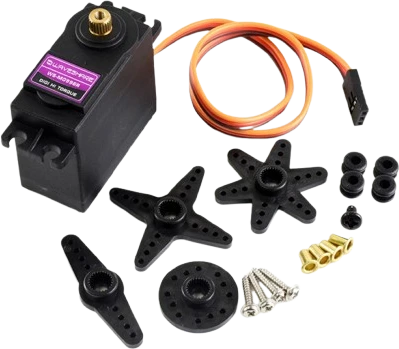
An MG996R can stall at about 1.4 A, nearly three times the Arduino Uno's 500 mA USB budget, so on the Uno only its signal comes from the board: orange to D3, while red and brown go to a separate 5 V to 6 V supply whose ground is joined to the Uno's GND.
Wiring the MG996R Servo · Cross Horn to the Arduino Uno
Pin by pin.
| MG996R Servo · Cross Horn | Arduino Uno | Note |
|---|---|---|
| GND | GND | and to the separate supply's −: the servo, its supply and the board share one ground |
| SIG | D3 | |
| VCC | a separate 4.8 to 6.6 V supply (4 × AA), never the board's 5V pin | the MG996R draws about 1.4 A at stall |
What to know on the Arduino Uno
- The servo's 1,400 mA stall current exceeds the Uno's 500 mA USB polyfuse, and Arduino rates the 5V pin as an output, not a servo supply. Power it from 4.8 V to 6.6 V of its own.TowerPro MG996R spec page; Arduino UNO R3 documentation, USB overcurrent protection
- The servo reads SIG against its own ground, so the external supply's GND must be wired to a Uno GND pin; without it the servo jitters or ignores the pulses.Arduino Servo Motor Basics guide
- The Servo library on the Uno uses Timer1 whatever pin SIG is on, which disables analogWrite() on D9 and D10. Keep PWM-driven parts such as motor enables off those two pins.Arduino Servo library reference
- The library's default pulse range, 544 µs to 2400 µs, may stop short of the MG996R's full travel. Widen it with servo.attach(3, min, max) in small steps, and back off if the servo buzzes at an end: it is stalled against its stop and drawing up to 1.4 A.Arduino Servo library reference; TowerPro MG996R spec page
MG996R Servo · Cross Horn code for the Arduino Uno
Compiled for arduino:avr:uno on 2026-10-30.
// MG996R Servo · Cross Horn on Arduino Uno: wiring and a free simulation at https://www.tinkered.ai/components/servo-mg996r-cross/arduino-uno
#include <Servo.h>

// The MG996R draws up to about 1.4 A at stall: power it from its own 5 to 6 V supply,
// never from the board's 5V pin, and join that supply's GND to the board's GND.
const int SERVO_PIN = 3;
Servo servo;

void setup() {
  servo.attach(SERVO_PIN);
}

void loop() {
  for (int angle = 0; angle <= 180; angle += 2) {
    servo.write(angle);
    delay(15);
  }
  for (int angle = 180; angle >= 0; angle -= 2) {
    servo.write(angle);
    delay(15);
  }
}
MG996R Servo · Cross Horn on the Arduino Uno: questions
Can I power an MG996R servo from the Arduino Uno's 5V pin?
No. It can stall at about 1.4 A (TowerPro spec page), far above the Uno's 500 mA USB limit. Use a separate 4.8 V to 6.6 V supply and join its ground to the Uno's GND.
Why does my MG996R jitter on the Uno?
Usually a missing common ground or a sagging supply. Wire the servo supply's GND to the Uno's GND and add a 470 µF to 1000 µF capacitor across the servo supply.
Why did analogWrite() on D9 and D10 stop working when I added the servo?
The Servo library takes Timer1 on the Uno, which drives PWM on D9 and D10. Move PWM loads to D5, D6 or D11; D3 carries the servo here.
This guide as plain Markdown. /components/servo-mg996r-cross/arduino-uno.md