SH1107 OLED 128×128 with a Raspberry Pi Pico
A 1.5-inch square monochrome OLED module built on the SH1107 controller, driving a self-lit 128x128 pixel grid over I2C.
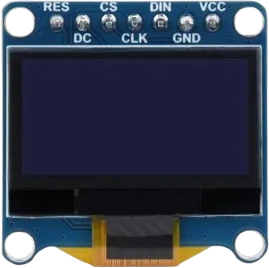
The 128x128 SH1107 OLED connects to the Raspberry Pi Pico's I2C0, SDA on GP4 and SCL on GP5, at address 0x3C, powered from 3V3. U8g2's hardware I2C constructor uses the core's default Wire bus, so those two pins need no setup.
Wiring the SH1107 OLED 128×128 to the Raspberry Pi Pico
Pin by pin.
| SH1107 OLED 128×128 | Raspberry Pi Pico |
|---|---|
| VCC | 3V3 |
| GND | GND |
| SCL | GP5 |
| SDA | GP4 |
What to know on the Raspberry Pi Pico
- The sketch uses U8g2's page-buffer constructor (_1_), sized for an Uno. The RP2040 has 264 kB of SRAM, so the full-buffer U8G2_SH1107_128X128_F_HW_I2C fits easily and draws with a single sendBuffer().Raspberry Pi Pico datasheet, release 21, p. 3
- Only one 0x3C device per bus: an SSD1306 OLED on the same pins clashes. The Pico's second I2C controller (Wire1) can carry a second display.Raspberry Pi Pico datasheet, release 21, p. 4
SH1107 OLED 128×128 code for the Raspberry Pi Pico
Compiled for rp2040:rp2040:rpipico on 2026-10-30.
// SH1107 OLED 128×128 on Raspberry Pi Pico: wiring and a free simulation at https://www.tinkered.ai/components/oled-sh1107-128x128/raspberry-pi-pico
#include <Arduino.h>
#include <U8g2lib.h>
#include <Wire.h>

// SH1107 128x128, PAGE-BUFFER mode ("_1_", a 128 B page buffer) so it fits an Uno.
U8G2_SH1107_128X128_1_HW_I2C u8g2(U8G2_R0, U8X8_PIN_NONE);

void setup() {
  Serial.begin(9600);
  u8g2.setI2CAddress(0x3C * 2);   // 8-bit address (0x3C << 1)
  u8g2.begin();
  Serial.println(F("SH1107 U8g2 ready"));
}

void loop() {
  u8g2.firstPage();
  do {
    u8g2.drawFrame(0, 0, 128, 128);           // border
    u8g2.setFont(u8g2_font_ncenB10_tr);
    u8g2.drawStr(14, 26, "SH1107");
    u8g2.setFont(u8g2_font_6x12_tr);
    u8g2.drawStr(12, 52, "128x128 OLED");
    u8g2.drawStr(12, 70, "I2C @ 0x3C");
    u8g2.drawDisc(64, 100, 18);               // filled circle
  } while (u8g2.nextPage());
  delay(1000);
}
SH1107 OLED 128×128 on the Raspberry Pi Pico: questions
Which constructor should I use for the SH1107 on a Pico?
U8G2_SH1107_128X128_1_HW_I2C as on the page, or the full-buffer _F_ version, which the Pico's 264 kB of SRAM holds (Pico datasheet, p. 3). Do not use SSD1306 or Adafruit_SH110X constructors.
Why is my SH1107 blank on the Pico?
Check SDA on GP4, SCL on GP5 and the address: U8g2 takes it in 8-bit form, setI2CAddress(0x3C * 2). Draw inside the firstPage()/nextPage() loop with the _1_ constructor.
Can I use two OLEDs with one Pico?
Not two at 0x3C on one bus. Put the second on Wire1, the Pico's second I2C controller (Pico datasheet, p. 4), or set it to 0x3D.
Keep going
This guide as plain Markdown. /components/oled-sh1107-128x128/raspberry-pi-pico.md