NeoPixel Ring 16 with an Arduino Uno
A 44.5mm ring of 16 individually addressable WS2812B RGB LEDs driven over a single data wire and chainable end to end.
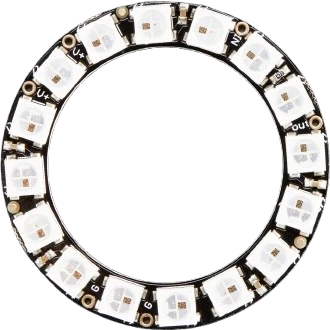
Sixteen NeoPixels are about the most an Arduino Uno should feed from its own 5V pin, and only because the sketch caps brightness: setBrightness(50) is the line that keeps this ring inside the Uno's USB budget. The data line runs from D2 through a 470 Ω resistor.
Wiring the NeoPixel Ring 16 to the Arduino Uno
Pin by pin.
| NeoPixel Ring 16 | Arduino Uno | Note |
|---|---|---|
| VCC | 5V | |
| GND | GND | |
| DIN | D2 | through a 470 Ω resistor |
What to know on the Arduino Uno
- Full white on 16 pixels is about 960 mA, nearly twice the Uno's 500 mA USB polyfuse. setBrightness(50) out of 255 scales the worst case to about 190 mA; raising it past about 130 would reach 500 mA at full white, so do that only with a separate 5 V supply.Adafruit NeoPixel Uberguide; Arduino UNO R3 documentation, USB overcurrent protection
- setBrightness() scales colours in the Uno's buffer and loses precision each time it is changed; set it once in setup() and dim animations with the colour values instead.Adafruit NeoPixel Uberguide
- With an external 5 V supply, join its GND to the Uno's GND and keep the Uno's 5V pin off the ring's power; Arduino says the 5V pin must not be fed from outside.Arduino UNO R3 tech specs
- Writing 16 pixels takes about 0.5 ms (24 bits each at 800 kbps), during which the library holds interrupts off on the Uno; that is short enough not to disturb millis().Worldsemi WS2812B datasheet; Adafruit NeoPixel Uberguide
NeoPixel Ring 16 code for the Arduino Uno
Compiled for arduino:avr:uno on 2026-10-30.
// NeoPixel Ring 16 on Arduino Uno: wiring and a free simulation at https://www.tinkered.ai/components/neopixel-ring-16/arduino-uno
#include <Adafruit_NeoPixel.h>

#define LED_PIN     2
#define LED_COUNT   16

Adafruit_NeoPixel ring(LED_COUNT, LED_PIN, NEO_GRB + NEO_KHZ800);

void setup() {
  ring.begin();
  ring.setBrightness(50);  // 50 of 255: full white then draws about 12 mA a pixel (60 mA at full
                           // brightness). Raise it only with an external 5 V supply.
  ring.show();
}

void loop() {
  // Rainbow effect
  for (long firstPixel = 0; firstPixel < 65536; firstPixel += 256) {
    for (int i = 0; i < ring.numPixels(); i++) {
      int hue = firstPixel + (i * 65536L / ring.numPixels());
      ring.setPixelColor(i, ring.gamma32(ring.ColorHSV(hue)));
    }
    ring.show();
    delay(10);
  }
}
NeoPixel Ring 16 on the Arduino Uno: questions
Can I power a 16 LED NeoPixel ring from the Arduino Uno?
At the example's brightness, yes: setBrightness(50) keeps full white near 190 mA. At full brightness the ring can draw about 960 mA (Adafruit Uberguide), which needs a separate 5 V supply.
What brightness is safe for a NeoPixel Ring 16 on Uno USB power?
About 130 or less out of 255 keeps full white under the Uno's 500 mA USB polyfuse, before counting the Uno itself. The example's 50 leaves generous margin.
Why do my NeoPixel colours look washed out after changing brightness on the Uno?
setBrightness() rescales the stored colours, which loses precision. Call it once in setup() and set colours afterwards.
Keep going
This guide as plain Markdown. /components/neopixel-ring-16/arduino-uno.md