NeoPixel Ring 12 with an Arduino Uno
A ring of 12 individually addressable 5050 RGB LEDs driven from a single 5V data wire.
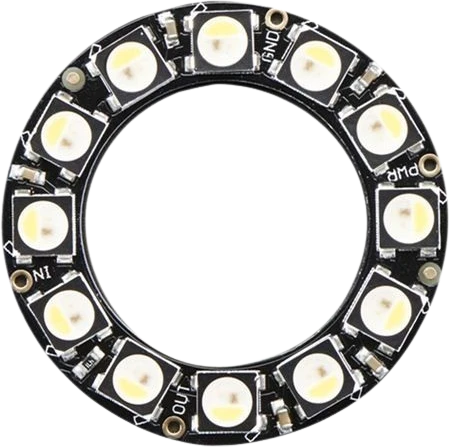
A NeoPixel Ring 12 runs from 5 V, so on an Arduino Uno its supply and its data line are both at the Uno's own level: DIN comes straight from D2 through the 470 Ω resistor, with no level shifter. Twelve pixels are also small enough that the Uno's USB supply covers the example at its reduced brightness.
Wiring the NeoPixel Ring 12 to the Arduino Uno
Pin by pin.
| NeoPixel Ring 12 | Arduino Uno | Note |
|---|---|---|
| VCC | 5V | |
| GND | GND | |
| DIN | D2 | through a 470 Ω resistor |
What to know on the Arduino Uno
- WS2812B-type pixels read a data high from 0.7 × VDD, 3.5 V on a 5 V ring. The Uno's 5 V outputs clear that easily, which is why this ring needs a level shifter on 3.3 V boards but not on the Uno.Worldsemi WS2812B datasheet
- At full white the ring can draw about 720 mA (12 × 60 mA), more than the Uno's 500 mA USB polyfuse. The sketch's setBrightness(50) scales that to about 140 mA, which the Uno's 5V pin carries comfortably.Adafruit NeoPixel Uberguide; Arduino UNO R3 documentation, USB overcurrent protection
- Fit the 1000 µF capacitor across the ring's power pins and keep the 470 Ω resistor near DIN; on a breadboard fed by the Uno's 5V, they stop the first pixel being damaged by the inrush and ringing when the board powers up.Adafruit NeoPixel Uberguide, Best Practices
- Twelve pixels take 36 bytes of the Uno's 2 KB SRAM in the Adafruit library's buffer, leaving the rest of the sketch plenty of room.Arduino UNO R3 tech specs
NeoPixel Ring 12 code for the Arduino Uno
Compiled for arduino:avr:uno on 2026-10-30.
// NeoPixel Ring 12 on Arduino Uno: wiring and a free simulation at https://www.tinkered.ai/components/neopixel-ring-12/arduino-uno
#include <Adafruit_NeoPixel.h>

#define LED_PIN     2
#define LED_COUNT   12

Adafruit_NeoPixel ring(LED_COUNT, LED_PIN, NEO_GRB + NEO_KHZ800);

void setup() {
  ring.begin();
  ring.setBrightness(50);  // 50 of 255: full white then draws about 12 mA a pixel (60 mA at full
                           // brightness). Raise it only with an external 5 V supply.
  ring.show();
}

void loop() {
  // Rainbow effect
  for (long firstPixel = 0; firstPixel < 65536; firstPixel += 256) {
    for (int i = 0; i < ring.numPixels(); i++) {
      int hue = firstPixel + (i * 65536L / ring.numPixels());
      ring.setPixelColor(i, ring.gamma32(ring.ColorHSV(hue)));
    }
    ring.show();
    delay(10);
  }
}
NeoPixel Ring 12 on the Arduino Uno: questions
Can an Arduino Uno power a 12 LED NeoPixel ring?
Yes at reduced brightness: full white is about 720 mA (Adafruit Uberguide), above the Uno's 500 mA USB limit, but setBrightness(50) brings it to about 140 mA. For full brightness, use a separate 5 V supply with a shared GND.
Do I need a level shifter for a NeoPixel ring on the Uno?
No. The Uno's data pin drives 5 V, above the 3.5 V the pixels need for a high on a 5 V supply.
Which Uno pin should the NeoPixel ring use?
Any digital pin; the example uses D2 through a 470 Ω resistor. The library bit-bangs the data, so no PWM or SPI pin is needed.
Keep going
This guide as plain Markdown. /components/neopixel-ring-12/arduino-uno.md