DS3231 RTC with an Arduino Uno
The DS3231 is an I2C real-time clock whose integrated temperature-compensated crystal oscillator (TCXO) holds time to ±2 ppm, about a minute a year, between 0 and 40 °C.
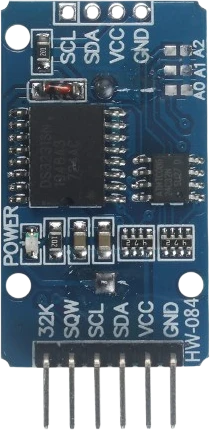
The DS3231 runs from 2.3 V to 5.5 V and its SDA and SCL may be pulled up to 5.5 V whatever its supply, so on an Arduino Uno it takes the 5V pin and joins the I2C bus on A4 and A5 with no level shifting. Its SQW output can tick the Uno once a second through one of the Uno's two interrupt pins.
Wiring the DS3231 RTC to the Arduino Uno
Pin by pin.
| DS3231 RTC | Arduino Uno |
|---|---|
| VCC | 5V |
| GND | GND |
| SCL | SCL |
| SDA | SDA |
What to know on the Arduino Uno
- VCC from the Uno's 5V sits inside the chip's 2.3 V to 5.5 V range, and SDA and SCL tolerate pull-ups to 5.5 V, so the module's pull-ups at 5 V match the Uno's I2C levels.Analog Devices DS3231 datasheet 19-5170 rev 10, pp. 2, 9
- SQW/INT is open drain. Wire it to D2 or D3, the Uno's external interrupt pins, with pinMode(INPUT_PULLUP), and set the 1 Hz square wave or an alarm to wake the sketch instead of polling every loop.Analog Devices DS3231 datasheet 19-5170 rev 10, p. 9; Arduino language reference, attachInterrupt()
- The Uno resets each time the Serial Monitor opens, through its USB bridge's DTR line. That is why the sketch only calls rtc.adjust() from the compile time when lostPower() is true; an unconditional adjust would rewind the clock to the build time on every reset.Arduino UNO R3 datasheet (automatic software reset)
- F(__DATE__) and F(__TIME__) keep those strings in flash rather than in the Uno's 2 KB of SRAM.Arduino UNO R3 tech specs
DS3231 RTC code for the Arduino Uno
Compiled for arduino:avr:uno on 2026-10-30.
// DS3231 RTC on Arduino Uno: wiring and a free simulation at https://www.tinkered.ai/components/ds3231-rtc/arduino-uno
#include <Wire.h>
#include <RTClib.h>

RTC_DS3231 rtc;

void setup() {
  Serial.begin(9600);
  if (!rtc.begin()) {                 // ACKs at 0x68
    Serial.println("DS3231 not found");
    while (1) delay(10);
  }
  if (rtc.lostPower()) {              // first boot / dead coin cell
    rtc.adjust(DateTime(F(__DATE__), F(__TIME__)));  // set from compile time
  }
}

void loop() {
  DateTime now = rtc.now();
  Serial.print(now.year());  Serial.print('-');
  Serial.print(now.month()); Serial.print('-');
  Serial.print(now.day());   Serial.print(' ');
  Serial.print(now.hour());  Serial.print(':');
  Serial.print(now.minute());Serial.print(':');
  Serial.print(now.second());
  Serial.print("  ");
  Serial.print(rtc.getTemperature()); Serial.println(" C");
  delay(1000);
}
DS3231 RTC on the Arduino Uno: questions
Can I connect a DS3231 to the Arduino Uno's 5V?
Yes. The chip runs from 2.3 V to 5.5 V and its I2C pins accept pull-ups up to 5.5 V (Analog Devices datasheet, pp. 2, 9), so the module wires straight to 5V, GND, A4 (SDA) and A5 (SCL).
Why does my DS3231 time jump back to when I uploaded the sketch?
The sketch is setting it from __DATE__ and __TIME__ on every start, and the Uno restarts whenever the Serial Monitor opens. Only call rtc.adjust() when rtc.lostPower() is true, as this example does.
How do I get a 1 Hz interrupt from the DS3231 on an Uno?
Enable the 1 Hz square wave on SQW (RTClib: rtc.writeSqwPinMode(DS3231_SquareWave1Hz)), wire SQW to D2 with INPUT_PULLUP, and attach an interrupt on the falling edge.
Keep going
This guide as plain Markdown. /components/ds3231-rtc/arduino-uno.md