BMP280 Pressure Sensor with a Raspberry Pi Pico
Bosch's barometric pressure and temperature sensor, 300 to 1100 hPa at ±0.12 hPa relative accuracy, over I2C or SPI.
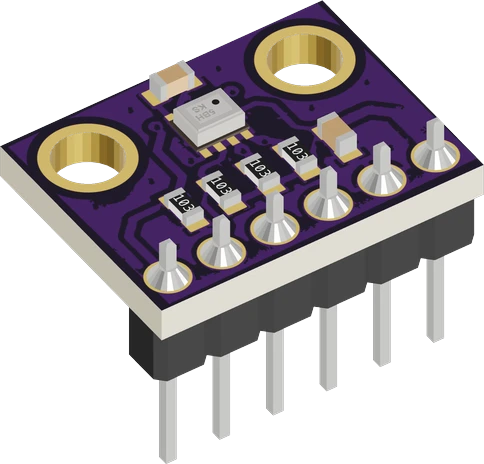
The GY-BMP280 module has no regulator, so on the Raspberry Pi Pico it must take its VCC from 3V3, never from VBUS. Its I2C lines go to the Pico's default I2C0 pins, SDA on GP4 and SCL on GP5, and the sketch asks for address 0x76.
Wiring the BMP280 Pressure Sensor to the Raspberry Pi Pico
Pin by pin.
| BMP280 Pressure Sensor | Raspberry Pi Pico |
|---|---|
| VCC | 3V3 |
| GND | GND |
| SCL | GP5 |
| SDA | GP4 |
What to know on the Raspberry Pi Pico
- Bosch rates the chip's supply at 1.71 V to 3.6 V, with 4.25 V as the absolute maximum, so the 5 V on VBUS would destroy it; 3V3 is the only supply pin on the Pico that fits.Bosch BMP280 datasheet rev 1.26, pp. 7, 9; Raspberry Pi Pico datasheet, release 21, p. 8
- Adafruit_BMP280's bare begin() looks at 0x77, but the module with SDO pulled down answers at 0x76, which is why the sketch passes 0x76.Bosch BMP280 datasheet rev 1.26, p. 28
- If the sketch prints chip ID 0x60, the board carries a BME280; the BMP280's ID is 0x58.Bosch BMP280 datasheet rev 1.26, p. 24
- For SPI instead of I2C, the Pico's SPI0 defaults are SCK GP18, MOSI GP19 and MISO GP16, with CSB on any GPIO; at 3.3 V no level shifting is needed.arduino-pico core documentation (Earle Philhower), SPI
BMP280 Pressure Sensor code for the Raspberry Pi Pico
Compiled for rp2040:rp2040:rpipico on 2026-10-30.
// BMP280 Pressure Sensor on Raspberry Pi Pico: wiring and a free simulation at https://www.tinkered.ai/components/bmp280/raspberry-pi-pico
#include <Wire.h>
#include <Adafruit_BMP280.h>

Adafruit_BMP280 bmp;   // I2C

void setup() {
  Serial.begin(115200);
  if (!bmp.begin(0x76)) {            // 0x77 with SDO on 3.3 V
    Serial.print("BMP280 not found, chip id 0x");
    Serial.println(bmp.sensorID(), HEX);   // 0x60 = a BME280, 0xFF/0x00 = nothing at that address
    while (1) delay(10);
  }
  // normal mode, ×2 temperature, ×16 pressure, filter ×16, 500 ms standby
  bmp.setSampling(Adafruit_BMP280::MODE_NORMAL,
                  Adafruit_BMP280::SAMPLING_X2,
                  Adafruit_BMP280::SAMPLING_X16,
                  Adafruit_BMP280::FILTER_X16,
                  Adafruit_BMP280::STANDBY_MS_500);
}

void loop() {
  Serial.print("Temperature: ");
  Serial.print(bmp.readTemperature());
  Serial.println(" C");
  Serial.print("Pressure: ");
  Serial.print(bmp.readPressure() / 100.0);
  Serial.println(" hPa");
  Serial.print("Altitude: ");
  Serial.print(bmp.readAltitude(1013.25));   // the local sea-level pressure, hPa
  Serial.println(" m");
  delay(1000);
}
BMP280 Pressure Sensor on the Raspberry Pi Pico: questions
Can I power a BMP280 from the Pico's VBUS pin?
No. The common GY-BMP280 has no regulator and the chip's absolute maximum supply is 4.25 V (Bosch datasheet rev 1.26, p. 9). Use the Pico's 3V3 pin.
Why does my Pico say 'BMP280 not found'?
Pass the address: begin(0x76) for SDO low, begin(0x77) for SDO high (Bosch datasheet, p. 28). Then check SDA on GP4, SCL on GP5 and CSB not tied low.
How accurate is the BMP280's altitude on a Pico?
Relative pressure accuracy is ±0.12 hPa, about ±1 m (Bosch datasheet rev 1.26, pp. 7, 8), whatever board reads it; the absolute altitude depends on the sea-level pressure you pass to readAltitude().
Keep going
This guide as plain Markdown. /components/bmp280/raspberry-pi-pico.md