APDS-9960 with an Arduino Uno
A single-chip I2C optical sensor from Broadcom that combines ambient light, RGB color, proximity, and gesture detection in one package.
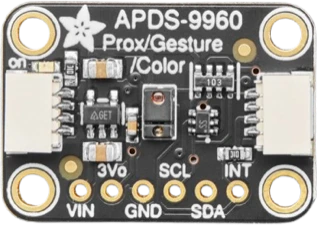
The APDS-9960 chip is a 3.3 V part, but on Adafruit's breakout VIN takes the Arduino Uno's 5 V and the board level-shifts SDA and SCL, so it wires straight to the Uno's I2C pins. INT goes to D2 because D2 is one of only two Uno pins with a dedicated external interrupt.
Wiring the APDS-9960 to the Arduino Uno
Pin by pin.
| APDS-9960 | Arduino Uno |
|---|---|
| VIN | 5V |
| GND | GND |
| SCL | SCL |
| SDA | SDA |
| INT | D2 |
What to know on the Arduino Uno
- The bare chip runs from 2.4 V to 3.6 V, so only a regulated, level-shifted board such as Adafruit's is safe on the Uno's 5V pin and 5 V I2C lines. A bare APDS-9960 module without a regulator needs 3.3 V and a level shifter on the Uno.Broadcom APDS-9960 datasheet AV02-4191EN, p. 3; Adafruit APDS9960 guide, Pinouts
- INT is an open-drain, active-low output. The Uno has external interrupts only on D2 (INT0) and D3 (INT1), which is why the wiring uses D2: attachInterrupt(digitalPinToInterrupt(2), handler, FALLING) fires when a gesture or threshold event is ready. The example sketch polls instead, so INT is optional.Broadcom APDS-9960 datasheet AV02-4191EN, p. 3; Arduino language reference, attachInterrupt()
- The APDS-9960's address 0x39 is fixed, so the Uno's single I2C bus on A4 and A5 can hold only one of them; a second sensor needs an I2C multiplexer.Broadcom APDS-9960 datasheet AV02-4191EN, pp. 1, 8; Arduino UNO R3 datasheet, p. 10
- The breakout's 3Vo pin can supply up to 100 mA from its regulator, twice the 50 mA the Uno's own 3.3V pin is rated for, if another small 3.3 V part needs power.Adafruit APDS9960 guide, Pinouts; Arduino UNO R3 tech specs
APDS-9960 code for the Arduino Uno
Compiled for arduino:avr:uno on 2026-10-30.
// APDS-9960 on Arduino Uno: wiring and a free simulation at https://www.tinkered.ai/components/apds-9960/arduino-uno
#include <Wire.h>
#include <Adafruit_APDS9960.h>

Adafruit_APDS9960 apds;

void setup() {
  Serial.begin(9600);
  if (!apds.begin()) {
    Serial.println("APDS-9960 not found");
    while (1) delay(10);
  }
  apds.enableProximity(true);
  apds.enableColor(true);
  apds.enableGesture(true);
}

void loop() {
  Serial.print("Prox: ");
  Serial.print(apds.readProximity());

  uint16_t r, g, b, c;
  if (apds.colorDataReady()) {
    apds.getColorData(&r, &g, &b, &c);
    Serial.print("  R="); Serial.print(r);
    Serial.print(" G="); Serial.print(g);
    Serial.print(" B="); Serial.print(b);
    Serial.print(" Ambient="); Serial.print(c);
  }

  uint8_t gesture = apds.readGesture();
  if (gesture == APDS9960_UP)    Serial.print("  Gesture: UP");
  if (gesture == APDS9960_DOWN)  Serial.print("  Gesture: DOWN");
  if (gesture == APDS9960_LEFT)  Serial.print("  Gesture: LEFT");
  if (gesture == APDS9960_RIGHT) Serial.print("  Gesture: RIGHT");

  Serial.println();
  delay(200);
}
APDS-9960 on the Arduino Uno: questions
Can the APDS-9960 run on an Arduino Uno's 5V?
On Adafruit's breakout, yes: VIN takes 3 V to 5 V and the onboard regulator feeds the chip 3.3 V, with SDA and SCL level-shifted. The chip alone is rated 2.4 V to 3.6 V, so a bare module needs 3.3 V and level shifting.
Which Uno pin should the APDS-9960 INT go to?
D2 or D3, the Uno's two external interrupt pins. INT is active low and open drain, so trigger on FALLING. Leave it unconnected if the sketch polls the sensor, as the example does.
Can I use two APDS-9960 sensors on one Uno?
Not on the same bus: the address is fixed at 0x39 (Broadcom datasheet, p. 8). Put them behind an I2C multiplexer such as a TCA9548A, or use one sensor.
This guide as plain Markdown. /components/apds-9960/arduino-uno.md